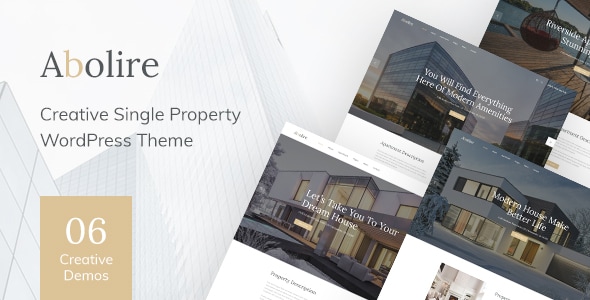

Abolire – Single Property WordPress Theme v1.0.16

Version :

v1.0.16
MetaMax - SEO and Marketing WordPress Theme
MetaMax - SEO and Marketing WordPress Theme v1.0.7 Original price was: Rs4,984.00.Current price is: Rs249.00.
Back to products
JetBlog for Elementor is a powerful plugin designed to enhance the blogging experience on WordPress websites by integrating advanced blogging widgets with the Elementor page builder. It is created by Crocoblock, a company known for its premium Elementor add-ons. JetBlog provides a set of stylish and customizable widgets specifically tailored for bloggers, content creators, and marketers who want to create modern, dynamic, and visually appealing blogs without writing custom code. Key Features of JetBlog for Elementor: Post List Widget: The Post List widget allows you to display posts in a clean and attractive list format. You can choose from multiple layouts, including grid, list, and masonry styles. You can customize the layout, the number of posts displayed, the categories, and the order of the posts. It also supports pagination to manage large blog sections. Smart Posts List: This widget offers even more advanced features for displaying posts dynamically. It lets you create custom post lists based on specific criteria like categories, tags, or custom post types. You can filter and sort posts by various attributes such as recent, popular, or featured posts. It's useful for creating curated lists based on specific topics. Post Tiles Widget: The Post Tiles widget allows you to display posts in a stylish, tile-based layout with an emphasis on visuals. It’s ideal for those looking to create a modern, grid-based blog layout. You can choose to display post images, titles, and excerpts, and adjust the appearance of the tiles (e.g., hover effects, image sizes, etc.). Post Excerpt Widget: This widget gives you the ability to display a short excerpt of your posts instead of the entire content. You can define the length of the excerpt and how it appears on the page. It’s particularly useful for creating blog pages with previews or summaries, enticing users to click and read the full articles. Text Ticker Widget: The Text Ticker widget adds a scrolling or ticker effect to your posts or custom content. It’s a great way to highlight important news, featured posts, or updates in a dynamic and engaging manner. You can customize the scrolling speed, the direction (left to right or right to left), and the styling. Video Playlist Widget: If your blog includes video content, the Video Playlist widget allows you to create a playlist of videos directly within your posts. This widget integrates well with YouTube, Vimeo, and other video platforms. You can display a grid or list of video thumbnails, and clicking on a thumbnail opens the video in a lightbox or video player. Related Posts Widget: The Related Posts widget enables you to display related content on your blog posts. This helps keep readers engaged and increases page views by showing them more content that matches their interests. You can set conditions for related posts, such as showing posts from the same category or tags. Post Navigation Widget: The Post Navigation widget is designed to improve user experience by adding easy navigation between blog posts. Visitors can seamlessly move to the next or previous post without returning to the blog homepage. This is perfect for blogs with long-form content or series of posts that should be read in sequence. Customizable Layouts: JetBlog allows you to adjust layouts and post designs directly within Elementor, with no coding required. You can modify things like spacing, typography, colors, borders, hover effects, and more to match your site’s branding and style. Category and Tag Filters: With JetBlog, you can provide users with an easy way to filter content by categories or tags directly from the blog page. This makes it easier for visitors to find the content that interests them the most. Content Styling: Every widget in JetBlog for Elementor offers deep customization options for styling. From colors and typography to spacing and hover effects, you have full control over how your blog looks. You can style post titles, dates, excerpts, buttons, and more to create a polished and visually consistent blog page. Mobile Responsiveness: JetBlog widgets are designed with responsive layouts in mind, ensuring that your blog looks great on mobile devices as well as desktops. You can fine-tune the appearance for smaller screens to make sure that the user experience is optimal across all devices. SEO-Friendly: JetBlog helps you optimize your blog posts for search engines by offering clean and well-structured code. It ensures that your posts are easily crawlable and indexable by search engines. Multilingual and RTL Support: The plugin supports multilingual websites and right-to-left (RTL) languages, making it an excellent choice for global websites and those targeting non-English speaking audiences. How to Set Up JetBlog for Elementor: Install Elementor: Before using JetBlog, you need to have the Elementor page builder installed and activated. If you don’t already have Elementor, go to your WordPress admin dashboard, navigate to Plugins > Add New, search for "Elementor," and install it. Install JetBlog Plugin: To install JetBlog, you need to purchase it from the Crocoblock website as part of their JetPlugins bundle or as a standalone plugin. After purchasing, download the plugin and upload it to your WordPress site by going to Plugins > Add New > Upload Plugin. Then, activate the plugin. Create or Edit a Page with Elementor: After activating JetBlog, go to the Pages section in your WordPress dashboard. Create a new page or edit an existing one, then click Edit with Elementor to open the Elementor editor. Add JetBlog Widgets: Once in the Elementor editor, you will see the JetBlog widgets in the Elementor panel (on the left side). Drag and drop the desired JetBlog widgets (e.g., Post List, Post Tiles, Smart Posts List, etc.) onto the page. Customize the widget settings, such as post filters, layout options, styling, etc. Style and Customize: Use the Elementor panel to adjust the widget’s design. JetBlog allows you to customize fonts, colors, borders, spacing, and other design elements to match your branding. You can also adjust the visibility of widgets based on categories or tags, and fine-tune the layout for mobile responsiveness. Preview and Publish: Once you’re happy with the design, preview your changes to see how the blog looks. When ready, click Publish to make the page live. Use Cases for JetBlog for Elementor: Personal Blogs: Bloggers can use JetBlog to create a visually appealing, engaging blog with a clean design that helps users navigate content easily. With widgets like Post Tiles and Smart Post Lists, you can showcase your content effectively. News Websites: News sites can use the Smart Post List and Post Navigation widgets to display a dynamic list of articles and allow users to easily browse between related stories. Content-heavy Websites: Websites with a lot of content (e.g., magazine-style websites, educational sites, or even recipe sites) can benefit from JetBlog’s flexible layout options, such as category-based filtering, related posts, and tile-based layouts. Product or Service Blogs: Businesses offering products or services can use JetBlog to showcase related blog posts, articles, or tutorials in an attractive way, improving user engagement and guiding visitors through the sales funnel. Photography, Portfolio, or Media Sites: Photographers or media professionals can create visually rich blogs with JetBlog’s Post Tiles and Video Playlist widgets, showcasing their work in a stunning way. Conclusion: JetBlog for Elementor is a versatile and user-friendly plugin for bloggers, content creators, and businesses who want to create a stylish, feature-rich blog on their WordPress website. With advanced widgets like Smart Posts List, Post Tiles, Video Playlist, and more, it offers plenty of customization options to meet the needs of various blog types and niches. Whether you're building a personal blog, a content-heavy site, or a business-focused blog, JetBlog provides the tools to enhance user engagement and improve the overall look and functionality of your site. Inestio-Business-amp-Creative-WordPress-Theme
Inestio - Business & Creative WordPress Theme v2.0.0 Original price was: Rs4,984.00.Current price is: Rs249.00.

Abolire – Single Property WordPress Theme v1.0.16

Membership Category Products

Original price was: Rs4,948.00.Current price is: Rs249.00.

Abolire - Single Property WordPress Theme

Live Demo: Abolire - Single Property WordPress Theme v1.0.16 Live Demo

Abolire - Single Property WordPress Theme is a sleek and modern WordPress theme designed specifically for showcasing single property listings. Whether you're a real estate agent, developer, or homeowner, this theme provides a professional platform to highlight your property's key features and attract potential buyers or renters.

Abolire offers a user-friendly interface and intuitive customization options, allowing you to create a captivating online presence without any coding experience. With its responsive design, your website will look stunning on all devices, ensuring a seamless browsing experience for your visitors.

Product Overview

Abolire - Single Property WordPress Theme is a comprehensive solution for creating a dedicated website for a single property. It comes packed with essential features and functionalities to effectively present your property's details, including high-resolution images, virtual tours, floor plans, and detailed descriptions. The theme's clean and minimalist design allows your property's features to take center stage, creating an impactful first impression on potential clients.

Modern Design and User Experience

Abolire boasts a contemporary and elegant design aesthetic that is both visually appealing and user-friendly. The theme's layout is carefully crafted to guide visitors through the property information seamlessly. It utilizes whitespace effectively, creating a clean and organized look that minimizes distractions and allows visitors to focus on the key details.

Main Features and Capabilities

  • Property Showcase: Display stunning images and videos of your property, allowing potential buyers or renters to get a realistic feel for the space.
  • Virtual Tours: Integrate interactive virtual tours to provide an immersive experience, enabling visitors to explore the property from the comfort of their own homes.
  • Floor Plans: Showcase detailed floor plans to help visitors understand the property's layout and spatial arrangement.
  • Property Features: Highlight key features and amenities, such as bedrooms, bathrooms, square footage, and appliances, to cater to specific needs.
  • Contact Form: Enable visitors to easily submit inquiries and contact you directly for further information.
  • Social Media Integration: Share your property listings on popular social media platforms to reach a wider audience.

Customization Options

Abolire - Single Property WordPress Theme offers a range of customization options to tailor the design and functionality to your specific requirements. You can easily change colors, fonts, and layouts to match your brand identity. The theme's intuitive customization panel allows you to make adjustments without requiring any coding knowledge.

Responsive Design

Abolire is fully responsive, ensuring that your website looks and functions flawlessly across all devices, including desktops, laptops, tablets, and smartphones. This ensures that your property listings are accessible to a wider audience and provide a consistent browsing experience regardless of the device used.

Ideal Use Cases

Abolire - Single Property WordPress Theme is ideal for:

  • Real estate agents and brokers
  • Property developers
  • Homeowners selling or renting their properties
  • Vacation rental businesses
  • Architecture firms showcasing projects

Who Should Use This Product?

This WordPress theme is perfect for anyone looking to create a professional and engaging website to showcase a single property. Whether you're a real estate professional or an individual homeowner, Abolire provides the tools and features you need to make a lasting impression on potential clients or buyers.

Installation and Setup Guide

Installing Abolire - Single Property WordPress Theme is straightforward. After purchasing the theme, you'll receive download instructions and a comprehensive installation guide.

Important Product Information

Abolire - Single Property WordPress Theme is licensed under the GPLv3, allowing for both personal and commercial use. The theme is regularly updated to ensure compatibility with the latest WordPress versions and security enhancements.

Final Conclusion

Abolire - Single Property WordPress Theme offers a powerful and user-friendly solution for creating a stunning online presence for your property. With its modern design, comprehensive features, and easy customization options, Abolire empowers you to showcase your property effectively and attract potential buyers or renters.

Category: Membership

(Only For Premium Category Products !)

1. All digital products are the most recent version, with no possibility of free updates. After payment, you can request an update to the most recent version for 5 days if a new version is released. We free support within 5 days.

2. If a license is required (Excludes WHMCS license , we provide only method not license), please contact us via email or ticket for assistance with activation. Our license is only valid for activation and does not include support.

3. We provide Mobile, PHP script installation services for $19.90 / ₹1700. Please create a backup after installation as we do not support re-installation. For mobile app source code, we do not offer installation services.

4. If you have any questions, please contact us by email  or create a ticket on this page

5. Please note that any digital products presented on the website do not contain malicious code, viruses or advertising. You will receive the original files from the developers. We do not sell any products that have been downloaded from other websites.

6. The response time can last up to 6 hours.

(Only For Membership Category Products !)

Benefits of our Membership Plans

  • Instant access to all plugins and all themes including all future releases
  • Unlimited domain usage
  • Regular Updates as of when available. Usually, updates are released daily.
  • Before purchasing, please read the Terms and Conditions & Refund Policy.
  • If you have any questions, please first read the FAQs.
  • If you haven’t found the answer to your question, please contact us, and we will respond ASAP.
  • Please note that any digital products on the website do not contain malicious code, viruses, or advertising. We buy the original files from the developers. We do not sell any products downloaded from other sites.
  • Buy or download for FREE by subscribing to our VIP Membership Plan. Join the club of more than 1100+ happy members. This is the same theme as sold by the developer.

Updates:

  • We offer frequent updates for one year from the date of purchase. After this period, you have to purchase the item again to receive further updates, we also offer lifetime updates as a second option.
  • We regularly update products as soon as we are notified about an update, we go and download it from the author and update it on our site, but In case the current version of the product is not the latest, You can request an update for the product by contact form.
  • We send regular emails advising when products have been updated so please be sure to provide an active email address when you sign up.

Support:

  • Our support team is available 24/7, if you have any questions or need help in installing or configuring digital products purchased on the website, please don’t hesitate to contact form.
  • Please note that we are not developers of the provided products, so our technical support capabilities are limited. We do not change product functionality and do not fix developer bugs.

For more information please read FAQs & About Us.

(Only For WHMCS Category Products !)

  • We Only provide WHMCS Module, how you can  nulled any module step only !
  • Instant access to all plugins and all themes 
  • Unlimited domain usage
  • Regular Updates as of when available. Usually, updates are released daily.
  • Before purchasing, please read the Terms and Conditions & Refund Policy.
  • If you have any questions, please first read the FAQs.
  • If you haven’t found the answer to your question, please contact us, and we will respond ASAP.
  • Please note that any digital products on the website do not contain malicious code, viruses, or advertising. We buy the original files from the developers. We do not sell any products downloaded from other sites.

More Like This Products