Premium Category Products
Accounting and Bookkeeping plugin for RISE CRM
✨ Latest Version
- Safety, Guarantees Files
- Malware-Free (Clean) Files
- License: GPL Preactivated
- Unlimited Site & Domain Usage
Accounting and Bookkeeping plugin for RISE CRM
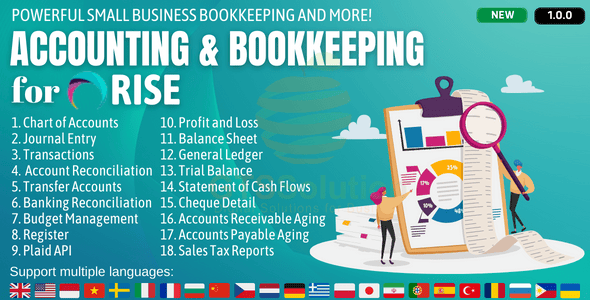
Accounting is the process of recording and tracking financial statements to see the financial health of an entity. This is done by inputting, sorting, measuring, and then communicating transactions in various formats. Accounting consists of bookkeeping and analysis. Bookkeeping, or financial accounting, consists of recording transactions, which can include purchases, sales, and receipts of an individual or an organization. Once the bookkeeper records and organizes all of the transactions, the next step of accounting is to analyze these transactions into helpful reports which will show the state of one’s finances. These reports can include profit/loss statements, cash flow reports, and can track sales tax to keep a close eye on what is owed come tax time. With small business accounting done right, small business owner will be able to have a clear understanding of the state of your finances so you can make better decisions based on what you have available. The benefits of a Accounting & Bookkeeping module Using this module helps in relieving the burden of manual data entry, prevents common human errors, helps businesses and accountants when tax time comes around and allows the user to look at in-depth reports of how their business’ finances are faring. Perhaps the biggest advantage of this module is all of the time it will save. With this module, all of their financial reports will be consolidated into one online system, making it easier to keep track of their records. An accounting module for businesses offers the ability to automate many processes which will not only save time but will also ensure accuracy and efficiency with one’s financial reports. Module Features- Dashboard: Profit & Loss Chart, Income Chart, Expense Chart, Cashflow Chart and Bank Accounts Overview
- Banking:
- Banking Register
- Posted Bank Transaction
- Reconcile Bank Account
- Import Bank Transacions
- Transactions:
- Mapping Bank Statements to Accounting
- Mapping Invoices to Accounting
- Mapping Payments to Accounting
- Mapping Expenses to Accounting
- Item Mapping Setup
- Expense Category Mapping Setup
- Tax Mapping Setup
- Purchasing Mapping Setup
- Inventory Mapping Setup
- Banking Rules: to automatically categorize transactions
- Journal Entry: to record transactions in the general ledger
- Transfer: to transfers of amounts between accounts
- Chart of Accounts: is a list of the account numbers and names relevant to your company. Typically, a chart of accounts will have four categories (Asset accounts, Liability accounts, Income accounts and Expense accounts).
- Reconcile: is the process of matching transactions entered into module against your bank or credit card statements
- Budgets Management: supports preparing budgets, which help you monitor, track, and compare expected income and expenses with actual income and expenses. When you prepare a budget, you typically prepare it for a fiscal year, and you can opt to supply budget amounts or use historical amounts
- Business Overview Reports:
- Balance Sheet Comparison: what you own (assets), what you owe (liabilities), and what you invested (equity) compared to last year.
- Balance Sheet Detail: a detailed view of what you own (assets), what you owe (liabilities), and what you invested (equity).
- Balance Sheet Summary: a summary of what you own (assets), what you owe (liabilities), and what you invested (equity).
- Balance Sheet: what you own (assets), what you owe (liabilities), and what you invested (equity).
- Custom Summary Report: a report you build from scratch. With more options to customise.
- Profit and Loss as % of total income: your expenses as a percentage of your total income.
- Profit and Loss Comparison: your income, expenses, and net income (profit or loss) compared to last year.
- Profit and Loss Detail: profit and Loss Detail
- Profit and Loss year-to-date comparison: your income, expenses, and net income (profit or loss) compared to this year so far.
- Profit and Loss: your income, expenses, and net income (profit or loss). Also called an income statement.
- Statement of Cash Flows: cash flowing in and out from sales and expenses (operating activities), investments, and financing.
- Statement of Changes in Equity: statement of changes in equity.
- Bookkeeping Reports:
- Account list: the name, type, and balance for each account in your chart of accounts.
- Balance Sheet Comparison: what you own (assets), what you owe (liabilities), and what you invested (equity) compared to last year.
- Balance Sheet: what you own (assets), what you owe (liabilities), and what you invested (equity).
- General Ledger: the beginning balance, transactions, and total for each account in your chart of accounts.
- Journal: the debits and credits for each transaction, listed by date.
- Profit and Loss Comparison: your income, expenses, and net income (profit or loss) compared to last year.
- Profit and Loss: your income, expenses, and net income (profit or loss). Also called an income statement.
- Account history: account history
- Recent Transactions: Transactions you created or edited in the last 4 days.
- Statement of Cash Flows: cash flowing in and out from sales and expenses (operating activities), investments, and financing.
- Transaction Detail by Account: transactions and total for each account in your chart of accounts.
- Transaction List by Date: A list of all your transactions, ordered by date.
- Trial Balance: this report summarises the debit and credit balances of each account on your chart of accounts during a period of time.
(Only For Premium Category Products !)
1. All digital products are the most recent version, with no possibility of free updates. After payment, you can request an update to the most recent version for 5 days if a new version is released. We free support within 5 days.
2. If a license is required (Excludes WHMCS license , we provide only method not license), please contact us via email or ticket for assistance with activation. Our license is only valid for activation and does not include support.
3. We provide Mobile, PHP script installation services for $19.90 / ₹1700. Please create a backup after installation as we do not support re-installation. For mobile app source code, we do not offer installation services.
4. If you have any questions, please contact us by email [email protected] or create a ticket on this page
5. Please note that any digital products presented on the website do not contain malicious code, viruses or advertising. You will receive the original files from the developers. We do not sell any products that have been downloaded from other websites.
6. The response time can last up to 6 hours.
(Only For Membership Category Products !)
Benefits of our Membership Plans
- Instant access to all plugins and all themes including all future releases
- Unlimited domain usage
- Regular Updates as of when available. Usually, updates are released daily.
- Before purchasing, please read the Terms and Conditions & Refund Policy.
- If you have any questions, please first read the FAQs.
- If you haven’t found the answer to your question, please contact us, and we will respond ASAP.
- Please note that any digital products on the website do not contain malicious code, viruses, or advertising. We buy the original files from the developers. We do not sell any products downloaded from other sites.
- Buy or download for FREE by subscribing to our VIP Membership Plan. Join the club of more than 1100+ happy members. This is the same theme as sold by the developer.
Updates:
- We offer frequent updates for one year from the date of purchase. After this period, you have to purchase the item again to receive further updates, we also offer lifetime updates as a second option.
- We regularly update products as soon as we are notified about an update, we go and download it from the author and update it on our site, but In case the current version of the product is not the latest, You can request an update for the product by contact form.
- We send regular emails advising when products have been updated so please be sure to provide an active email address when you sign up.
Support:
- Our support team is available 24/7, if you have any questions or need help in installing or configuring digital products purchased on the website, please don’t hesitate to contact form.
- Please note that we are not developers of the provided products, so our technical support capabilities are limited. We do not change product functionality and do not fix developer bugs.
(Only For WHMCS Category Products !)
- We Only provide WHMCS Module, how you can nulled any module step only !
- Instant access to all plugins and all themes
- Unlimited domain usage
- Regular Updates as of when available. Usually, updates are released daily.
- Before purchasing, please read the Terms and Conditions & Refund Policy.
- If you have any questions, please first read the FAQs.
- If you haven’t found the answer to your question, please contact us, and we will respond ASAP.
- Please note that any digital products on the website do not contain malicious code, viruses, or advertising. We buy the original files from the developers. We do not sell any products downloaded from other sites.