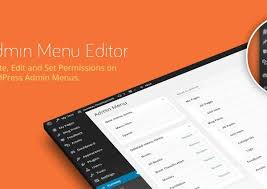

ADMIN MENU EDITOR PRO WordPress Plugin v2.27.2
Membership Category Products
Rs4,956.00 Original price was: Rs4,956.00.Rs249.00Current price is: Rs249.00.

ADMIN MENU EDITOR PRO Wordpress Plugin
Live Demo: ADMIN MENU EDITOR PRO Wordpress Plugin v2.27.2 Live Demo
ADMIN MENU EDITOR PRO Wordpress Plugin is a powerful WordPress plugin designed to give you complete control over your WordPress admin dashboard. It provides a user-friendly interface to customize the default menu structure, organize menus, add custom items, and manage permissions for different user roles. With this plugin, you can streamline your admin experience, enhance security, and create a more personalized dashboard tailored to your specific needs.
Product Overview
The ADMIN MENU EDITOR PRO Wordpress Plugin is specifically designed to empower WordPress website administrators to modify and enhance the default WordPress admin menu. It goes beyond basic menu management by offering a range of features that allow you to customize the appearance, organization, and functionality of the admin dashboard.
Modern Design and User Experience
The plugin boasts a modern and intuitive interface that makes menu editing a breeze. The drag-and-drop functionality allows you to effortlessly rearrange menu items, create custom hierarchies, and optimize the flow of your admin dashboard.
Main Features and Capabilities
-
Drag and Drop Menu Editor: Rearrange menu items effortlessly using a simple drag-and-drop interface. Move menus to different positions, change their hierarchy, and create a custom menu structure that suits your workflow.
-
Custom Menu Items: Add custom menu items that link to external URLs, specific pages on your website, or even custom functions within your WordPress site. This allows you to create personalized shortcuts and integrate third-party tools directly into your admin dashboard.
-
Hide or Show Menu Items: Control the visibility of menu items based on user roles. This is crucial for managing access to sensitive settings or features, ensuring that only authorized users can view or modify specific information.
-
User Role Permissions: Fine-tune permissions for different user roles. Determine which user roles have access to specific menu items, creating a granular system of access control that enhances security and streamlines administrative tasks.
-
Custom Icons: Assign custom icons to menu items for a more visually appealing and organized dashboard. Use icons to quickly identify different menu sections and make your admin interface more intuitive.
-
Rename Menu Items: Modify the text of existing menu items to align with your branding or website's terminology. This ensures consistency throughout your admin dashboard and makes it easier for users to navigate.
Responsive Design
While the plugin focuses on the WordPress admin dashboard, its core functionality is built with a responsive design philosophy in mind. This means that the menu structure and customizations you create will adapt seamlessly to different screen sizes, ensuring a consistent and user-friendly experience across desktops, tablets, and mobile devices.
Pages, Components, or Modules
The ADMIN MENU EDITOR PRO Wordpress Plugin doesn't come with pre-built pages or modules. It's primarily focused on modifying the existing WordPress admin menu structure. However, the flexibility it offers allows you to create a highly customized admin dashboard that effectively integrates with your website's specific needs and functionalities.
Integration and Compatibility
The plugin is designed to work seamlessly with all major WordPress themes and plugins. It's thoroughly tested for compatibility and stability, ensuring a smooth integration with your existing WordPress setup.
SEO and Performance Considerations
While the plugin primarily focuses on admin dashboard customization, it doesn't directly impact your website's SEO performance. However, by creating a more organized and user-friendly admin experience, you can indirectly improve your workflow efficiency, leading to potentially better content creation and website maintenance.
Ideal Use Cases
-
Website Administrators: Easily customize the admin dashboard to streamline your workflow and organize administrative tasks.
-
Multi-Site Administrators: Manage multiple WordPress sites with granular control over menu access and permissions for different user roles.
-
Developers: Create custom admin interfaces for your WordPress plugins or themes, enhancing the user experience for developers and site managers.
Who Should Use This Product?
This product is ideal for anyone who manages a WordPress website and wants to:
- Simplify their admin dashboard experience.
- Organize menus and create a more efficient workflow.
- Restrict access to sensitive settings based on user roles.
- Personalize the admin interface with custom icons and branding.
Installation and Setup Guide
The ADMIN MENU EDITOR PRO Wordpress Plugin is easy to install and configure. Simply download the plugin file, upload it to your WordPress site's plugins directory, and activate it through the WordPress dashboard. The plugin comes with a comprehensive documentation section and helpful tutorials to guide you through the installation and setup process.
Important Product Information
- This plugin is compatible with all major WordPress versions.
- Regular updates are provided to ensure compatibility with new WordPress releases and address any potential issues.
- Customer support is available through the plugin's website and forum, where you can find answers to common questions, submit support tickets, and connect with other users.
Final Conclusion
The ADMIN MENU EDITOR PRO Wordpress Plugin is a powerful tool for WordPress administrators who want to take control of their admin dashboard and create a more personalized and efficient experience. With its intuitive interface, extensive customization options, and user-friendly setup, it's an essential plugin for any WordPress website manager looking to streamline their workflow and enhance the overall admin experience.
Category: Membership
(Only For Premium Category Products !)
1. All digital products are the most recent version, with no possibility of free updates. After payment, you can request an update to the most recent version for 5 days if a new version is released. We free support within 5 days.
2. If a license is required (Excludes WHMCS license , we provide only method not license), please contact us via email or ticket for assistance with activation. Our license is only valid for activation and does not include support.
3. We provide Mobile, PHP script installation services for $19.90 / ₹1700. Please create a backup after installation as we do not support re-installation. For mobile app source code, we do not offer installation services.
4. If you have any questions, please contact us by email [email protected] or create a ticket on this page
5. Please note that any digital products presented on the website do not contain malicious code, viruses or advertising. You will receive the original files from the developers. We do not sell any products that have been downloaded from other websites.
6. The response time can last up to 6 hours.
(Only For Membership Category Products !)
Benefits of our Membership Plans
- Instant access to all plugins and all themes including all future releases
- Unlimited domain usage
- Regular Updates as of when available. Usually, updates are released daily.
- Before purchasing, please read the Terms and Conditions & Refund Policy.
- If you have any questions, please first read the FAQs.
- If you haven’t found the answer to your question, please contact us, and we will respond ASAP.
- Please note that any digital products on the website do not contain malicious code, viruses, or advertising. We buy the original files from the developers. We do not sell any products downloaded from other sites.
- Buy or download for FREE by subscribing to our VIP Membership Plan. Join the club of more than 1100+ happy members. This is the same theme as sold by the developer.
Updates:
- We offer frequent updates for one year from the date of purchase. After this period, you have to purchase the item again to receive further updates, we also offer lifetime updates as a second option.
- We regularly update products as soon as we are notified about an update, we go and download it from the author and update it on our site, but In case the current version of the product is not the latest, You can request an update for the product by contact form.
- We send regular emails advising when products have been updated so please be sure to provide an active email address when you sign up.
Support:
- Our support team is available 24/7, if you have any questions or need help in installing or configuring digital products purchased on the website, please don’t hesitate to contact form.
- Please note that we are not developers of the provided products, so our technical support capabilities are limited. We do not change product functionality and do not fix developer bugs.
(Only For WHMCS Category Products !)
- We Only provide WHMCS Module, how you can nulled any module step only !
- Instant access to all plugins and all themes
- Unlimited domain usage
- Regular Updates as of when available. Usually, updates are released daily.
- Before purchasing, please read the Terms and Conditions & Refund Policy.
- If you have any questions, please first read the FAQs.
- If you haven’t found the answer to your question, please contact us, and we will respond ASAP.
- Please note that any digital products on the website do not contain malicious code, viruses, or advertising. We buy the original files from the developers. We do not sell any products downloaded from other sites.