
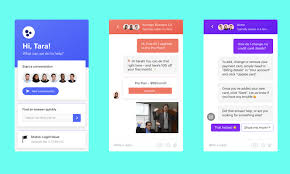

Awesome Live Chat is a WordPress plugin designed to help website owners engage with visitors in real-time through live chat. It offers a variety of features that allow businesses to connect with their customers instantly, providing personalized support and enhancing user experience.
Key Features of Awesome Live Chat:
- Real-Time Chat:
- Awesome Live Chat enables real-time communication between website visitors and the website owner or support team. This provides instant assistance, which can significantly improve customer satisfaction.
- Multiple Operators:
- You can add multiple chat agents or operators to handle incoming chat requests. This is especially useful for businesses that need to provide support to a large number of visitors simultaneously.
- Customizable Chatbox:
- The chatbox is fully customizable to match the look and feel of your website. You can change colors, text, and position to ensure the chat widget blends seamlessly with your site's design.
- Offline Mode:
- When agents are unavailable, the plugin can switch to offline mode. During this time, users can leave a message or request a callback. This ensures no inquiry goes unanswered.
- Pre-Chat Survey:
- The plugin allows you to set up a pre-chat survey to collect basic information from users before starting the chat. This helps agents prepare for the conversation and offer more efficient support.
- Typing Indicator:
- The typing indicator shows when the agent or customer is typing a message. This feature helps make the conversation feel more natural and improves the flow of communication.
- Mobile-Friendly:
- The plugin is designed to be responsive, meaning it will work seamlessly on mobile devices as well. This ensures that visitors can access the chat functionality from any device, whether they are on a phone, tablet, or desktop.
- Chat Transcripts:
- After a conversation ends, you can send chat transcripts to users via email or save them for later reference. This helps keep track of customer interactions and is useful for follow-up or customer service purposes.
- Automated Greetings:
- You can configure automated greetings to welcome visitors as soon as they land on your website. This proactive approach encourages users to engage with the chat.
- File Uploads:
- The plugin supports file uploads, allowing customers to share documents, images, or screenshots during the chat. This can be helpful when troubleshooting technical issues or when documents are needed for verification.
- Visitor Tracking:
- Awesome Live Chat allows you to monitor your visitors in real-time. You can track where they are on your website, how long they've been there, and other relevant details. This helps agents tailor their responses based on the visitor's behavior.
- Notifications:
- You can set up notifications to alert operators when a new chat request comes in. These notifications can be sent via the WordPress dashboard, email, or even browser push notifications, ensuring no message is missed.
- Canned Responses:
- Canned responses (pre-written replies) can be used to quickly answer frequently asked questions or common inquiries, saving time for the support team.
- User-Friendly Interface:
- The plugin is designed to be intuitive and easy to use, with a clean and straightforward interface. Both website visitors and chat agents can easily navigate the chat window without needing technical expertise.
- Analytics & Reporting:
- The plugin provides analytics that help you track the performance of the live chat, such as the number of chats, response times, and customer satisfaction. This data can be used to improve customer support strategies.
- Multilingual Support:
- The plugin supports multiple languages, which is essential for websites with an international audience. You can easily translate the plugin into your preferred language or use it out of the box in different languages.
- Integrations:
- Awesome Live Chat can integrate with other popular services and plugins like Google Analytics, CRM tools, and email marketing platforms, allowing you to streamline your workflow and connect with your audience on multiple platforms.
Benefits of Using Awesome Live Chat:
- Instant Customer Support:
- Customers appreciate instant support, and offering live chat on your site ensures they don’t have to wait for long response times. This enhances the overall user experience and can increase customer satisfaction and retention.
- Improved Conversion Rates:
- Live chat has been shown to increase conversion rates, as visitors who engage with a live chat are more likely to complete a purchase or sign up for a service. The real-time interaction provides an opportunity to address concerns and convert potential leads into customers.
- Higher Customer Satisfaction:
- Having live chat enables you to provide personalized, real-time help, which can greatly improve customer satisfaction. Customers who get immediate answers to their questions are more likely to return to your site.
- Proactive Customer Engagement:
- With the automated greeting feature and visitor tracking, you can proactively reach out to visitors to offer assistance, guiding them through their journey on your site before they even ask for help.
- Reduced Response Time:
- The typing indicator, canned responses, and easy-to-use interface help agents respond quickly to inquiries, reducing wait times and improving the overall support experience.
- Increased Sales and Leads:
- By engaging visitors in real-time, you can address any doubts or questions they may have, leading to increased sales and a higher chance of converting visitors into paying customers.
- Better Understanding of Visitors:
- With the visitor tracking feature, you can gather insights into how users interact with your site. This data can help you improve the user experience and tailor your website’s content to meet their needs more effectively.
- Easy to Use and Set Up:
- The Awesome Live Chat plugin is simple to install and configure, even for WordPress beginners. The intuitive interface ensures that anyone can set it up without the need for coding skills.
- Cost-Effective:
- Live chat is an affordable customer support solution compared to other methods like phone or email support. It allows you to provide personalized service while saving time and resources.
How to Use Awesome Live Chat:
- Install and Activate:
- Go to your WordPress dashboard and search for Awesome Live Chat in the plugin repository. Install and activate it.
- Configure the Plugin:
- Once activated, go to the Awesome Live Chat settings page in the WordPress dashboard. Set up your operator details, chatbox appearance, greeting messages, and other preferences.
- Add Agents:
- Add support agents or operators who will be responsible for answering live chat requests. You can set their roles and permissions accordingly.
- Customize the Chat Widget:
- Customize the look of the chatbox to match your website’s theme. You can adjust colors, position, and even add a welcome message.
- Set Up Offline Mode:
- Configure what happens when no agents are available. You can set up a form or message for users to leave a message when you're offline.
- Test the Live Chat:
- Before going live, test the chat feature to make sure everything works properly, including notifications, automated greetings, and the operator interface.
- Go Live:
- Once you're ready, start accepting live chat requests and provide instant support to your visitors.








![Booknetic - Appointment Booking & Appointment Scheduling & Calendar reservation [SaaS]](https://gplpixel.com/wp-content/uploads/2024/06/Booknetic-Appointment-Booking-Appointment-Scheduling-Calendar-reservation-SaaS-400x203.jpg)





















