Premium Category Products

Background eraser

Background eraser

Background Eraser

Live Demo: Background eraser Live Demo

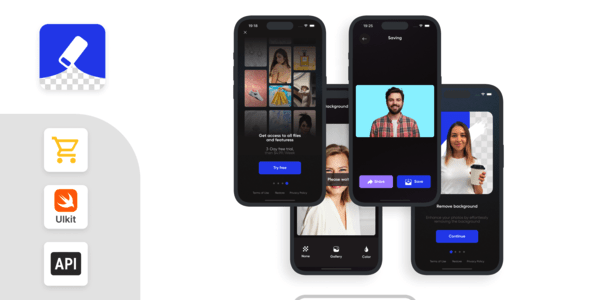
Background Eraser is a digital tool designed to remove or isolate backgrounds from images, leaving only the desired subject visible. This powerful tool is widely used in various fields like photography, e-commerce, graphic design, and social media content creation. Background erasers allow users to create cleaner, more professional-looking visuals by eliminating distractions in the background, enhancing the focus on the main subject.

Types of Background Erasers

There are three main types of background erasers:

  • Automatic AI-Based Background Removal: These tools leverage artificial intelligence and machine learning algorithms to detect the subject of an image and automatically separate it from the background. Popular examples include Remove.bg, Canva, and Photoshop's Remove Background feature.

  • Manual Background Eraser: These tools provide users with brushes, lasso selections, or eraser tools to manually outline the subject and erase the background. Popular examples include Photoshop and GIMP. Manual erasing offers full control but can be time-consuming.

  • Semi-Automatic Background Removal: This type combines AI with user input, allowing for refinement and adjustment of the background removal results. Adobe Photoshop's "Select and Mask" and Snapseed's "Brush Tool" are examples of semi-automatic background removal tools.

Core Features of Background Erasers

Effective background erasers typically offer these core features:

  • Automatic Detection and Removal: The tool identifies the subject and removes the background with a single click.

  • Adjustable Brush Tools: These tools allow users to refine the selection with brushes that vary in size, hardness, and opacity, enabling precise edits.

  • Edge Refinement: This feature smooths and refines edges around the subject for a more natural cut-out, especially helpful for subjects with hair or fur.

  • Transparent Background or Replacement Options: The tool allows users to save the edited image with a transparent background (PNG format) or replace the background with another image, color, or design.

  • Batch Processing: Some tools offer batch processing, enabling users to remove backgrounds from multiple images simultaneously, which is beneficial for e-commerce or bulk editing.

Popular Background Eraser Tools

  • Remove.bg: A popular web-based AI-powered tool known for its quick, high-quality background removal, exporting images with transparent backgrounds.

  • Canva: Provides a background removal tool within its editor, making it ideal for creating graphics with customized backgrounds.

  • Adobe Photoshop: Renowned for its precision, offering multiple ways to remove backgrounds, including the "Remove Background" tool, "Select and Mask," and manual selection tools.

  • Photoshop Express: A mobile-friendly version of Photoshop with a simplified background removal tool.

  • GIMP: A free and open-source tool with features like the Fuzzy Select Tool and Foreground Select Tool for manual background removal.

How to Use a Background Eraser (General Steps)

  1. Upload or Open the Image: Import the image into the background eraser app.

  2. Select Background Eraser Option: Choose the automatic or manual background eraser feature based on your preference and the tool's capabilities.

  3. Adjust the Selection: If needed, use brushes or refinement tools to perfect the edges of the subject, ensuring a clean separation from the background.

  4. Export with Transparent Background: Save the edited image as a PNG for transparency. Alternatively, replace the background with a new one as desired.

Use Cases

Background erasers are incredibly versatile and have numerous applications:

  • E-Commerce: Removing backgrounds from product images for a cleaner, more professional look on websites.

  • Content Creation: Creating graphics for social media, blog posts, and marketing materials with consistent, distraction-free visuals.

  • Graphic Design: Isolating subjects to be used in various design projects, from posters to logos.

Pros and Considerations

Pros:

  • Saves time with automatic background removal, especially for quick edits.

  • Enables high-quality cutouts, improving the professionalism of images.

  • Allows for creative flexibility in combining subjects with new backgrounds or designs.

Considerations:

  • AI-based tools may struggle with complex or intricate subjects like hair or fur without manual adjustments.

  • Quality of background removal may vary by tool, so manual adjustments might still be necessary.

  • Some background erasers require a subscription or payment for high-resolution output.

Best Background Eraser for Different Needs

  • Quick, High-Quality Results: Remove.bg for fast, single-click results.

  • Full Editing Suite: Photoshop for advanced users needing high control.

  • Budget-Friendly or Free: GIMP or PhotoScissors (limited features but effective for basic needs).

Category: Mobile App

(Only For Premium Category Products !)

1. All digital products are the most recent version, with no possibility of free updates. After payment, you can request an update to the most recent version for 5 days if a new version is released. We free support within 5 days.

2. If a license is required (Excludes WHMCS license , we provide only method not license), please contact us via email or ticket for assistance with activation. Our license is only valid for activation and does not include support.

3. We provide Mobile, PHP script installation services for $19.90 / ₹1700. Please create a backup after installation as we do not support re-installation. For mobile app source code, we do not offer installation services.

4. If you have any questions, please contact us by email  or create a ticket on this page

5. Please note that any digital products presented on the website do not contain malicious code, viruses or advertising. You will receive the original files from the developers. We do not sell any products that have been downloaded from other websites.

6. The response time can last up to 6 hours.

(Only For Membership Category Products !)

Benefits of our Membership Plans

  • Instant access to all plugins and all themes including all future releases
  • Unlimited domain usage
  • Regular Updates as of when available. Usually, updates are released daily.
  • Before purchasing, please read the Terms and Conditions & Refund Policy.
  • If you have any questions, please first read the FAQs.
  • If you haven’t found the answer to your question, please contact us, and we will respond ASAP.
  • Please note that any digital products on the website do not contain malicious code, viruses, or advertising. We buy the original files from the developers. We do not sell any products downloaded from other sites.
  • Buy or download for FREE by subscribing to our VIP Membership Plan. Join the club of more than 1100+ happy members. This is the same theme as sold by the developer.

Updates:

  • We offer frequent updates for one year from the date of purchase. After this period, you have to purchase the item again to receive further updates, we also offer lifetime updates as a second option.
  • We regularly update products as soon as we are notified about an update, we go and download it from the author and update it on our site, but In case the current version of the product is not the latest, You can request an update for the product by contact form.
  • We send regular emails advising when products have been updated so please be sure to provide an active email address when you sign up.

Support:

  • Our support team is available 24/7, if you have any questions or need help in installing or configuring digital products purchased on the website, please don’t hesitate to contact form.
  • Please note that we are not developers of the provided products, so our technical support capabilities are limited. We do not change product functionality and do not fix developer bugs.

For more information please read FAQs & About Us.

(Only For WHMCS Category Products !)

  • We Only provide WHMCS Module, how you can  nulled any module step only !
  • Instant access to all plugins and all themes 
  • Unlimited domain usage
  • Regular Updates as of when available. Usually, updates are released daily.
  • Before purchasing, please read the Terms and Conditions & Refund Policy.
  • If you have any questions, please first read the FAQs.
  • If you haven’t found the answer to your question, please contact us, and we will respond ASAP.
  • Please note that any digital products on the website do not contain malicious code, viruses, or advertising. We buy the original files from the developers. We do not sell any products downloaded from other sites.

More Like This Products