
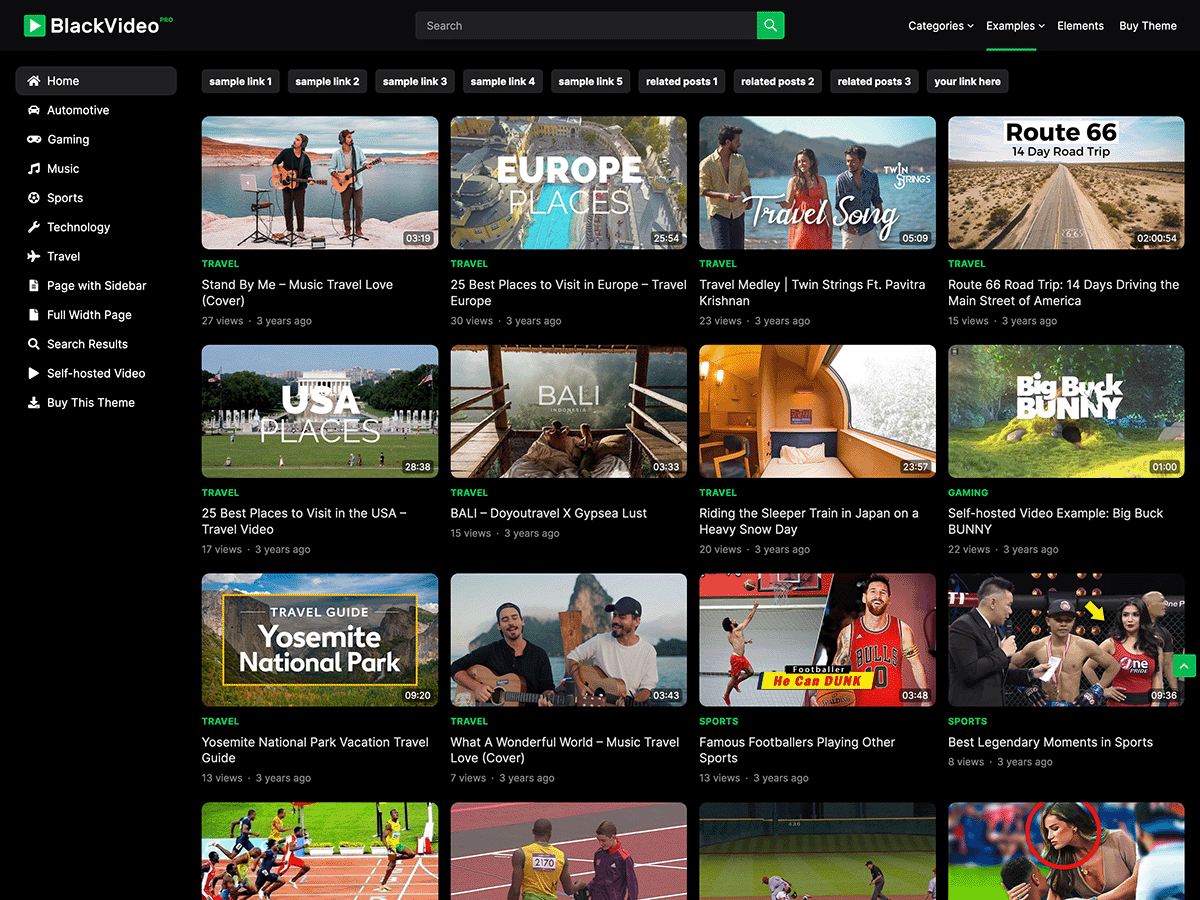

BlackVideo Pro is a premium WordPress plugin designed to enhance the functionality of video embedding on your website. It is particularly focused on providing seamless and visually appealing video backgrounds for your WordPress pages, posts, or sections. BlackVideo Pro is an ideal solution for users who want to create an immersive, modern design by incorporating video content as the backdrop for their websites.
Key Features of BlackVideo Pro:
- Video Backgrounds:
- Seamless Integration: The plugin allows you to easily add video backgrounds to any section of your WordPress site. You can use either self-hosted videos or embed videos from platforms like YouTube, Vimeo, or other external sources.
- Autoplay & Mute Options: The video can be set to autoplay when the user visits the page, with an option to mute the audio by default for a non-intrusive experience.
- Full-Screen Video Backgrounds: BlackVideo Pro allows you to set full-screen videos that cover the entire background of a webpage, providing a captivating and modern look.
- Easy Video Embedding:
- The plugin simplifies the process of embedding video backgrounds. Whether you want to embed a YouTube or Vimeo video, you can do so by simply entering the URL, eliminating the need for custom code.
- Self-Hosting Videos: You can also upload and host video files directly on your website, ensuring complete control over the content.
- Customizable Settings:
- Overlay Options: You can add custom overlays, such as color gradients, to improve text visibility over the video background. This ensures that text remains readable without distracting from the video.
- Opacity Control: Adjust the opacity of the video overlay or video background itself to achieve the desired effect.
- Responsive Design:
- The video backgrounds are fully responsive, ensuring they look great on any device, from desktop to mobile. The plugin automatically adjusts the video size and aspect ratio to fit different screen sizes.
- Lazy Loading for Videos:
- Lazy Loading is supported to improve page load speed. This means that videos are only loaded when they come into view (visible in the browser), helping reduce the initial page load time, especially on mobile devices.
- Advanced Video Settings:
- Looping: The video can be set to loop automatically for continuous playback.
- Custom Play Button: You can customize the appearance of the play button (if you want users to manually start the video).
- Video Positioning: You can control where the video is positioned within the section, allowing for better control over the layout of the page.
- Multiple Video Sources:
- The plugin supports a wide range of video sources such as YouTube, Vimeo, and self-hosted videos, giving users a lot of flexibility in choosing the content for their video backgrounds.
- Performance Optimization:
- Fast Loading: The plugin is optimized for performance, ensuring that videos load quickly and do not negatively impact the page's speed, even with heavy video content.
- Fallback Image Support: For browsers that don't support video backgrounds, a fallback image can be used to ensure a consistent experience.
- SEO-Friendly:
- Since BlackVideo Pro is designed to work smoothly with the WordPress platform, it ensures that the videos do not interfere with your site's SEO. You can still use keywords, alt texts, and other SEO best practices while embedding videos.
Benefits of Using BlackVideo Pro:
- Improved User Experience:
- Adding a video background can significantly improve the visual appeal and engagement of your site, making it more dynamic and interactive. Visitors are more likely to stay on a page with compelling visual content, enhancing user retention.
- Modern Design Aesthetic:
- Video backgrounds are becoming a popular design trend, especially for landing pages, portfolios, and business websites. By using BlackVideo Pro, you can give your website a sleek, contemporary feel.
- Customization Options:
- The plugin allows you to control various aspects of the video background, including opacity, overlay colors, and video source, giving you full control over the appearance and feel of your site.
- Better Performance:
- With features like lazy loading, responsive design, and performance optimization, BlackVideo Pro ensures that video backgrounds don’t compromise your website's performance, even with large or multiple videos.
- Easy Setup:
- You don’t need to be a developer to use BlackVideo Pro. The plugin is easy to install, configure, and use, making it ideal for both beginners and experienced WordPress users.
- Cross-Browser Compatibility:
- The plugin ensures that the video backgrounds are compatible across all modern browsers, providing a consistent experience for users regardless of their browser.
How to Use BlackVideo Pro:
- Install the Plugin:
- Install the BlackVideo Pro plugin from the WordPress plugin directory or upload the premium plugin file if you have purchased it. After activation, the plugin will be available in your WordPress dashboard.
- Configure the Video Background:
- Navigate to the BlackVideo Pro settings page in your WordPress dashboard.
- Choose the section or page where you want to add the video background. You can add videos to a specific page, post, or section of your website.
- Select the Video Source:
- Choose whether you want to use a self-hosted video, YouTube, or Vimeo as the background source. If using YouTube or Vimeo, simply paste the video URL.
- Customize the Video:
- Configure the overlay, opacity, playback options, and positioning according to your preferences. You can also enable looping and muting for the video.
- Preview and Publish:
- After configuring your video background, preview the page to ensure everything looks as expected. Once satisfied, publish the changes to your website.







![Booknetic - Appointment Booking & Appointment Scheduling & Calendar reservation [SaaS]](https://gplpixel.com/wp-content/uploads/2024/06/Booknetic-Appointment-Booking-Appointment-Scheduling-Calendar-reservation-SaaS-400x203.jpg)






















