
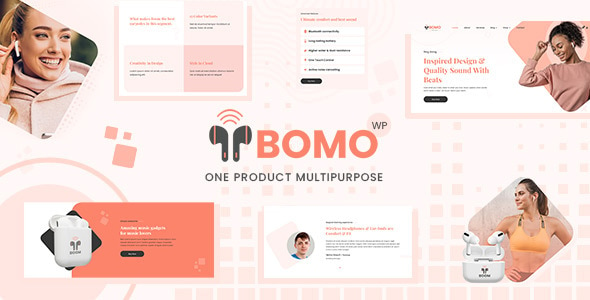


Bomo – Single Product WooCommerce is a beautifully designed WordPress theme created specifically for showcasing a single product in an eCommerce store. It's a perfect solution for entrepreneurs or businesses that want to focus on one flagship product, whether it's a physical item, digital product, or a service. The theme leverages WooCommerce, one of the most popular eCommerce plugins for WordPress, to help you set up a professional online store with minimal effort.
Key Features of Bomo – Single Product WooCommerce:
- Single Product Focus:
- Bomo is designed with a focus on one main product. If you have a single product to sell or want to highlight a specific product in your store, this theme is a great choice.
- The design is optimized to showcase the product from all angles, including its features, pricing, specifications, and customer reviews, making it easy for users to make a purchase decision.
- Modern, Clean, and Stylish Design:
- The theme comes with a modern and minimalist design that highlights your product’s visuals and important information without unnecessary distractions.
- It provides a professional and high-quality feel, which can instill trust in your customers and encourage them to complete a purchase.
- WooCommerce Integration:
- Built specifically for WooCommerce, Bomo makes it easy to integrate payment gateways, manage inventory, and create a smooth shopping experience for your customers.
- WooCommerce provides features like product variations, discounts, shipping options, and more, all seamlessly integrated into the theme.
- Product Image Gallery:
- A built-in image gallery that allows users to view the product from multiple angles and zoom in on images.
- This feature is important for eCommerce stores, especially those selling physical products where customers want to get a detailed look at the product before purchasing.
- Fast Checkout Process:
- Bomo helps streamline the purchase process by offering a smooth and fast checkout experience, reducing cart abandonment.
- The theme works well with popular WooCommerce extensions like One Page Checkout and WooCommerce Direct Checkout for a faster checkout process.
- Customizable Product Pages:
- You can fully customize the product page to highlight key details such as pricing, specifications, product benefits, and customer reviews.
- You can also add promotional banners, call-to-action buttons, and videos to boost sales.
- Responsive Design:
- Bomo is fully responsive, meaning your product page will look great on any device, whether it’s a desktop, tablet, or smartphone.
- The mobile-friendly design ensures a smooth shopping experience for customers on any device.
- User-Friendly Interface:
- The theme is easy to navigate, with clear and straightforward options for adding products to the cart, checking out, and accessing customer support.
- The design elements are clean, making the theme suitable for businesses looking for a professional, simple user experience.
- SEO Optimized:
- Built with SEO in mind, Bomo comes with clean code and a structure that helps your product pages rank better in search engines.
- SEO optimization is critical to ensure visibility and drive traffic to your product page.
- Product Reviews & Ratings:
- Bomo integrates the WooCommerce product reviews feature, allowing your customers to leave reviews and ratings, which can help build trust and encourage sales.
- Positive reviews can play a significant role in increasing conversions, so this feature is especially useful for single-product stores.
- Payment Gateway Support:
- Bomo supports multiple payment gateways like PayPal, Stripe, and other common WooCommerce-compatible payment methods.
- This makes it easier for customers to purchase the product using their preferred method.
- Live Chat Support Integration:
- Optionally, you can integrate a live chat service, which allows customers to get instant answers to their questions and increase customer satisfaction and conversion rates.
- Shipping Options:
- WooCommerce shipping settings work seamlessly with Bomo, allowing you to configure flat-rate shipping, free shipping, or integrate with various third-party shipping services.
- Customizable Design Elements:
- Customizable colors, fonts, and layout settings allow you to personalize the theme to fit your branding and create a cohesive look for your online store.
Benefits of Using Bomo – Single Product WooCommerce:
- Perfect for Single Product Stores:
- If you have a product you want to showcase prominently without distractions from other products, Bomo is designed specifically for that. It's a great choice for creating a clean and focused online shop.
- Increased Conversions:
- With an emphasis on a smooth user experience, product image galleries, easy checkout, and clear calls-to-action, Bomo helps optimize the sales funnel, improving the likelihood of converting visitors into customers.
- Simplified Maintenance:
- As the theme is optimized for selling a single product, you won’t need to manage a complicated product catalog. This is perfect for entrepreneurs who are focusing on one product.
- Easy Customization:
- Whether you’re a beginner or experienced developer, Bomo allows for easy customization of elements without needing to know how to code. You can change colors, fonts, product details, and other elements through the WordPress customizer.
- Professional Look and Feel:
- The theme's modern, clean, and minimalist design creates a professional image for your brand, which can help build customer trust and authority in your niche.
- Scalable:
- Even if you initially start with a single product, Bomo can scale with your business. If you later decide to expand your product offerings, you can easily add more products without disrupting the theme’s design or functionality.
How to Set Up Bomo – Single Product WooCommerce:
- Install the Theme:
- Upload the Bomo theme to your WordPress website through the WordPress theme uploader.
- After activation, install the necessary plugins (such as WooCommerce).
- Customize the Theme:
- Use the WordPress Customizer to modify the layout, colors, fonts, and other visual elements to align with your brand.
- Add your product’s details, images, descriptions, and set up the pricing.
- Configure WooCommerce:
- Set up WooCommerce with your shipping options, payment methods, and tax settings.
- Customize the checkout process, and integrate any additional tools or plugins you may need.
- Add Product Reviews:
- Encourage customers to leave reviews on your product page to build trust and social proof.
- You can enable or disable product reviews in the WooCommerce settings.
- Optimize for SEO:
- Make sure to fill out all meta descriptions, titles, and product tags to improve your SEO and visibility on search engines.
- Launch Your Store:
- Once your product is added and everything is customized to your liking, publish your page, and start promoting your product.






























