Premium Category Products

Buildly – Contractor & Construction Elementor Template Kit

Buildly – Contractor & Construction Elementor Template Kit

Buildly - Contractor & Construction Elementor Template Kit

Live Demo: Buildly - Contractor & Construction Elementor Template Kit Live Demo

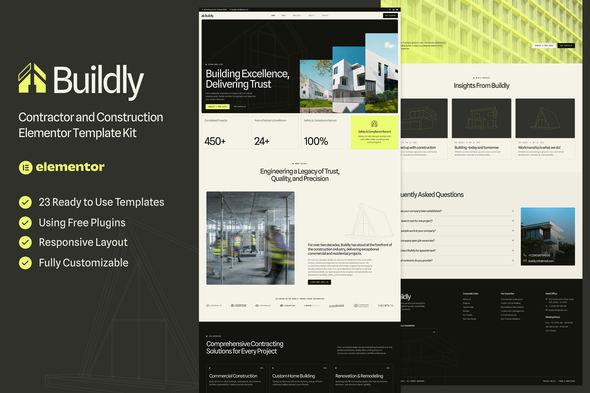
Buildly - Contractor and Construction Elementor Template Kit is a comprehensive, pixel-perfect Elementor Template Kit designed to help construction businesses establish instant authority. Whether you are a commercial contractor, a custom home builder, or an industrial engineering firm, Buildly provides the structural integrity and professional aesthetic required to convert high-value leads.

Buildly template is built with a focus on clean hierarchy, industrial credibility, and seamless mobile responsiveness. Buildly template kit includes stunning carefully crafted 18 Pages and 23 Stunning Templates, you can build your professional-looking website just a click away.

Product Overview

Buildly is not a WordPress theme; it's a powerful Elementor Template Kit designed to elevate your construction business's online presence. This kit offers a complete set of pre-designed pages and templates, allowing you to quickly and easily create a professional website without needing extensive coding knowledge.

Modern Design and User Experience

The Buildly Template Kit boasts a modern and minimalist design aesthetic that is both visually appealing and user-friendly. The templates feature a clean layout, impactful imagery, and intuitive navigation, ensuring a seamless browsing experience for your visitors.

Main Features and Capabilities

  • 18 Ready-to-Use Pages: Home, About, Services, Service Details, Projects, Projects Details, Consultation, FAQs, Career, Career Details, Testimonials, Contact, Team, Pricing, Coming Soon, Blog, Single Post, and 404 Page.
  • 23 Ready-to-Use Templates: Global Theme Style, Header, Footer, Form Newsletter, Form Contact, Form Consultation.
  • Fully Responsive Layout: Ensures optimal viewing experience across all devices, from desktops to mobile phones.
  • Fully Customizable: Easily modify colors, fonts, images, and content to match your brand identity.
  • Cross Browser Compatibility: Works seamlessly across popular browsers like Chrome, Firefox, Safari, and Opera.

Customization Options

While Buildly provides a comprehensive set of pre-designed elements, it also offers extensive customization options. You can tailor the design, colors, fonts, and content to perfectly reflect your brand's unique style and personality. The intuitive Elementor interface allows for easy modifications without requiring coding expertise.

Responsive Design

The Buildly Template Kit is fully responsive, meaning it automatically adjusts its layout and content to fit different screen sizes. This ensures a consistent and optimal viewing experience for users on desktops, laptops, tablets, and smartphones.

Pages, Components, or Modules

The kit includes a range of pre-designed pages, each with its own specific purpose and layout. These pages cover essential aspects of a construction business website, such as:

  • Home Page: Showcase your services, projects, and company values.
  • About Us Page: Tell your story and introduce your team.
  • Services Page: Highlight the range of construction services you offer.
  • Project Page: Display your past projects with detailed descriptions and images.
  • Contact Page: Provide clear contact information and a contact form.
  • Blog Page: Share industry insights, news, and updates.

Integration and Compatibility

Buildly is seamlessly compatible with Elementor, a popular and user-friendly page builder plugin for WordPress. It also integrates with essential plugins like MetForm, ElementsKit Lite, and Gum Elementor Addon to enhance functionality and create dynamic forms.

SEO and Performance Considerations

The Buildly Template Kit is built with SEO best practices in mind. It utilizes clean code, structured data, and optimized page titles and descriptions to improve search engine visibility.

Ideal Use Cases

Buildly is ideal for:

  • Construction Companies: Showcase your expertise, projects, and client testimonials.
  • Contractors: Attract new clients and manage your projects efficiently.
  • Home Builders: Display your custom home designs and floor plans.
  • Industrial Engineering Firms: Highlight your specialized services and expertise.

Who Should Use This Product?

This product is perfect for anyone who wants to create a professional and impactful construction website without needing extensive web development knowledge. Whether you're a business owner, marketing manager, or freelancer, Buildly empowers you to establish a strong online presence and attract new clients.

Installation and Setup Guide

  1. Download your kit file from Envato or ThemeForest and DO NOT unzip it. If you use Safari browser you may need to ensure “Open safe files after downloading” is disabled in the browser preferences.
  2. Go to Settings > Permalinks and ensure Post Name is selected.
  3. Go to Appearance > Themes > Add New and ensure Hello Elementor is installed and activated. This will prompt you to install Elementor if you haven’t already.
  4. Go to Plugins and ensure Elementor and Template Kit Import are installed and at the latest version. If your kit requires Elementor Pro, it must be installed now and connected to your account.
  5. Go to WordPress Dashboard > Tools > Template Kits and click Upload Template Kit Zip (or click your kit to view it).
  6. Check for the orange banner at the top and click Install Requirements to load any plugins the kit uses.
  7. Click import on the Global Kit Styles first. This will setup the site settings.
  8. Click Import on one template at a time in the order shown. These are stored in Elementor under Templates > Saved Templates and are re-used from here.
  9. Creating pages:
    • Go to Pages and create a new page and click Edit with Elementor
    • Click the gear icon at lower-left of the builder to view page settings and choose Elementor Full Width and hide page title
    • Click the gray folder icon to access My Templates tab and then Import the page you’d like to customize.
    • The home page is set under Settings > Reading by selecting Static Front Page.

How to Import Metforms

  • If you have Elementor Pro, skip install of Metform and form blocks.

  • Import the metform block templates

  • Import the page template where the form appears and right-click to enable the Navigator
  • Locate and select the Metform widget and click Edit Form. Choose New, then Edit Form. The builder will appear
  • Click ‘Add Template’ gray folder icon.
  • Click ‘My Templates’ tab.
  • Choose your imported metform template, then click ‘Insert’ (click No for page settings).
  • Once the template is loaded, make any desired customizations and click ‘Update & Close’ The form will appear in the template
  • Click Update

Setup Global Header and Footer

  1. Import the header and footer template
  2. Go to ElementsKit > Header Footer select Header and click Add New
  3. Give it a title, leave Entire Site selected and toggle Activation to On
  4. Click the template title and Edit Content
  5. Click the gray folder icon and select the header template to import and Update
  6. Repeat for Footer

  7. If you have Elementor Pro, headers and footers are customized under Templates > Theme Builder.

  8. Make Sure You Have Enabled ‘Flexbox Container’
  9. In the Dashboard go to Elementor > Settings > Features
  10. Go to ElementsKit > Header Footer select Header and click Add New
  11. Scroll down until you find ‘Flexbox Container’ > Active

Important Product Information

  • License: This Template Kit is licensed for personal and commercial use. You are permitted to use the kit on multiple websites, but you may not resell or redistribute the kit itself.
  • Support: For any questions or technical assistance, please refer to the product documentation and support channels provided by the developer.

Category: Elementor Template Kit

(Only For Premium Category Products !)

1. All digital products are the most recent version, with no possibility of free updates. After payment, you can request an update to the most recent version for 5 days if a new version is released. We free support within 5 days.

2. If a license is required (Excludes WHMCS license , we provide only method not license), please contact us via email or ticket for assistance with activation. Our license is only valid for activation and does not include support.

3. We provide Mobile, PHP script installation services for $19.90 / ₹1700. Please create a backup after installation as we do not support re-installation. For mobile app source code, we do not offer installation services.

4. If you have any questions, please contact us by email  or create a ticket on this page

5. Please note that any digital products presented on the website do not contain malicious code, viruses or advertising. You will receive the original files from the developers. We do not sell any products that have been downloaded from other websites.

6. The response time can last up to 6 hours.

(Only For Membership Category Products !)

Benefits of our Membership Plans

  • Instant access to all plugins and all themes including all future releases
  • Unlimited domain usage
  • Regular Updates as of when available. Usually, updates are released daily.
  • Before purchasing, please read the Terms and Conditions & Refund Policy.
  • If you have any questions, please first read the FAQs.
  • If you haven’t found the answer to your question, please contact us, and we will respond ASAP.
  • Please note that any digital products on the website do not contain malicious code, viruses, or advertising. We buy the original files from the developers. We do not sell any products downloaded from other sites.
  • Buy or download for FREE by subscribing to our VIP Membership Plan. Join the club of more than 1100+ happy members. This is the same theme as sold by the developer.

Updates:

  • We offer frequent updates for one year from the date of purchase. After this period, you have to purchase the item again to receive further updates, we also offer lifetime updates as a second option.
  • We regularly update products as soon as we are notified about an update, we go and download it from the author and update it on our site, but In case the current version of the product is not the latest, You can request an update for the product by contact form.
  • We send regular emails advising when products have been updated so please be sure to provide an active email address when you sign up.

Support:

  • Our support team is available 24/7, if you have any questions or need help in installing or configuring digital products purchased on the website, please don’t hesitate to contact form.
  • Please note that we are not developers of the provided products, so our technical support capabilities are limited. We do not change product functionality and do not fix developer bugs.

For more information please read FAQs & About Us.

(Only For WHMCS Category Products !)

  • We Only provide WHMCS Module, how you can  nulled any module step only !
  • Instant access to all plugins and all themes 
  • Unlimited domain usage
  • Regular Updates as of when available. Usually, updates are released daily.
  • Before purchasing, please read the Terms and Conditions & Refund Policy.
  • If you have any questions, please first read the FAQs.
  • If you haven’t found the answer to your question, please contact us, and we will respond ASAP.
  • Please note that any digital products on the website do not contain malicious code, viruses, or advertising. We buy the original files from the developers. We do not sell any products downloaded from other sites.

More Like This Products