
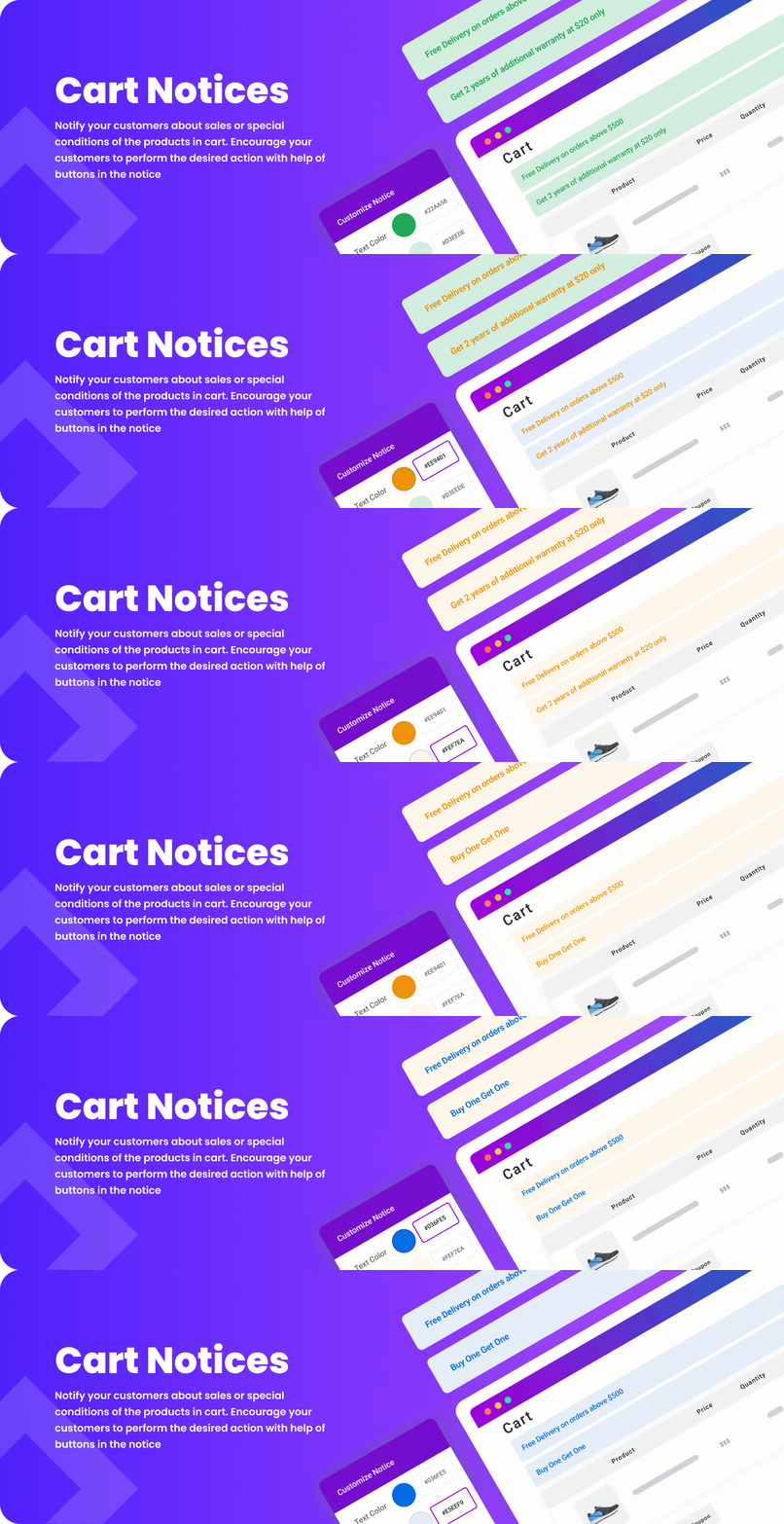

Cart Notices for WooCommerce is a powerful and flexible WooCommerce plugin that allows store owners to display customized notifications to users in their shopping cart and checkout process. These notifications can be used for various purposes, such as offering discounts, providing shipping information, promoting special offers, or alerting users about minimum order requirements.
This plugin is highly useful for increasing conversions, guiding customers through the purchasing process, and improving user experience by providing helpful information at critical stages of the checkout process.
Key Features of Cart Notices for WooCommerce:
- Customizable Cart Notices:
- You can create highly customized cart notices based on various triggers, such as a specific product in the cart, cart value, or customer actions. These notices can be displayed in different locations, such as the cart page, the checkout page, or even the product page.
- Conditional Display Rules:
- Cart Notices for WooCommerce allows you to set conditional display rules. For example, you can show a specific notice only when a customer adds a certain product, reaches a particular cart value, or uses a specific coupon code. This ensures that you show relevant messages based on customer behavior.
- Various Notification Types:
- You can display different types of cart notices, including:
- Fixed messages: Displaying static information like shipping offers, sale notifications, or policy updates.
- Discount offers: For encouraging customers to add more items or complete their purchase (e.g., "Free shipping on orders over $50").
- Upsell and cross-sell promotions: Suggesting related or higher-priced products.
- Abandoned cart reminders: Encouraging users to return and complete their purchase.
- You can display different types of cart notices, including:
- Customizable Design:
- You have the option to customize the appearance of the cart notices, including the color, font size, background, and text styling. This helps integrate the notices seamlessly with the rest of your store’s design.
- Easy Integration with WooCommerce:
- The plugin is fully integrated with WooCommerce and works out-of-the-box. It allows you to create and manage notices from the WooCommerce settings page, making it easy for store owners to get started without any technical skills.
- Multiple Display Locations:
- Cart Notices for WooCommerce lets you choose where the notices will appear, such as:
- The cart page
- The checkout page
- The product page
- Anywhere on your site (with the use of shortcodes or widgets).
- Cart Notices for WooCommerce lets you choose where the notices will appear, such as:
- Custom Redirects and Call to Actions:
- You can configure notices to include call-to-action buttons, such as directing customers to a specific page or redirecting them to the checkout page. You can also set custom redirects when the cart value reaches a certain threshold.
- Pop-up or Inline Notifications:
- You can choose to display your cart notices as either inline notifications (on the page) or as pop-up notifications (that appear on top of the page content).
- Exclude Specific Products or Categories:
- You can set up notices to exclude certain products or categories. For example, you may want to show a special offer for a specific category of products but exclude certain high-value items from receiving the discount.
- Cart Value Based Notices:
- Create notices based on cart value. For example, you can display a notice that offers free shipping once the customer’s cart reaches a certain amount, or you could offer a discount for orders above a set value.
- Scheduled Notices:
- Cart Notices for WooCommerce allows you to set time-based triggers. For instance, you can schedule the display of a special promotion during a limited-time sale, or activate notices at specific hours of the day.
- Multiple Notice Triggers:
- You can trigger the notices using various actions such as:
- Cart value conditions (e.g., show a discount when the cart total exceeds a certain amount).
- Product conditions (e.g., when a specific product is added).
- Customer role (e.g., show exclusive offers to specific customer groups).
- Coupon code use (e.g., after applying a particular coupon).
- You can trigger the notices using various actions such as:
- Easy Management:
- The plugin provides a simple interface to manage and track your notices. You can easily add, edit, and delete notices from the WooCommerce settings area, and it shows a preview of how each notice will appear on your site.
- Localized and Translatable:
- Cart notices can be fully localized for different languages, making it easy to show region-specific promotions. The plugin also supports WPML and Polylang for multi-language WooCommerce stores.
- Notifications for Different Customer Actions:
- Display targeted messages when specific actions occur, such as when a customer adds a product to the cart, applies a coupon, or reaches a minimum order amount. These notices are helpful for guiding the customer and increasing the likelihood of conversion.
- Full Support for Product Add-Ons:
- The plugin also supports product add-ons, so if your WooCommerce store uses product add-ons (such as custom engraving or gift wrapping), you can show notices based on the inclusion of these items.
Benefits of Using Cart Notices for WooCommerce:
- Increased Sales and Conversions:
- Cart notices can encourage customers to add more products to their cart, take advantage of promotions, or complete their checkout process, which can ultimately boost sales and conversions.
- Improved User Experience:
- By providing clear and helpful messages, you can enhance the shopping experience and guide customers toward making a purchase. For instance, notices about free shipping or discounts create a sense of urgency and excitement.
- Boosting Average Order Value (AOV):
- Cart notices, such as offering a discount on the next purchase or free shipping with a minimum order amount, can encourage customers to add more items to their cart, thus increasing your store’s average order value.
- Reduced Cart Abandonment:
- Well-placed cart notices can help reduce cart abandonment by reminding customers about limited-time offers or providing additional information, such as shipping details or return policies.
- Personalized Customer Communication:
- You can show personalized notices based on customer behavior, cart contents, or order history, helping to improve the overall customer experience and customer loyalty.
- Better Promotions Management:
- The plugin makes it easy to manage and schedule promotions and discount offers, ensuring they run at the right time and target the right customers.
- Increased Customer Retention:
- Offering incentives like free shipping or discounts on the next order can help keep customers engaged and encourage them to return to your store for repeat purchases.
Use Cases for Cart Notices for WooCommerce:
- Free Shipping Notifications: Inform customers when they are eligible for free shipping or when they need to add more products to their cart to qualify.
- Product Upsells: Display notices encouraging customers to purchase complementary products or upgraded versions of items in their cart.
- Abandoned Cart Reminders: Notify customers who have abandoned their carts, encouraging them to complete their purchase.
- Limited-Time Promotions: Display countdowns or urgency notices to promote limited-time offers or flash sales.
- Minimum Order Value Notices: Show customers if their cart is below the minimum order value required to receive a discount or free shipping.






![Booknetic - Appointment Booking & Appointment Scheduling & Calendar reservation [SaaS]](https://gplpixel.com/wp-content/uploads/2024/06/Booknetic-Appointment-Booking-Appointment-Scheduling-Calendar-reservation-SaaS-400x203.jpg)























