
-79%



-95%
NewsPro – Blog/News/Article App For WordPress v3.9.0
Original price was: Rs4,897.00.Rs249.00Current price is: Rs249.00.

-98%
SundayMart – All-in-One Grocery, Pharmacy Multivendor eCommerce (Web, User, Vendor, Delivery)
Original price was: Rs16,517.00.Rs249.00Current price is: Rs249.00.

-98%
GORIDE | InDriver Clone | Flutter Complete Taxi Booking Solution with Bidding Option v4.5
Original price was: Rs16,517.00.Rs249.00Current price is: Rs249.00.

-57%
Fast-Pro VPN App | VPN Unblock Proxy | VPN In App Purchase | High Secure VPN | Admob Ads
Original price was: Rs581.00.Rs249.00Current price is: Rs249.00.

-94%
GoEvent – Event Booking Management | Event Planner | Ticket Booking | Flutter Full Solution App
Original price was: Rs4,067.00.Rs249.00Current price is: Rs249.00.

-75%
MartFury – Multivendor / Marketplace Laravel eCommerce System
Original price was: Rs30,363.00.Rs7,590.75Current price is: Rs7,590.75.

-96%
MailWizz – Email Marketing Application
Original price was: Rs6,557.00.Rs249.00Current price is: Rs249.00.

-70%

-91%
Multi Content Pro (Application and Website)
Original price was: Rs2,822.00.Rs249.00Current price is: Rs249.00.

-75%
Math Cross Puzzle(Unity Game+Admob+iOS+Android)
Original price was: Rs1,653.00.Rs413.25Current price is: Rs413.25.

-75%
Android Offline Ringtones App | Template for Ringtones App | Ringtone App 2023 | Admob Ads
Original price was: Rs1,653.00.Rs413.25Current price is: Rs413.25.

-78%
Voice Changer Effects – Female Voice – Audio Editor – Prank Audio – Funny Voice – Audio Maker
Original price was: Rs2,523.00.Rs554.60Current price is: Rs554.60.

-78%
Alarm Manager – Simple Alarm Clock – Easy Alarm Management – Smart Alarm – Timer Alarm Clock
Original price was: Rs2,349.00.Rs519.80Current price is: Rs519.80.

-77%
Tic Tac Toe – Online Multiplayer Game Flutter with Admob
Original price was: Rs1,914.00.Rs432.80Current price is: Rs432.80.

-78%
Super Cleaner – Junk Removal – Storage Cleaner – Phone Master – Cleaner Antivirus – Phone Manager
Original price was: Rs2,523.00.Rs554.60Current price is: Rs554.60.

-78%
Android WhatsApp Stickers With Admin Panel
Original price was: Rs2,175.00.Rs485.00Current price is: Rs485.00.

-75%


-75%
Text to Speech Voice Text Reader with AdMob Ads Android
Original price was: Rs1,740.00.Rs435.00Current price is: Rs435.00.

-77%
GPS Photo Location On Map with AdMob Ads Android
Original price was: Rs1,914.00.Rs432.80Current price is: Rs432.80.

-78%
Font Keyboard – Keyboard Themes & Emoji Fonts – Design Keyboard – Design Keyboard color
Original price was: Rs2,610.00.Rs572.00Current price is: Rs572.00.

-78%
ColorKidz – Kids Coloring Book + GDPR | ADMOB, FIREBASE, ONESIGNAL 1.0.0
Original price was: Rs2,523.00.Rs554.60Current price is: Rs554.60.

-85%

-78%
RideIn Taxi App- Android Taxi Booking App With Admin Panel
Original price was: Rs8,613.00.Rs1,872.60Current price is: Rs1,872.60.
-78%
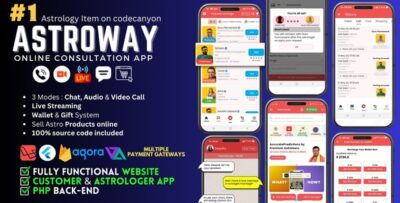
Astroway – Astrology Consultation App with Website and PHP Backend | Includes Chat, Audio-Video Call
Original price was: Rs4,263.00.Rs952.60Current price is: Rs952.60.

-75%
Screenshot Capture : Quick Capture – Android App + Admob + Facebook Integration
Original price was: Rs1,653.00.Rs413.25Current price is: Rs413.25.

-78%
GoMeet – Complete Social Dating Mobile App | Online Dating | Match, Chat & Video Dating | Dating App v1.5
Original price was: Rs4,263.00.Rs952.60Current price is: Rs952.60.

-78%
Andro News – Android News App With Reward System
Original price was: Rs2,175.00.Rs485.00Current price is: Rs485.00.

-75%
WordBook – WordPress Ebook App – WordPress API
Original price was: Rs1,740.00.Rs435.00Current price is: Rs435.00.
-78%
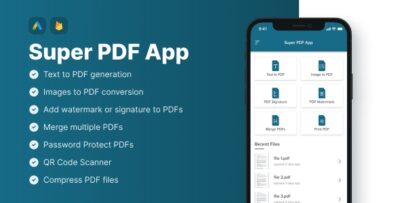
All in One PDF Tool | Image to PDF | Watermark | Merge | Password Protected | QR Code | Compress PDF
Original price was: Rs2,523.00.Rs554.60Current price is: Rs554.60.