
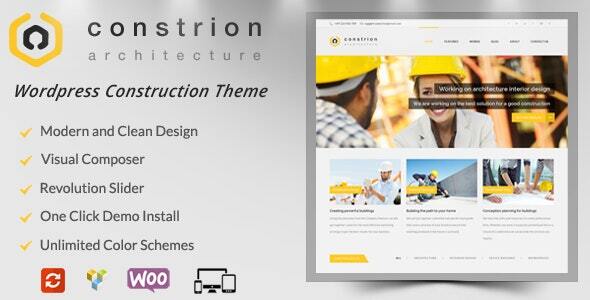


Constrion - Construction and Builder WordPress Theme is a premium WordPress theme designed specifically for construction, building, architecture, and engineering businesses. It offers a clean, modern, and professional design, aimed at helping companies in the construction industry showcase their services, projects, and expertise online. The theme is built with a user-friendly interface, making it easy for both beginners and experienced users to create a stunning website.
Key Features of Constrion - Construction and Builder WordPress Theme:
- Modern, Professional Design:
- Constrion is designed with a sleek and professional layout, emphasizing construction and building-related services. The design features large, attention-grabbing images, bold typography, and clean, structured layouts to appeal to both business owners and potential clients.
- Pre-Built Demo Content:
- The theme comes with pre-built demo websites that can be imported with one click. These demos are specifically designed for construction businesses, architectural firms, contractors, and other related industries. It allows you to quickly set up a website by importing the demo content and customizing it to your needs.
- Fully Responsive:
- Constrion is fully responsive, meaning it adapts seamlessly to all devices, including desktops, tablets, and smartphones. This ensures your website looks great on any screen size, providing an optimal browsing experience for visitors.
- Customizable Page Builder:
- The theme is compatible with WPBakery Page Builder (formerly Visual Composer), which allows you to create custom layouts using a drag-and-drop interface. You don’t need any coding knowledge to build and design your pages, making it ideal for beginners and experienced developers alike.
- One-Click Demo Import:
- With the one-click demo import feature, you can quickly replicate the demo site to kickstart your website setup. This saves you time and effort in creating the layout, and all content (images, text, and pages) is included in the demo import.
- Construction-Specific Design Elements:
- The theme is tailored for the construction industry with relevant design elements like service showcase sections, team profiles, project galleries, and testimonials. These features make it easy to display your construction services, past projects, and client feedback.
- Project Showcase & Portfolio:
- Constrion comes with a portfolio and project showcase feature, allowing you to display your previous work and highlight successful projects. This is especially important for construction companies that want to display their completed projects and attract new clients.
- Service and Pricing Tables:
- The theme includes predefined service and pricing table templates, which allow you to highlight your services and pricing plans. This is essential for informing potential clients about the services you offer and helping them make informed decisions.
- SEO Optimized:
- Constrion is built with SEO best practices in mind, ensuring that your website has a solid foundation for higher search engine rankings. Clean, optimized code and fast page load speeds contribute to better SEO performance.
- WooCommerce Support:
- Constrion is compatible with WooCommerce, so you can set up an online store to sell construction-related products, tools, or merchandise. You can manage your products, process payments, and track orders easily through the WooCommerce system.
- Custom Widgets:
- The theme includes various custom widgets such as a recent posts widget, client testimonials, contact form, social media icons, and more. These widgets allow you to add dynamic content to your website without having to code.
- Unlimited Colors and Fonts:
- With advanced color options and Google Fonts integration, you can easily customize the color scheme and typography to match your brand’s identity.
- Contact Forms and Lead Generation:
- Constrion includes built-in contact forms and call-to-action (CTA) buttons, making it easy to generate leads and allow customers to get in touch with you. The theme is compatible with popular form plugins like Contact Form 7.
- Advanced Theme Options Panel:
- The theme comes with an advanced theme options panel that lets you control various aspects of your website, such as logo placement, footer settings, typography, and more. This enables you to customize your website to your exact specifications without touching the code.
- Retina Ready:
- Constrion is retina-ready, meaning that it looks sharp and clear on high-resolution screens, providing a great user experience for visitors with modern devices.
- Regular Updates and Support:
- The theme is regularly updated to ensure compatibility with the latest version of WordPress and plugins. Additionally, premium support is available for troubleshooting any issues you may face during setup or customization.
- Multilingual and RTL Support:
- Constrion is compatible with WPML (WordPress Multilingual Plugin), allowing you to create a multilingual website. The theme also supports Right-to-Left (RTL) languages, making it suitable for global audiences.
Ideal Use Cases for Constrion - Construction and Builder WordPress Theme:
- Construction Companies: Showcase your services, projects, and team members to attract potential clients.
- Architectural Firms: Highlight your designs and previous projects to potential clients in the construction and real estate sectors.
- Contractors: Perfect for general contractors who want a professional, easy-to-use website to promote their services.
- Engineering Firms: Suitable for structural engineers, civil engineers, and other engineering professionals looking to create a strong online presence.
- Interior Designers: Ideal for companies offering design and construction services, allowing you to display your portfolio and services.
- Real Estate Developers: Great for companies involved in property development who want to display their completed construction projects.
How to Set Up Constrion - Construction and Builder WordPress Theme:
1. Install the Theme:
- Go to your WordPress dashboard, navigate to Appearance > Themes, and click Add New.
- Upload the Constrion theme zip file and click Install Now. Once installed, click Activate.
2. Import Demo Content:
- After activating the theme, go to Appearance > Import Demo Data and choose the demo you wish to import.
- One-click import will populate your website with demo content, making it easier to get started.
3. Customize Your Website:
- Go to Appearance > Customize to modify settings like site identity (logo, tagline), colors, typography, and layout.
- Use the WPBakery Page Builder to drag and drop elements and customize your pages.
4. Set Up Your Services and Portfolio:
- Add your services and showcase your projects in the portfolio section to demonstrate your expertise.
- Use the service and pricing tables to display your offerings clearly.
5. Install Plugins:
- To extend the functionality, install recommended plugins such as Contact Form 7, WooCommerce (if you plan to sell products), and any additional plugins for SEO or social sharing.
6. Test and Launch:
- Before going live, thoroughly test your website to ensure everything is functioning properly.
- Once satisfied, launch your website to attract clients and showcase your business.






























