
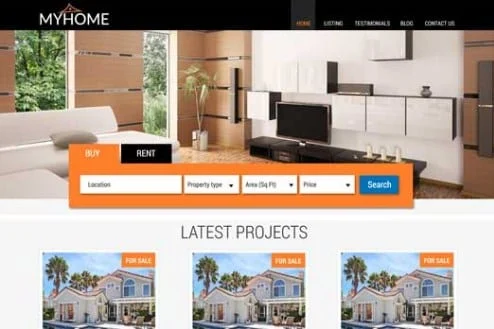

CyberChimps MyHome WordPress Theme is a flexible and feature-rich WordPress theme designed specifically for real estate businesses, agencies, and property listings. It provides a range of customization options and tools to help you create a professional, attractive, and functional real estate website. Whether you're building a real estate agency website, a property listing platform, or a blog focused on housing and real estate, the MyHome theme provides the essential features to make your website stand out.
Key Features of CyberChimps MyHome WordPress Theme:
- Real Estate Specific Features:
- MyHome is built specifically for the real estate industry, offering features such as property listings, advanced search options, property filters, and more. It makes it easy for users to browse and search for properties based on their preferences.
- Property Listings:
- The theme allows you to easily create property listings with important details such as price, location, square footage, number of rooms, and more. It offers custom fields to add specific property information, making it easy to manage a wide variety of property types.
- Advanced Property Search:
- MyHome comes with an advanced search feature that allows visitors to filter properties based on different criteria such as location, price range, number of bedrooms, property type, and other attributes.
- This helps users find properties quickly and efficiently, improving the overall user experience.
- Multiple Demo Layouts:
- MyHome offers several pre-designed demo layouts that you can import with a single click. These demos cover different types of real estate websites, including ones for real estate agencies, rental properties, or property listings. This saves time and provides a quick starting point for your site.
- Drag-and-Drop Page Builder (Elementor Compatibility):
- The theme is compatible with Elementor, a popular drag-and-drop page builder plugin, allowing you to create custom pages easily without needing coding skills. You can design pages from scratch or modify existing layouts with a visual editor.
- Customizable Header and Footer:
- The theme provides flexible header and footer options, enabling you to customize these sections based on your needs. You can choose from various header styles and include widgets, contact information, social media links, and more in your footer.
- Property Comparison:
- The theme includes a property comparison feature, which allows users to compare multiple properties side-by-side. This helps visitors make informed decisions when choosing properties that meet their criteria.
- Property Favorites:
- Users can save their favorite properties to a personalized list. This feature is beneficial for potential buyers or renters who want to keep track of the properties they are interested in.
- Agent and Agency Profiles:
- MyHome lets you create detailed agent and agency profiles, which can include contact information, social media links, and listings managed by the agent. This feature helps build trust and makes it easier for visitors to connect with agents.
- Google Maps Integration:
- The theme is integrated with Google Maps, so you can display the locations of properties on a map. This adds convenience for users and allows them to visualize property locations in relation to their surroundings.
- SEO Optimized:
- MyHome is built with SEO in mind. The theme's code is optimized to ensure your real estate site ranks well on search engines. It also supports popular SEO plugins like Yoast SEO, allowing you to fine-tune your content for better visibility.
- Responsive Design:
- The theme is fully responsive, meaning it looks great on any device, including smartphones and tablets. This ensures that your real estate website will provide an excellent user experience for visitors, no matter what device they use.
- Integration with IDX/MLS:
- MyHome supports integration with IDX/MLS (Internet Data Exchange/Multiple Listing Service) to display real estate listings directly from MLS databases. This is an essential feature for real estate agents who want to sync their site with industry-standard listing services.
- User Registration and Login:
- The theme includes user registration and login functionality, allowing users to create accounts to manage their property listings, save favorites, and more. This feature enhances the interactivity of the site and provides a more personalized experience.
- Custom Widgets:
- MyHome comes with a variety of custom widgets, such as recent properties, popular properties, featured agents, and property categories. These widgets can be added to different areas of your site, helping to display relevant content in an organized manner.
- Blog and Content Management:
- In addition to real estate features, MyHome supports a blog section where you can share industry news, tips, guides, and other content related to real estate. This helps keep your site fresh and engaging for visitors.
- Multilingual and RTL Support:
- MyHome is translation-ready and supports RTL (right-to-left) languages. This is important for real estate websites targeting audiences in different regions or speaking different languages.
- Regular Updates and Support:
- CyberChimps offers regular updates for the MyHome theme, ensuring compatibility with the latest version of WordPress. They also provide support to help with any issues or questions you may have regarding theme setup or functionality.
How to Use the CyberChimps MyHome WordPress Theme:
- Install the Theme:
- After purchasing and downloading the theme, go to your WordPress dashboard. Navigate to Appearance > Themes > Add New, upload the theme file, and activate it.
- Import Demo Content (Optional):
- You can import the demo content with a single click to get your website up and running quickly. This will import property listings, pages, and posts in the layout style you choose, which you can then customize.
- Customize Your Site with Elementor:
- Use the Elementor page builder to customize the theme's pages. You can drag and drop elements like images, text blocks, and forms to create your own layouts or modify existing pages.
- Add Property Listings:
- Start adding properties by navigating to the Properties section in the WordPress dashboard. You can input all the details about the property, such as price, location, size, and more. Add images, maps, and virtual tours to enhance your listings.
- Configure Advanced Search and Filters:
- Set up the advanced search filters for properties, allowing users to search based on specific criteria like price range, location, and property type. This will make your site more user-friendly and help visitors find properties quickly.
- Create Agent and Agency Profiles:
- If you have multiple agents, create profiles for each one, where you can add their contact information and a list of properties they manage. This can help visitors find the right agent for their needs.
- Integrate with IDX/MLS (Optional):
- If you need to integrate your site with MLS or IDX data feeds, install the relevant plugin or use custom integration methods to display real-time listings from MLS.
- Optimize for SEO:
- Use the built-in SEO features or install an SEO plugin like Yoast SEO to optimize your real estate website for search engines. Make sure to include proper meta descriptions, titles, and keywords in each listing.
- Test Your Website:
- Test the functionality of your website across different devices and browsers to ensure that everything works smoothly, especially the property search, map integration, and mobile responsiveness.
Benefits of Using the CyberChimps MyHome WordPress Theme:
- Tailored for Real Estate: Designed specifically for real estate businesses with all the essential features for property listings, searches, and agent profiles.
- Customization Flexibility: With Elementor compatibility, you can easily build and design custom pages to suit your brand and business needs.
- User-Friendly Interface: Offers a clean, easy-to-use interface for both website owners and visitors, improving the overall experience.
- Responsive and Mobile-Friendly: Your site will look great on any device, ensuring an optimal experience for users on smartphones and tablets.
- Advanced Search and Filtering: Users can find properties quickly with advanced search options and filters.
- SEO and Performance Optimized: Helps you create an SEO-friendly site that performs well in search engines, leading to higher traffic and more leads.





![Booknetic - Appointment Booking & Appointment Scheduling & Calendar reservation [SaaS]](https://gplpixel.com/wp-content/uploads/2024/06/Booknetic-Appointment-Booking-Appointment-Scheduling-Calendar-reservation-SaaS-400x203.jpg)
























