
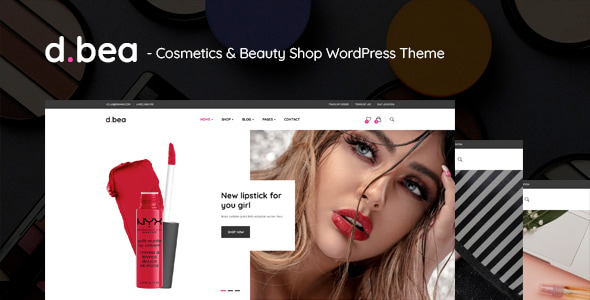


DBea – Cosmetics & Beauty Shop WordPress Theme is a beautifully designed, versatile theme tailored specifically for beauty, cosmetics, skincare, and wellness businesses. Whether you own a beauty shop, a skincare brand, or a cosmetics store, DBea provides everything you need to create a stunning, functional, and user-friendly website that resonates with your audience.
Key Features of DBea – Cosmetics & Beauty Shop WordPress Theme:
1. Fully Responsive Design:
- DBea is responsive, meaning your website will look great on all devices—desktops, tablets, and smartphones. This ensures a seamless user experience for visitors, regardless of the device they’re using.
- The theme is designed to adapt to various screen sizes, providing a mobile-friendly experience which is crucial as a significant amount of online shopping and browsing happens on mobile devices.
2. Pre-designed Demo Content:
- The theme comes with multiple pre-designed demo layouts that you can easily import with just one click. These demos are designed to cater to the beauty and cosmetics industry, with stylish and functional layouts.
- Demo content includes homepage templates, product pages, about pages, blog sections, and contact pages, providing a strong foundation for your site.
3. WooCommerce Integration:
- DBea is fully compatible with WooCommerce, the most popular WordPress plugin for creating online stores. This allows you to easily set up an online beauty shop where you can sell cosmetics, skincare products, beauty accessories, and more.
- WooCommerce integration includes product pages, shopping cart, checkout process, payment gateways, and inventory management, offering a complete e-commerce solution.
4. Beautiful Product Pages:
- DBea features beautifully designed product pages, perfect for showcasing your cosmetics and beauty products in an elegant and professional way. You can display high-quality images, product descriptions, pricing, and customer reviews.
- The product page design allows you to highlight product features, ingredients, sizes, and other essential details that shoppers look for when purchasing beauty products.
5. Drag-and-Drop Page Builder (Elementor):
- DBea works seamlessly with Elementor, a powerful drag-and-drop page builder plugin. Elementor allows you to design custom layouts and pages for your site without needing coding skills.
- With Elementor widgets and content blocks, you can add text, images, buttons, and other elements to create a unique and personalized design for your beauty website.
6. SEO Optimized:
- The theme is built with SEO best practices in mind, ensuring that your website is optimized for search engines. It includes clean, semantic code, optimized image sizes, and a structure that’s easy for search engines like Google to index.
- You can further enhance your site’s SEO using popular plugins like Yoast SEO or Rank Math to optimize metadata, titles, and descriptions for better search visibility.
7. Blog and Content Sharing:
- With the DBea theme, you can easily create and manage a blog section to share beauty tips, product reviews, skincare advice, and more. Blogging is an excellent way to engage with your audience, build trust, and boost your site’s SEO.
- The theme’s blog layout is visually appealing, allowing for beautiful article displays with images, quotes, and social media sharing options to increase engagement.
8. Advanced Theme Customizer:
- The theme offers a customizer that allows you to modify essential elements of your site, including colors, fonts, header styles, logo, and more, giving you full control over your website’s look.
- You can match the theme’s design with your brand’s identity by choosing from multiple color schemes, font styles, and layout options.
9. Multiple Header Styles:
- DBea comes with multiple header styles that you can choose from to fit the style of your beauty business. You can opt for a minimalistic, elegant, or bold header design based on your brand's aesthetic.
- The theme also provides options to display a logo, navigation menu, shopping cart, and other elements in different configurations.
10. Contact and Appointment Booking:
- The theme comes with a contact page template where you can add a contact form, your physical address, and social media links.
- You can also integrate appointment booking functionality, making it easy for clients to book consultations, beauty treatments, or other services directly through your website.
11. Custom Widgets:
- DBea offers several custom widgets, including:
- Recent Products: Display new or featured products in your sidebar or footer.
- Social Media Widgets: Showcase your social media feeds, such as Instagram or Facebook, directly on your website.
- Newsletter Subscription: Grow your email list by integrating a newsletter signup form.
12. Translation Ready:
- DBea is translation-ready, making it easy to translate your site into multiple languages. Whether you're targeting local or international audiences, this feature ensures that your website can be accessible to a global customer base.
- It supports RTL (Right to Left) languages, such as Arabic, if you have customers from regions that use RTL writing systems.
13. Regular Updates and Premium Support:
- When you purchase DBea – Cosmetics & Beauty Shop WordPress Theme, you gain access to regular updates. This ensures compatibility with the latest versions of WordPress and WooCommerce.
- You also get access to premium support to assist you with any technical issues, theme-related questions, or customization requests.
14. Optimized for Speed:
- The theme is optimized for fast loading times, which is essential for both user experience and SEO. A fast website improves user engagement and ensures visitors don’t leave due to slow page loading times.
- You can further improve the speed of your website using caching plugins, image optimization tools, and content delivery networks (CDNs).
How to Set Up and Use DBea – Cosmetics & Beauty Shop WordPress Theme:
1. Install the Theme:
- From your WordPress dashboard, navigate to Appearance > Themes > Add New and upload the DBea theme ZIP file.
- Click Install Now and then activate the theme.
2. Install and Activate Elementor:
- To use DBea's drag-and-drop page builder, install and activate Elementor. This will allow you to customize your website easily without needing any coding knowledge.
- You can download Elementor from the WordPress plugin repository.
3. Import Demo Content:
- After activating the theme, use the one-click demo import feature to import the demo content. This will set up your website with the same layout and content as the demo, allowing you to customize it with your own branding and products.
4. Customize Your Website:
- Access the WordPress Customizer to change site-wide settings like colors, typography, and layout options.
- Use Elementor to customize your pages. You can drag and drop widgets, add product sections, and create unique layouts for your homepage, product pages, and more.
5. Add Your Products:
- Start adding your cosmetics or beauty products using the WooCommerce integration. Create individual product pages where you can upload product images, add descriptions, set prices, and manage inventory.
- You can organize products into categories (e.g., skincare, makeup, haircare) to make it easier for customers to find what they’re looking for.
6. Set Up Blog and Content:
- Use the blog section to write articles related to your products or industry. Share beauty tips, tutorials, and product recommendations to engage your audience.
- Use social media integration to encourage visitors to follow your brand on platforms like Instagram, Facebook, or Pinterest.
7. Optimize for SEO:
- Install an SEO plugin like Yoast SEO or Rank Math to optimize your product pages, blog posts, and other content for better search engine visibility.
- Add meta descriptions, product tags, and optimized images to improve your rankings.
8. Launch Your Store:
- Once you’ve customized your website and uploaded your products, it’s time to launch your store! Promote your website through social media, email newsletters, and other marketing channels to attract customers.






























