
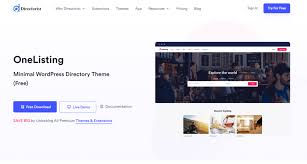

Directorist – Themes is an add-on for the Directorist plugin, which is a powerful directory listing plugin for WordPress. This add-on provides various pre-designed themes specifically created to work seamlessly with the Directorist plugin. These themes allow you to quickly and easily create a professional-looking directory website, without needing to design everything from scratch. The Directorist themes are customizable, responsive, and optimized for directories in a variety of niches, including real estate, business directories, job boards, and more.
Key Features of Directorist – Themes Add-On:
- Pre-Designed Themes for Different Niches:
- Directorist – Themes comes with several pre-designed themes tailored for different types of directories, including:
- Business Directories: Themes designed for business listings, such as local business directories or service provider directories.
- Real Estate Directories: Themes specifically designed for showcasing properties for sale or rent.
- Job Portals: Themes tailored for job listing websites with features for job seekers and employers.
- Event Directories: Themes that focus on listing events, such as conferences, festivals, or concerts.
- Restaurant Directories: Themes that allow users to list restaurants, cafes, and food-related businesses.
- Directorist – Themes comes with several pre-designed themes tailored for different types of directories, including:
- Fully Responsive Design:
- All themes included in the Directorist Themes add-on are fully responsive, ensuring that your directory website looks great and functions well on all devices, including smartphones, tablets, and desktops.
- Customizable Design:
- These themes are designed to be highly customizable. You can change colors, fonts, layouts, and other design elements to match your branding and vision for the directory website. The flexibility of customization means that you can create a unique look for your site.
- Seamless Integration with Directorist Plugin:
- The themes are built to integrate seamlessly with the Directorist plugin, ensuring that directory listings and features, such as pricing plans, reviews, ratings, and search filters, are displayed correctly and work without issues.
- User-Friendly Setup:
- The Directorist – Themes add-on is easy to set up. With just a few clicks, you can install and activate the theme of your choice, then start customizing it using the WordPress Customizer or built-in options. You don’t need any coding knowledge to create a professional-looking directory site.
- Fast Loading Speed:
- The themes are optimized for fast loading times. With lightweight design and optimized images, your website will load quickly, providing a smooth and pleasant experience for users.
- SEO Optimization:
- The themes are built with SEO best practices in mind, ensuring that your directory website is optimized for search engines. This includes clean, semantic code, optimized image sizes, and fast loading times, all of which help your site rank higher in search engine results.
- Advanced Search and Filtering:
- Directorist themes come with advanced search and filtering options, making it easy for users to find listings based on specific criteria (e.g., location, price, category, etc.). This improves the user experience and helps visitors quickly find what they’re looking for.
- Ready-to-Use Demo Content:
- Each theme comes with demo content that can be imported with a single click. This gives you a quick start by setting up the basic structure of the directory site, including placeholder content, images, and listings, which you can later replace with your own content.
- Highly Compatible with Page Builders:
- Directorist themes are compatible with popular WordPress page builders like Elementor, WPBakery Page Builder, and others. This provides even more flexibility when designing your site, as you can easily drag and drop elements to build custom pages.
- Multiple Listing Layouts:
- The themes support multiple listing layouts, allowing you to choose how your directory listings will appear. You can display listings in a grid view, list view, or even a map-based view depending on the theme and the specific needs of your directory.
- Demo Import and One-Click Installation:
- You can import demo content and setup your site in just a few clicks using the one-click import feature. This allows you to quickly get started with a pre-configured theme, making the setup process much easier and faster.
- Theme Updates:
- Regular theme updates are provided to ensure compatibility with the latest version of WordPress and the Directorist plugin, as well as to introduce new features, security fixes, and performance improvements.
Benefits of Using Directorist – Themes:
- Quick Setup:
- With the pre-designed themes and demo content, setting up your directory website is quick and easy. You can have a professional-looking website up and running in no time, saving you both time and effort.
- Professional Design:
- The themes are designed by professionals, ensuring that your directory website will look visually appealing and modern, without requiring you to hire a designer or spend hours customizing the design from scratch.
- Optimized for User Experience:
- The themes are built with user experience in mind, offering intuitive navigation, well-organized layouts, and fast load times. This helps improve engagement and conversion rates on your site.
- Flexibility and Customization:
- Even though the themes come with pre-built designs, you have full control over the customization. Whether you want to change the colors, fonts, or layout, the Directorist – Themes add-on offers flexibility to match your site to your unique style.
- SEO-Friendly:
- The themes are SEO-optimized, which helps your directory website rank higher in search engines, driving more organic traffic to your site. The built-in SEO features help improve visibility and reach.
- Improved Monetization:
- By using professional, customizable themes, you can create a directory that attracts more users and listings. This can increase your chances of monetizing your site effectively, whether through paid listings, advertising, or subscription plans.
- Mobile-Optimized:
- With more users accessing the internet via mobile devices, the responsive design ensures your directory website looks and functions perfectly on any screen size, providing a seamless experience for all users.
- Increase Conversion Rates:
- A clean, visually appealing, and easy-to-navigate directory increases the chances that visitors will stay on your site longer and complete actions such as contacting listing owners, submitting listings, or making bookings/purchases.
Ideal Use Cases for Directorist – Themes:
- Business Directory:
- If you are running a directory for businesses, services, or professionals, you can use a business directory theme to showcase listings in an organized and appealing way. Examples include directories for restaurants, contractors, or consultants.
- Real Estate Directory:
- Real estate websites can benefit from Directorist themes designed specifically for property listings. Themes for real estate directories allow you to showcase properties, search filters, and advanced map-based listings.
- Job Listing Website:
- Job boards can take advantage of the themes designed for job listings, which include features like job search filters, resume uploads, and employer profiles.
- Event Listings:
- If you're running an event directory, you can use a theme tailored to event listings, with features like event calendars, booking options, and detailed event pages.
- Restaurant Directories:
- Restaurants and cafes can use themes designed for food-related businesses, with the ability to showcase menus, user reviews, photos, and contact details.
- Portfolio and Freelancer Directories:
- Freelancers and agencies can use Directorist themes to create an online portfolio directory, where they can list services, showcase projects, and attract clients.
How to Set Up Directorist – Themes:
- Install Directorist Plugin: Ensure you have the Directorist plugin installed and activated on your WordPress website.
- Install Directorist Themes Add-On: Purchase the Directorist – Themes add-on, and install it on your website by uploading it through the WordPress plugin dashboard.
- Activate the Theme: After installation, go to the Appearance > Themes section in your WordPress admin and activate the theme that fits your directory.
- Import Demo Content: Use the one-click demo import feature to quickly set up your site with pre-designed demo content.
- Customize Your Site: Use the WordPress Customizer or page builder tools to personalize the theme, update branding, colors, and layout, and configure any theme-specific settings.
- Add Listings: Once the theme is set up, you can start adding your directory listings, configuring any additional features, and publishing your site.






![Booknetic - Appointment Booking & Appointment Scheduling & Calendar reservation [SaaS]](https://gplpixel.com/wp-content/uploads/2024/06/Booknetic-Appointment-Booking-Appointment-Scheduling-Calendar-reservation-SaaS-400x203.jpg)























