Premium Category Products
DocScan – A mini and Powerful mobile scanner for Android
✨ Latest Version
- Safety, Guarantees Files
- Malware-Free (Clean) Files
- License: GPL Preactivated
- Unlimited Site & Domain Usage
DocScan - A Mini and Powerful Mobile Scanner for Android
Live Demo: DocScan - A mini and Powerful mobile scanner for Android Live Demo
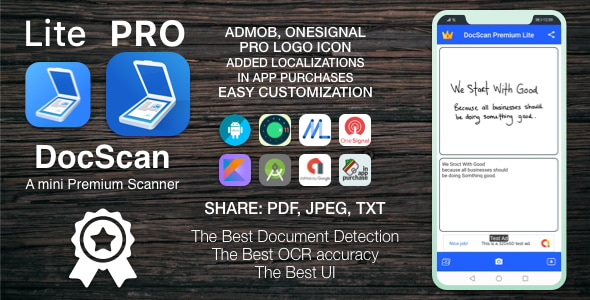
DocScan is a mobile application designed for Android devices that enables users to scan, digitize, and manage documents efficiently. With its powerful features and user-friendly interface, DocScan serves as a handy tool for students, professionals, and anyone needing to quickly capture and organize documents on the go.
Product Overview
DocScan aims to simplify the document scanning process, making it accessible to everyone regardless of their technical expertise. The app leverages the capabilities of your Android device's camera to capture high-resolution images of documents, transforming physical papers into digital files that can be easily stored, shared, and edited.
Document Scanning
DocScan's core functionality revolves around its robust document scanning capabilities.
- High-Quality Scans: The app utilizes your device's camera to capture high-resolution images of documents, ensuring clarity and detail in the resulting digital files.
- Auto-Edge Detection: DocScan automatically detects the edges of documents for precise cropping and framing, eliminating the need for manual adjustments and enhancing the scanning experience.
File Management
Beyond capturing scans, DocScan provides comprehensive file management features to keep your documents organized and easily accessible.
- Multi-Page Scanning: Users can scan multiple pages in a single document, creating comprehensive PDF or image files. This feature is particularly useful for capturing multi-page reports, contracts, or books.
- Organize Files: DocScan offers options to categorize and tag scanned documents for easy retrieval, along with a search functionality to quickly locate specific files.
Editing and Enhancement
DocScan empowers users to refine their scanned documents with various editing and enhancement tools.
- Image Enhancements: Features to adjust brightness, contrast, and apply filters allow users to improve the quality of scanned documents, making them clearer and more readable.
- Annotation Tools: Users can annotate scans with text, highlights, or drawings, making it easy to mark important information, add notes, or create visual cues within the documents.
Sharing and Exporting
Sharing and exporting scanned documents is seamless with DocScan's versatile options.
- Multiple File Formats: Users can export scanned documents in various formats, including PDF, JPEG, or PNG, ensuring compatibility with different applications and devices.
- Cloud Integration: Options to directly upload scanned files to popular cloud storage services like Google Drive or Dropbox enable easy access, backup, and collaboration on documents.
Visual and Audio Design
DocScan prioritizes a user-friendly experience through its intuitive design and visual cues.
- User Interface (UI): A clean and intuitive design simplifies the scanning process, making it accessible for users of all technical levels. The app's layout is organized logically, guiding users through each step seamlessly.
- Visual Feedback: Animations and visual cues provide clear feedback during the scanning and editing processes, enhancing user understanding and engagement.
Development Considerations
The development of DocScan involves several key considerations to ensure its functionality, performance, and security.
- Technology Stack: DocScan is built using native Android development tools (Java or Kotlin) for optimal performance and compatibility with a wide range of Android devices. The app leverages Android's camera APIs to enable seamless document capture and processing.
- Backend Infrastructure: A robust backend infrastructure is crucial for managing user data, file storage, and app functionality. DocScan implements local and cloud storage solutions to securely manage scanned documents. User preferences and data are handled with strict security measures to protect user privacy.
Monetization Strategies
DocScan employs a freemium model to make its core features accessible to a broad audience while offering premium features for users seeking advanced functionalities.
- Freemium Model: The app is offered for free with essential features, providing users with a taste of its capabilities. Premium upgrades unlock advanced functionalities like OCR (Optical Character Recognition), allowing users to search within scanned documents, and increased cloud storage capacity for storing and managing files.
- In-App Purchases: Users can purchase additional features, such as advanced editing tools, enhanced cloud storage integration, or specialized document formatting options, through in-app purchases.
Testing and Quality Assurance
Rigorous testing and quality assurance are essential to ensure the app's functionality, performance, and user satisfaction.
- User Testing: DocScan undergoes extensive user testing with real users to identify any issues with the scanning process, file management, and user interface. User feedback is invaluable in refining the app and addressing any potential usability concerns.
- Performance Optimization: The app is optimized to perform efficiently across a range of devices, including low-end smartphones, ensuring a smooth and responsive user experience.
Marketing and Community Engagement
Effective marketing and community engagement are crucial for app visibility and user growth.
- Launch Strategy: DocScan is promoted through various channels, including social media, tech blogs, and educational platforms, to reach a wide audience of potential users.
- User Support and Feedback: Dedicated channels for user support and feedback are established to address issues promptly and gather insights from users. This ongoing interaction fosters a sense of community and encourages user loyalty.
Category: Mobile App
(Only For Premium Category Products !)
1. All digital products are the most recent version, with no possibility of free updates. After payment, you can request an update to the most recent version for 5 days if a new version is released. We free support within 5 days.
2. If a license is required (Excludes WHMCS license , we provide only method not license), please contact us via email or ticket for assistance with activation. Our license is only valid for activation and does not include support.
3. We provide Mobile, PHP script installation services for $19.90 / ₹1700. Please create a backup after installation as we do not support re-installation. For mobile app source code, we do not offer installation services.
4. If you have any questions, please contact us by email [email protected] or create a ticket on this page
5. Please note that any digital products presented on the website do not contain malicious code, viruses or advertising. You will receive the original files from the developers. We do not sell any products that have been downloaded from other websites.
6. The response time can last up to 6 hours.
(Only For Membership Category Products !)
Benefits of our Membership Plans
- Instant access to all plugins and all themes including all future releases
- Unlimited domain usage
- Regular Updates as of when available. Usually, updates are released daily.
- Before purchasing, please read the Terms and Conditions & Refund Policy.
- If you have any questions, please first read the FAQs.
- If you haven’t found the answer to your question, please contact us, and we will respond ASAP.
- Please note that any digital products on the website do not contain malicious code, viruses, or advertising. We buy the original files from the developers. We do not sell any products downloaded from other sites.
- Buy or download for FREE by subscribing to our VIP Membership Plan. Join the club of more than 1100+ happy members. This is the same theme as sold by the developer.
Updates:
- We offer frequent updates for one year from the date of purchase. After this period, you have to purchase the item again to receive further updates, we also offer lifetime updates as a second option.
- We regularly update products as soon as we are notified about an update, we go and download it from the author and update it on our site, but In case the current version of the product is not the latest, You can request an update for the product by contact form.
- We send regular emails advising when products have been updated so please be sure to provide an active email address when you sign up.
Support:
- Our support team is available 24/7, if you have any questions or need help in installing or configuring digital products purchased on the website, please don’t hesitate to contact form.
- Please note that we are not developers of the provided products, so our technical support capabilities are limited. We do not change product functionality and do not fix developer bugs.
(Only For WHMCS Category Products !)
- We Only provide WHMCS Module, how you can nulled any module step only !
- Instant access to all plugins and all themes
- Unlimited domain usage
- Regular Updates as of when available. Usually, updates are released daily.
- Before purchasing, please read the Terms and Conditions & Refund Policy.
- If you have any questions, please first read the FAQs.
- If you haven’t found the answer to your question, please contact us, and we will respond ASAP.
- Please note that any digital products on the website do not contain malicious code, viruses, or advertising. We buy the original files from the developers. We do not sell any products downloaded from other sites.

Full Ionic 5 Mobile App for WordPress – Admob, Analytics, Rewards ads, Cloudflare – Hala News Pro
Rs5,727.00Original price was: Rs5,727.00.Rs249.00Current price is: Rs249.00.