Premium Category Products

DocuScan – iOS Document Scanner & PDF Manager with OCR | SwiftUI App

DocuScan – iOS Document Scanner & PDF Manager with OCR | SwiftUI App

DocuScan - iOS Document Scanner & PDF Manager with OCR | SwiftUI App

Live Demo: DocuScan - iOS Document Scanner & PDF Manager with OCR | SwiftUI App Live Demo

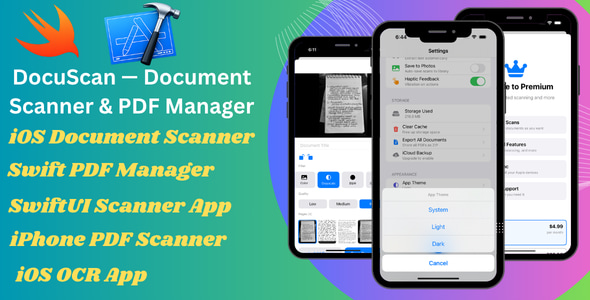
DocuScan AI is a powerful and production-ready iOS document scanner and PDF manager built entirely with native Swift and SwiftUI. It empowers users to scan documents, apply filters, extract text using on-device OCR, organize files, and manage PDFs - all without relying on any third-party libraries or backend services.

This DocuScan template is meticulously designed for developers, agencies, and entrepreneurs seeking to rapidly launch a modern document scanner app on the App Store. It offers clean code, smooth performance, and straightforward customization options.

Product Overview

DocuScan AI provides a comprehensive suite of features to transform your device into a versatile document management tool. Its intuitive interface and powerful capabilities make it ideal for capturing, processing, and organizing documents on the go.

Modern Design and User Experience

Built with SwiftUI, DocuScan boasts a sleek and modern user interface that seamlessly blends with the latest iOS design principles. The app is highly responsive, ensuring a smooth and enjoyable user experience across various iOS devices. Its intuitive navigation and clear visual cues make it easy for users to find what they need quickly.

Main Features and Capabilities

  • Multi-Page Document Scanning: Capture multiple pages of a document with ease, automatically detecting edges for precise scanning.
  • Advanced Scan Filters: Choose from four scan filters - Color, Grayscale, Black & White, and Enhanced - to optimize your scans based on document type and lighting conditions.
  • Image Import: Import existing images from your device's photo library directly into DocuScan for easy processing and organization.
  • Document Management: Rotate, delete, and rearrange pages before saving your document.
  • High-Quality PDF Generation: Generate high-resolution PDFs (up to 300 DPI) for professional-looking output.

PDF Viewer & Management

  • Built-in PDF Viewer: Navigate through your PDFs with ease using the intuitive built-in viewer, featuring smooth page transitions and zoom functionality.
  • Annotation Tools: Highlight, draw, and add text annotations directly to your PDFs, enhancing collaboration and document comprehension.
  • Annotation Saving: Your annotations are automatically saved within the PDF file for future reference.
  • Sharing and Export Options: Easily share your PDFs via email, messaging apps, or cloud storage.
  • Document Organization: Create custom folders and tags to categorize your documents for efficient retrieval.
  • Smart Filters: Quickly filter your documents by All, Favorites, or Recent.

OCR Text Recognition

  • On-Device OCR: Utilize Apple's Vision framework for on-device text recognition, eliminating the need for internet connectivity or API keys.
  • Multilingual Support: DocuScan supports over 60 languages, enabling global document processing capabilities.
  • Instant Search: Perform full-text search across your scanned documents for quick and precise information retrieval.
  • Text Sharing: Easily copy and share extracted text for further use in other apps.

Document Organization

  • Custom Folders and Tags: Create custom folders and tags to categorize your documents based on type, project, or importance.
  • Smart Filters: Utilize smart filters to quickly navigate through your documents based on criteria such as All, Favorites, or Recent.
  • Sorting Options: Sort your documents by date, name, size, or number of pages for organized access.
  • Batch Selection: Select multiple documents for simultaneous operations, such as deletion or sharing.
  • Quick Actions: Use swipe gestures for intuitive document management actions.

Authentication

  • Sign in with Apple: Integrate seamlessly with Apple's Sign in with Apple service for secure user authentication.
  • Guest Mode: Allow users to access basic functionalities without creating an account.
  • User Profile Management: Create and manage user profiles for personalized document access and settings.
  • Secure Authentication: Utilize Apple's secure authentication frameworks to protect user data.

Premium Features

  • Subscription System: Implement a subscription model with StoreKit 2 to offer premium features and content.
  • Free Tier Limitations: Define limitations for the free tier to encourage users to upgrade to premium.
  • Restore Purchases: Allow users to restore their previous purchases seamlessly.
  • Product ID Configuration: Easily configure your product IDs for seamless integration with the App Store.

User Experience

  • Modern SwiftUI Design: Enjoy a visually appealing and modern user interface powered by SwiftUI.
  • Light and Dark Mode Support: Customize the app's appearance to match your preferred display mode.
  • iPhone and iPad Compatibility: Access DocuScan's features on both iPhone and iPad devices for versatile usage.
  • Accessibility Support: The app incorporates Dynamic Type and VoiceOver support to ensure accessibility for all users.
  • Clean and Responsive UI: Experience a clutter-free and responsive user interface designed for optimal usability.

Technology Stack

  • Swift 5.10: Leverage the latest version of Swift for efficient and modern development.
  • SwiftUI (iOS 17+): Build dynamic and interactive user interfaces with SwiftUI's declarative syntax.
  • SwiftData for Local Storage: Utilize SwiftData for efficient and secure local data storage.
  • VisionKit (document scanning): Integrate Apple's VisionKit framework for seamless document scanning functionality.
  • Vision Framework (OCR): Leverage Apple's Vision Framework for powerful on-device OCR capabilities.
  • PDFKit (PDF handling): Utilize PDFKit for comprehensive PDF manipulation and rendering.
  • Core Image (filters): Apply advanced image filters using Core Image for enhanced document processing.
  • StoreKit 2 (subscriptions): Integrate with StoreKit 2 for seamless subscription management.
  • No Third-Party Dependencies: DocuScan relies solely on Apple's native frameworks for a robust and secure development foundation.

Requirements

  • Xcode 16 or higher: Utilize the latest Xcode version for seamless development and compatibility.
  • iOS 17.0+: Target iOS 17 and above for optimal app performance and feature utilization.
  • Apple Developer Account: Obtain an Apple Developer Account for publishing your app on the App Store.

What’s Included

  • Complete SwiftUI Source Code: Access the entire source code to modify and customize the app to your needs.
  • Organized Project Structure: Benefit from a well-structured project for easy navigation and understanding.
  • Ready-to-Use UI Components: Utilize pre-built UI components to accelerate your development process.
  • Rebranding Guide: Easily modify the app's branding elements to match your requirements.
  • Documentation for Setup and Customization: Comprehensive documentation guides you through setup, customization, and advanced features.

Easy Customization

  • App Name and Colors: Change the app name and colors from a single configuration file.
  • App Icon and Bundle ID: Update the app icon and bundle ID for unique identification.
  • Feature Modification: Modify existing features or add new functionalities to tailor the app to your specific use case.
  • Subscription Product ID Configuration: Easily integrate your subscription product IDs for seamless implementation.

Support

We are dedicated to providing exceptional support to our customers. If you encounter any issues or require assistance with setup or customization, our team is here to help.

Launch your own document scanner app quickly and efficiently with this clean, modern, and scalable iOS template.

Category: Mobile App

(Only For Premium Category Products !)

1. All digital products are the most recent version, with no possibility of free updates. After payment, you can request an update to the most recent version for 5 days if a new version is released. We free support within 5 days.

2. If a license is required (Excludes WHMCS license , we provide only method not license), please contact us via email or ticket for assistance with activation. Our license is only valid for activation and does not include support.

3. We provide Mobile, PHP script installation services for $19.90 / ₹1700. Please create a backup after installation as we do not support re-installation. For mobile app source code, we do not offer installation services.

4. If you have any questions, please contact us by email  or create a ticket on this page

5. Please note that any digital products presented on the website do not contain malicious code, viruses or advertising. You will receive the original files from the developers. We do not sell any products that have been downloaded from other websites.

6. The response time can last up to 6 hours.

(Only For Membership Category Products !)

Benefits of our Membership Plans

  • Instant access to all plugins and all themes including all future releases
  • Unlimited domain usage
  • Regular Updates as of when available. Usually, updates are released daily.
  • Before purchasing, please read the Terms and Conditions & Refund Policy.
  • If you have any questions, please first read the FAQs.
  • If you haven’t found the answer to your question, please contact us, and we will respond ASAP.
  • Please note that any digital products on the website do not contain malicious code, viruses, or advertising. We buy the original files from the developers. We do not sell any products downloaded from other sites.
  • Buy or download for FREE by subscribing to our VIP Membership Plan. Join the club of more than 1100+ happy members. This is the same theme as sold by the developer.

Updates:

  • We offer frequent updates for one year from the date of purchase. After this period, you have to purchase the item again to receive further updates, we also offer lifetime updates as a second option.
  • We regularly update products as soon as we are notified about an update, we go and download it from the author and update it on our site, but In case the current version of the product is not the latest, You can request an update for the product by contact form.
  • We send regular emails advising when products have been updated so please be sure to provide an active email address when you sign up.

Support:

  • Our support team is available 24/7, if you have any questions or need help in installing or configuring digital products purchased on the website, please don’t hesitate to contact form.
  • Please note that we are not developers of the provided products, so our technical support capabilities are limited. We do not change product functionality and do not fix developer bugs.

For more information please read FAQs & About Us.

(Only For WHMCS Category Products !)

  • We Only provide WHMCS Module, how you can  nulled any module step only !
  • Instant access to all plugins and all themes 
  • Unlimited domain usage
  • Regular Updates as of when available. Usually, updates are released daily.
  • Before purchasing, please read the Terms and Conditions & Refund Policy.
  • If you have any questions, please first read the FAQs.
  • If you haven’t found the answer to your question, please contact us, and we will respond ASAP.
  • Please note that any digital products on the website do not contain malicious code, viruses, or advertising. We buy the original files from the developers. We do not sell any products downloaded from other sites.

More Like This Products