
Premium Category Products

Dropdown Quantity for Opencart

Dropdown Quantity for Opencart

Dropdown Quantity for Opencart

Live Demo: Dropdown Quantity for Opencart Live Demo

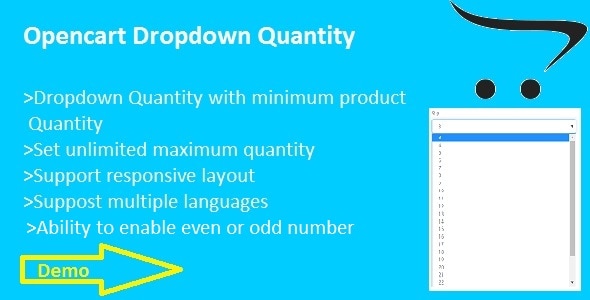
Dropdown Quantity for Opencart is a powerful OpenCart module that allows your customers to easily select product quantities using a convenient dropdown list. This module replaces the standard quantity input field with a user-friendly dropdown, enhancing the checkout experience and simplifying the ordering process for your customers.

Product Overview

The Dropdown Quantity for Opencart module offers a modern and intuitive way to manage product quantities on your store. It eliminates the need for customers to manually type in quantities, reducing the chance of errors and streamlining the checkout process. The module automatically detects the minimum product quantity and sets the dropdown accordingly, ensuring that customers can only select valid quantities.

Main Features and Capabilities

  • User-Friendly Dropdown Interface: Replace the default quantity input field with a visually appealing and easy-to-use dropdown menu. This simplifies the ordering process for customers and enhances the overall shopping experience.

  • Customizable Quantity Limits: Set a maximum number of quantities that can be selected from the dropdown. This allows you to control the number of products that customers can order at once, preventing accidental over-ordering.

  • Automatic Minimum Quantity Detection: The module automatically detects the minimum product quantity and sets the dropdown starting point accordingly. This ensures that customers can only select valid quantities, preventing them from ordering less than the available stock.

  • Even/Odd Quantity Selection: Choose to display even or odd numbers in the dropdown list. This allows you to tailor the quantity options to your specific product offerings and preferences.

  • Standard Design View: The module seamlessly integrates with the standard OpenCart design, ensuring a consistent and cohesive look and feel across your store.

Installation and Setup Guide

  • For OpenCart 2.0.x, 2.1.x, 2.2.0.x:

    1. Extract the "dropdownquantity.zip" file in your local folder.
    2. In your OpenCart admin panel, navigate to Extensions > Extension Installer > Click Upload and select the "for-2.0.x-2.2.x.ocmod.zip" file (inside "dropdownquantity.zip").
    3. Click the "Install" button.
    4. To enable the module and set the maximum quantity, go to Extensions > Modules > Choose "Quantity Dropdown" > Click "Edit" button, fill the fields, and click "Save."
    5. In your OpenCart admin panel, go to Extensions > Modifications > Click "Refresh" button.
  • For OpenCart 1.5.6.x:

    1. First, install the vQmod extension if you haven't already (visit www.vQmod.com for more information).
    2. Extract the "dropdownquantity.zip" file in your local folder.
    3. Go to your OpenCart root folder and extract the "for-1.5.6.x.zip" file (found in "dropdownquantity.zip").
    4. Go to your site admin panel and navigate to Extensions > Modules > Click "Quantity Dropdown" > Install.
    5. After installation, go to "Quantity Dropdown" > Edit button > Enable the module and fill the required fields.

Ideal Use Cases

This module is ideal for any OpenCart store that wants to:

  • Enhance the user experience by simplifying the quantity selection process.
  • Reduce the risk of order errors by eliminating manual quantity input.
  • Control the maximum quantity that customers can order for each product.
  • Offer a more visually appealing and modern checkout experience.

Who Should Use This Product?

This product is perfect for:

  • OpenCart store owners who want to improve the checkout experience for their customers.
  • Businesses that sell products with varying quantities or limited stock.
  • E-commerce stores looking to enhance the visual appeal and usability of their checkout pages.

Category: Plugins

(Only For Premium Category Products !)

1. All digital products are the most recent version, with no possibility of free updates. After payment, you can request an update to the most recent version for 5 days if a new version is released. We free support within 5 days.

2. If a license is required (Excludes WHMCS license , we provide only method not license), please contact us via email or ticket for assistance with activation. Our license is only valid for activation and does not include support.

3. We provide Mobile, PHP script installation services for $19.90 / ₹1700. Please create a backup after installation as we do not support re-installation. For mobile app source code, we do not offer installation services.

4. If you have any questions, please contact us by email  or create a ticket on this page

5. Please note that any digital products presented on the website do not contain malicious code, viruses or advertising. You will receive the original files from the developers. We do not sell any products that have been downloaded from other websites.

6. The response time can last up to 6 hours.

(Only For Membership Category Products !)

Benefits of our Membership Plans

  • Instant access to all plugins and all themes including all future releases
  • Unlimited domain usage
  • Regular Updates as of when available. Usually, updates are released daily.
  • Before purchasing, please read the Terms and Conditions & Refund Policy.
  • If you have any questions, please first read the FAQs.
  • If you haven’t found the answer to your question, please contact us, and we will respond ASAP.
  • Please note that any digital products on the website do not contain malicious code, viruses, or advertising. We buy the original files from the developers. We do not sell any products downloaded from other sites.
  • Buy or download for FREE by subscribing to our VIP Membership Plan. Join the club of more than 1100+ happy members. This is the same theme as sold by the developer.

Updates:

  • We offer frequent updates for one year from the date of purchase. After this period, you have to purchase the item again to receive further updates, we also offer lifetime updates as a second option.
  • We regularly update products as soon as we are notified about an update, we go and download it from the author and update it on our site, but In case the current version of the product is not the latest, You can request an update for the product by contact form.
  • We send regular emails advising when products have been updated so please be sure to provide an active email address when you sign up.

Support:

  • Our support team is available 24/7, if you have any questions or need help in installing or configuring digital products purchased on the website, please don’t hesitate to contact form.
  • Please note that we are not developers of the provided products, so our technical support capabilities are limited. We do not change product functionality and do not fix developer bugs.

For more information please read FAQs & About Us.

(Only For WHMCS Category Products !)

  • We Only provide WHMCS Module, how you can  nulled any module step only !
  • Instant access to all plugins and all themes 
  • Unlimited domain usage
  • Regular Updates as of when available. Usually, updates are released daily.
  • Before purchasing, please read the Terms and Conditions & Refund Policy.
  • If you have any questions, please first read the FAQs.
  • If you haven’t found the answer to your question, please contact us, and we will respond ASAP.
  • Please note that any digital products on the website do not contain malicious code, viruses, or advertising. We buy the original files from the developers. We do not sell any products downloaded from other sites.

More Like This Products