
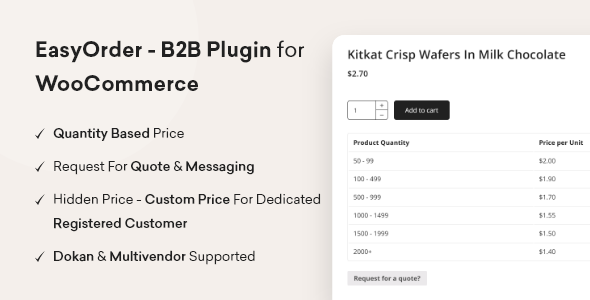


The EasyOrder BB Plugin for WooCommerce is a plugin designed to simplify the ordering process on WooCommerce-based eCommerce websites. It helps enhance the customer experience by providing an easy-to-use, streamlined ordering interface. The plugin integrates with WooCommerce to enable users to quickly and easily place orders for products, improving overall site usability and potentially increasing conversion rates.
Key Features of EasyOrder BB Plugin for WooCommerce:
- Quick and Simple Ordering:
- Customers can place orders faster, minimizing the steps they need to take to complete a purchase.
- It simplifies the checkout process, which can reduce cart abandonment and increase sales.
- Customizable Product Selection:
- You can customize the product display, allowing customers to quickly add products to their cart and proceed with checkout.
- The plugin often includes options like displaying product variations or attributes directly on the ordering page.
- Better User Interface:
- EasyOrder BB provides a user-friendly interface, often with modal windows or a sidebar, for quicker product ordering without leaving the current page.
- It allows customers to see a preview of their cart, modify quantities, and proceed to checkout in fewer clicks.
- Integration with WooCommerce:
- The plugin integrates seamlessly with your existing WooCommerce store, ensuring all your products and orders are managed directly within WooCommerce.
- All WooCommerce features like payment gateways, shipping options, and order management are retained.
- Optimized for Mobile:
- The plugin is designed to work well on mobile devices, making it ideal for stores with a significant portion of customers shopping via smartphones and tablets.
- Customizable Order Forms:
- You can adjust the look and feel of the order forms, add custom fields, and tailor the plugin to match your website's theme and branding.
- Instant Notifications:
- When an order is placed, EasyOrder BB may send instant notifications to the store owner, and in some versions, customers may also receive confirmation notifications, helping to keep everyone in the loop.
- Product and Category Filtering:
- Depending on the plugin version, you may also get product filtering options for customers to easily navigate through large product catalogs.
How to Use the EasyOrder BB Plugin:
- Install and Activate the Plugin:
- First, you need to install the EasyOrder BB Plugin for WooCommerce on your WordPress website. You can do this by uploading the plugin ZIP file through the WordPress plugin repository or directly from a marketplace where the plugin is available.
- After installing, activate the plugin in your WordPress dashboard.
- Configure the Settings:
- After activation, go to the plugin's settings page (usually found under the WooCommerce or Settings menu) and configure your preferences.
- You can customize how the order forms are displayed, how products are added to the cart, and any other ordering-related features.
- Customize Product Display and Forms:
- Choose the products, categories, and layout that you want to use for quick order forms.
- Customize fields like product quantities, product variations, or add custom fields to gather additional info (if needed).
- Test the Ordering Process:
- Before going live, test the ordering process from a customer's perspective. Ensure that the process is smooth, products can be easily selected, and the checkout works correctly.
- Launch Your Store:
- Once everything is set up and tested, make the plugin live on your site and start receiving orders through the simplified interface.
Benefits:
- Faster Checkout: A simplified and quick ordering process leads to fewer abandoned carts and a smoother customer experience.
- Better Mobile Experience: The plugin is optimized for mobile users, which is essential as more people shop via mobile devices.
- Customization: You can tailor the plugin to match your website’s branding, making it more visually appealing and in line with your store's look and feel.





![Booknetic - Appointment Booking & Appointment Scheduling & Calendar reservation [SaaS]](https://gplpixel.com/wp-content/uploads/2024/06/Booknetic-Appointment-Booking-Appointment-Scheduling-Calendar-reservation-SaaS-400x203.jpg)
























