
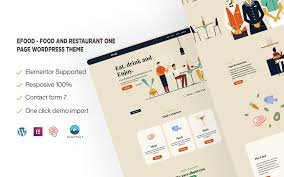


Efood - Food and Restaurant One Page WordPress Theme is a stylish and versatile theme designed specifically for food and restaurant businesses. Whether you're running a restaurant, cafe, food delivery service, or catering business, Efood provides all the necessary tools to showcase your food menu, attract customers, and enable easy online bookings or orders. The one-page design keeps everything compact and user-friendly, allowing your customers to find all relevant information quickly.
This theme is fully customizable and built to work seamlessly with Elementor, so you can easily tweak it to fit your branding and business needs.
Key Features of Efood - Food and Restaurant One Page WordPress Theme:
- One-Page Design:
- Efood uses a one-page layout, meaning all content is displayed on a single page. This is great for businesses that want to keep everything in one easily navigable place, making it quick and simple for users to access information.
- Responsive and Mobile-Friendly:
- The theme is fully responsive, ensuring that your restaurant's website will look great on any device. Whether your customers are browsing from their desktop, tablet, or mobile phone, the design will adjust accordingly to ensure an optimal viewing experience.
- Elementor Compatibility:
- Efood is built to work seamlessly with Elementor, the popular drag-and-drop page builder. This allows you to easily customize the theme, adding or rearranging sections, adjusting colors, fonts, and content, all without writing any code.
- Pre-Built Demo Content:
- With Efood, you get access to pre-built demo content, which you can import with a single click. This gives you a starting point that closely mirrors the theme’s demo site, helping you get started quickly and easily.
- Menu Showcase:
- The theme includes a menu section where you can display your food or drink offerings in a visually appealing way. You can organize the menu by categories, list ingredients, and even add prices. The menu layout is designed to make it easy for visitors to browse your offerings.
- Reservation and Contact Forms:
- Efood comes with contact and reservation forms, allowing customers to get in touch with you directly or book a table online. The forms are easy to customize and integrate with your preferred booking system or email service.
- CTA (Call-to-Action) Buttons:
- Well-placed CTA buttons encourage users to take action, whether it's making a reservation, ordering online, or contacting you for more information. These buttons are strategically positioned to maximize conversions and improve customer engagement.
- Modern and Clean Design:
- The theme offers a modern and clean design that focuses on food images and menu presentation. It is designed to highlight the quality of your food and services while offering an intuitive and seamless user experience.
- Social Media Integration:
- Easily integrate your restaurant’s social media profiles (like Facebook, Instagram, Twitter, etc.) into the website. You can display your social media feeds on your site, helping customers stay connected with your restaurant and giving them an easy way to follow you.
- SEO Optimized:
- Efood is designed with SEO best practices in mind. The clean, well-structured code helps search engines crawl your site more easily, which can improve your rankings on search results pages and help new customers discover your restaurant online.
- High-Quality Stock Images:
- The theme includes high-quality stock images that you can use to showcase your dishes and restaurant ambiance. You can replace these with your own images for a more personalized touch.
- Fast Loading Speed:
- Efood is optimized for fast loading speeds, ensuring that visitors don’t have to wait long for your website to load. A fast website improves user experience and contributes to better SEO performance.
- Flexible Color and Typography Options:
- The theme offers a variety of color and typography options, allowing you to customize the look and feel of your website to match your restaurant’s branding. With Elementor’s real-time editor, you can see changes instantly.
- Multilingual Ready:
- If you're serving an international customer base or plan to, Efood is multilingual ready, so you can translate your website into different languages. This helps you reach a wider audience and ensures your content is accessible to a broader demographic.
- Fast and Easy Setup:
- With Efood, setting up your website is a breeze. The one-page layout, combined with Elementor and demo content import, allows you to get your restaurant's website up and running quickly.
- Regular Updates and Support:
- Efood comes with regular updates and premium support to ensure that your theme is always up-to-date and functions as expected. If you need help customizing the theme or encounter any issues, support is available to assist you.
How to Set Up Efood - Food and Restaurant One Page WordPress Theme:
- Install the Theme:
- First, download the Efood theme file, then go to your WordPress Dashboard > Appearance > Themes > Add New, and upload the theme file. Once uploaded, activate it.
- Install Elementor:
- To take full advantage of the drag-and-drop capabilities, make sure you have the Elementor plugin installed. You can install the free version from the WordPress plugin directory or upgrade to Elementor Pro for advanced features.
- Import Demo Content:
- Once the theme is activated, import the demo content using the one-click import feature. This will set up the layout and pages for you, saving time during the setup process.
- Customize Your Content:
- Use Elementor to start customizing your site. Change the text, images, colors, and menu items. Update the reservation form, contact details, and any other sections to fit your restaurant’s branding and services.
- Add Your Menu:
- In the menu section, add your food items, descriptions, and prices. Organize your menu into categories to make it easy for customers to browse through.
- Set Up Reservation and Contact Forms:
- Customize the reservation form and contact forms according to your business needs. If you're using an external booking system, make sure to integrate it with the forms.
- Optimize for SEO:
- Add relevant keywords to your content to help search engines rank your restaurant’s website. You can also use an SEO plugin like Yoast SEO to assist with on-page SEO.
- Integrate Social Media:
- Link your restaurant’s social media accounts to your website to keep your visitors engaged and informed about your latest news and promotions.
- Publish Your Website:
- Once everything looks perfect, publish your site! Your restaurant’s online presence is now ready to attract visitors and encourage bookings and orders.
Why Choose Efood - Food and Restaurant One Page WordPress Theme?
- Quick Setup: The one-page design and demo import feature make it easy to set up your website in no time.
- Customizable: With Elementor compatibility, you have full control over your site’s design without needing to code.
- Optimized for Food Businesses: The theme includes specific features designed for restaurants, like menu displays, reservation forms, and CTA buttons, making it perfect for your food business.
- SEO Friendly: Efood helps ensure your website ranks well on search engines, attracting more customers to your restaurant.






























