
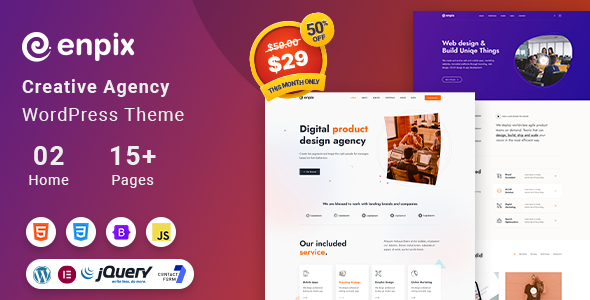

Enpix – Digital Agency & Creative Portfolio Theme is a versatile and modern WordPress theme designed specifically for digital agencies, creative studios, freelancers, and businesses in the creative industry. Whether you're a web design agency, digital marketing firm, photographer, or creative professional, Enpix provides an elegant and functional platform to showcase your portfolio, services, and client work.
Key Features of Enpix – Digital Agency & Creative Portfolio Theme:
1. Modern and Clean Design:
- Enpix features a sleek, modern design that is highly customizable to suit your unique branding and style.
- The theme's layout is clean and minimalist, allowing your work and services to take center stage. This makes it ideal for agencies, designers, and creative professionals who want to showcase their work effectively.
2. Fully Responsive & Retina Ready:
- The theme is fully responsive, ensuring that your website looks great on any device, including desktops, tablets, and smartphones.
- Retina-ready images ensure that your site’s visuals appear crisp and clear, even on high-resolution screens like Retina displays.
3. Creative Portfolio Showcase:
- Enpix includes a portfolio section specifically designed to highlight your work in a visually appealing way.
- You can display your projects in various layouts, such as grid, masonry, or carousel, and categorize your work based on types of services or industries.
- It also supports portfolio items with hover effects, lightboxes, and detailed project descriptions.
4. Multiple Demo Layouts:
- The theme comes with several pre-designed demos that you can import with a single click. This includes layouts for creative agencies, personal portfolios, landing pages, and more.
- You can choose a demo layout that suits your needs and customize it further to match your branding.
5. Drag-and-Drop Page Builder (Elementor):
- Enpix is fully compatible with Elementor, the most popular drag-and-drop page builder plugin for WordPress.
- Elementor allows you to design and build pages without writing any code, using a visual interface to add elements, sections, and widgets to your site.
6. One-Click Demo Import:
- Enpix features a one-click demo import option, which allows you to easily set up your site with the demo content.
- This saves you time in setting up the structure and layout of your site, allowing you to focus on customizing the content to fit your business.
7. Comprehensive Service Pages:
- The theme includes dedicated pages to showcase the services your agency or business offers. You can detail each service with descriptions, images, pricing tables, and even testimonials from previous clients.
- These service pages can be used to clearly communicate your offerings, whether you provide web design, digital marketing, branding, or other creative services.
8. Creative Blog Layouts:
- Enpix comes with multiple blog layouts, giving you flexibility in presenting articles, news, case studies, or creative content.
- With various layouts such as grid, list, or classic, you can choose the one that fits your content strategy and aesthetic.
9. Team and Testimonials Sections:
- Enpix includes dedicated sections to showcase your team members, their roles, and their expertise.
- You can also add testimonials from your clients to build trust and credibility, featuring reviews of your services or past work.
10. SEO Optimized:
- Enpix is built with SEO best practices in mind. It has clean, optimized code, fast loading times, and supports SEO plugins like Yoast SEO and Rank Math.
- This ensures your site ranks well on search engines and improves your online visibility.
11. WooCommerce Integration:
- Enpix is fully compatible with WooCommerce, allowing you to set up an online store if you wish to sell digital products, services, or creative assets like templates, themes, or graphics.
- WooCommerce integration makes it easy to manage products, orders, and payments.
12. Multiple Header & Footer Layouts:
- The theme provides various header and footer options so you can create a layout that fits your brand and design needs.
- You can adjust the header to include navigation menus, logos, search bars, and contact information.
13. Customizable Typography & Colors:
- Enpix offers full control over typography and color schemes. You can choose from a variety of Google Fonts and adjust the font sizes, weights, and styles to match your brand.
- Additionally, you can customize colors for elements like buttons, links, and text to create a cohesive visual identity.
14. Built-in Contact Forms:
- The theme includes pre-built contact forms, allowing potential clients to easily reach out for inquiries, project proposals, or quotes.
- The contact form is integrated with Ajax, meaning users can submit their information without needing to reload the page.
15. Advanced Theme Options Panel:
- Enpix provides an advanced theme options panel that allows you to easily customize various settings of your site, such as logos, colors, fonts, and layout settings, without touching any code.
- The panel gives you complete control over how your site looks and functions.
16. Regular Updates & Premium Support:
- Enpix receives regular updates to ensure compatibility with the latest WordPress versions and new features.
- Premium support is available to assist with any issues or customization needs, ensuring a smooth experience for theme users.
How to Set Up and Use Enpix – Digital Agency & Creative Portfolio Theme:
1. Install the Theme:
- To install Enpix, go to Appearance > Themes > Add New in your WordPress dashboard.
- Upload the theme ZIP file and click Install Now.
- Once installed, activate the theme to begin customizing your website.
2. Install Required Plugins:
- Enpix will prompt you to install required plugins like Elementor (for page building), Contact Form 7 (for contact forms), and any other recommended plugins.
- Install and activate these plugins to ensure all the theme features work correctly.
3. Import Demo Content:
- Use the one-click demo import feature to import the demo content, including pages, posts, and layout settings. This gives you a good starting point for building your site.
- After importing the demo content, replace it with your own portfolio items, services, team members, and other content.
4. Customize Your Website:
- Use the WordPress Customizer or Elementor to adjust the theme settings, add your logo, modify colors, and select fonts.
- You can build custom pages and layouts with Elementor by dragging and dropping elements like text, images, buttons, and portfolio grids.
5. Add Portfolio and Service Pages:
- Add new portfolio items to showcase your previous projects. You can categorize your work by type or industry and display project details, images, and client testimonials.
- Create detailed service pages outlining what your business offers. You can include features like pricing tables, service descriptions, and calls-to-action to encourage visitors to get in touch.
6. Set Up the Blog:
- Set up the blog section if you plan to publish articles, case studies, or other creative content. Choose a blog layout that fits your brand style and start adding blog posts.
7. Set Up WooCommerce (If Needed):
- If you’re selling products or services online, integrate WooCommerce. You can create product pages, manage inventory, process payments, and track orders all within the WordPress dashboard.
8. Test Your Website:
- Before launching, test your website on different devices and browsers to ensure it is fully responsive and functional.
- Make sure all forms, portfolio items, and shop pages (if applicable) are working properly.
9. Launch Your Website:
- Once you're satisfied with the website design and content, it’s time to launch your site.
- Promote your digital agency through social media, SEO optimization, and other marketing strategies to attract new clients.






























