
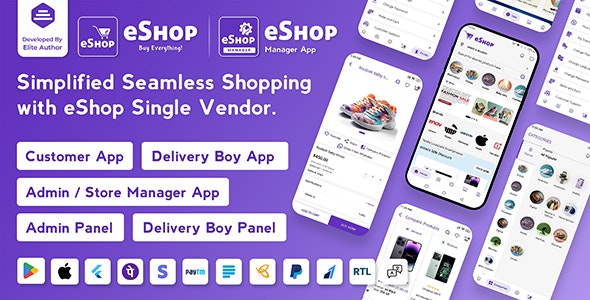


eShop is a single-vendor eCommerce app built with Flutter, designed to create a comprehensive shopping experience for users on mobile devices. Flutter, developed by Google, is a popular framework for building natively compiled applications for mobile, web, and desktop from a single codebase.
Here’s a detailed guide on understanding, customizing, and utilizing the eShop - eCommerce Single Vendor App:
eShop Key Features of eShop
- Core Functionality:
- Product Listings: Displays products with detailed descriptions, prices, and images.
- Product Categories: Organizes products into categories for easier navigation.
- Shopping Cart: Allows users to add products to a cart and review their selections.
- Checkout Process: Manages the checkout process, including shipping details, payment options, and order confirmation.
- User Authentication: Supports user registration, login, and profile management.
- Search and Filters: Provides search functionality and filters to help users find products quickly.
- Order Tracking: Allows users to track the status of their orders.
- User Interface:
- Responsive Design: Optimized for various screen sizes and orientations.
- Modern UI: Features a clean, user-friendly design with intuitive navigation.
- Backend Integration:
- API Integration: Connects with backend services for product data, user management, and order processing.
- Payment Gateway: Integrates with payment gateways for secure transactions.
- Customization and Branding:
- Themes and Styles: Customizable themes and styles to match your brand identity.
- Localization: Supports multiple languages for a global audience.
Customization and Setup
- Set Up Your Development Environment:
- Install Flutter: Ensure you have Flutter installed on your machine. Follow the official Flutter installation guide for setup.
- Install IDE: Use an IDE like Visual Studio Code or Android Studio with Flutter support.
- Download and Open the Template:
- Obtain the Source Code: Get the source code for the eShop template. This may be from a purchase or download link.
- Open the Project: Use your IDE to open the Flutter project.
- Explore the Project Structure:
- Project Files: Familiarize yourself with the project directory, including
lib,assets,pubspec.yaml, and other key files. - Main Components: Explore the main components such as
main.dart,models,screens,widgets, andservices.
- Project Files: Familiarize yourself with the project directory, including
- Modify UI and Design:
- Themes and Styles: Update the theme and styles in
lib/themeor similar directories to match your brand's identity. - Screens and Widgets: Customize UI elements in
lib/screensandlib/widgets. Update layouts, colors, fonts, and images to align with your design requirements. - Localization: Configure localization in
lib/l10nto support multiple languages if needed.
- Themes and Styles: Update the theme and styles in
- Update Product Data and Categories:
- Product Listings: Modify the product data in your backend or local storage as needed. This may involve updating
lib/servicesor integrating with a new API. - Categories: Adjust product categories and filters to reflect your product catalog.
- Product Listings: Modify the product data in your backend or local storage as needed. This may involve updating
- Configure Backend and API Integration:
- API Endpoints: Update API endpoints in
lib/servicesto connect with your backend services. - Payment Gateway: Configure payment gateway integration in
lib/servicesor similar directories to support your preferred payment methods.
- API Endpoints: Update API endpoints in
- Test and Debug:
- Run the App: Use
flutter runto test the app on an emulator or physical device. Ensure all features work as expected. - Debugging: Utilize Flutter’s debugging tools and logs to identify and resolve any issues.
- Run the App: Use
- Build and Deploy:
- Build the App: Use
flutter buildto compile the app for Android and iOS. Follow Flutter’s build instructions for details. - Publish: Submit the app to Google Play Store and Apple App Store following their respective guidelines.
- Build the App: Use
Common Customization Areas
- UI/UX Design: Tailor the user interface to fit your branding and enhance the user experience.
- Product Management: Customize product listings, categories, and details to match your inventory.
- Payment and Checkout: Integrate your preferred payment methods and adjust the checkout process.
- User Authentication: Configure authentication and profile management to meet your requirements.
Troubleshooting Tips
- Build Issues: Ensure you have the correct Flutter version and dependencies. Check for any missing packages or errors in
pubspec.yaml. - API Connectivity: Verify that API endpoints are correctly configured and that your backend services are operational.
- UI Problems: Use Flutter’s hot reload and debugging tools to fix any layout or design issues.






Full Ionic 5 Mobile App for WordPress – Admob, Analytics, Rewards ads, Cloudflare – Hala News Pro
Rs5,727.00Original price was: Rs5,727.00.Rs249.00Current price is: Rs249.00.