Premium Category Products
Events Calendar WordPress Plugin by MotoPress
✨ Latest Version
- Safety, Guarantees Files
- Malware-Free (Clean) Files
- License: GPL Preactivated
- Unlimited Site & Domain Usage
Events Calendar WordPress Plugin by MotoPress
Live Demo: Events Calendar WordPress Plugin by MotoPress Live Demo
Events Calendar WordPress Plugin by MotoPress is a powerful and user-friendly plugin designed to help you effortlessly manage and display events on your WordPress website. Whether you're hosting workshops, conferences, webinars, or any other type of event, this plugin provides a comprehensive solution to keep your schedule organized and visually appealing for your visitors.
Product Overview
The Events Calendar WordPress Plugin by MotoPress empowers you to create, manage, and display events on your website with ease. It offers a drag-and-drop calendar interface, allowing you to add and schedule events intuitively, just like you would in Google Calendar. With its intuitive design and powerful features, this plugin is suitable for website owners of all experience levels, from beginners to seasoned developers.
Modern Design and User Experience
MotoPress Events Calendar boasts a modern and clean design that seamlessly integrates with your existing WordPress theme. The calendar interface is visually appealing and user-friendly, making it easy for visitors to browse and find events of interest. The plugin prioritizes user experience, ensuring a smooth and enjoyable interaction for both website administrators and visitors.
Main Features and Capabilities
The Events Calendar WordPress Plugin by MotoPress is packed with essential features to streamline your event management workflow:
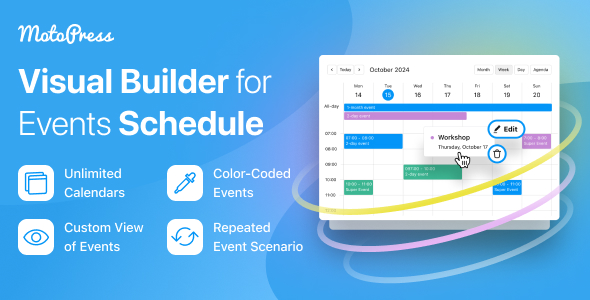
- Drag-and-Drop Calendar Builder: Add and manage events effortlessly with a simple drag-and-drop interface.
- Unlimited Calendars: Create separate calendars for different event categories, departments, or locations.
- Recurring Events: Easily set up recurring events that repeat on a weekly, monthly, or yearly basis, saving you time and effort.
- Flexible Display Options: Choose from hourly, all-day, or multi-day event formats to present your schedule in the most suitable manner.
- Intuitive Color-Coding: Assign different colors to events for easy categorization and visual organization.
- Event Details Pages: Display comprehensive event information, including descriptions, locations, dates, times, and speaker details.
- Event Registration: Allow visitors to register for events directly through your website, simplifying the process for attendees.
- Search Functionality: Enable visitors to search for specific events based on keywords, dates, or categories.
Customization Options
The Events Calendar WordPress Plugin by MotoPress offers a range of customization options to tailor the calendar to your website's design and branding:
- Theme Compatibility: The plugin seamlessly integrates with most popular WordPress themes, ensuring a harmonious look and feel.
- Custom Styles: Modify the calendar's appearance with custom CSS styles to match your website's design aesthetic.
- Widget Options: Display event listings as widgets on your website's sidebars or other designated areas.
Responsive Design
The Events Calendar WordPress Plugin is fully responsive, ensuring that your event calendar displays correctly and looks great on all devices, including desktops, laptops, tablets, and smartphones. This ensures a seamless user experience for visitors accessing your website from any device.
Pages, Components, or Modules
The Events Calendar WordPress Plugin provides various components and modules to enhance your event management capabilities:
- Calendar View: The primary view displays events in a calendar format, allowing visitors to easily browse upcoming events.
- List View: Present events in a list format, providing a more detailed overview of event information.
- Event Single Page: Dedicated pages display comprehensive details about individual events, including descriptions, locations, dates, times, and speaker information.
- Event Search: A search functionality allows visitors to find specific events based on keywords, dates, or categories.
Integration and Compatibility
The Events Calendar WordPress Plugin integrates seamlessly with popular WordPress plugins and tools:
- WordPress Theme Compatibility: The plugin is designed to work with most WordPress themes, ensuring compatibility and a seamless integration.
- Event Registration Plugins: Integrate with event registration plugins to manage attendee registration and payments.
- Email Marketing Plugins: Connect with email marketing plugins to send event reminders and promotional emails to your subscribers.
SEO and Performance Considerations
The Events Calendar WordPress Plugin is optimized for search engine visibility:
- Schema Markup: The plugin automatically generates schema markup for events, improving your website's search engine ranking.
- SEO-Friendly URLs: Events are displayed with SEO-friendly URLs, making it easier for search engines to index and understand your content.
- Performance Optimization: The plugin is designed to be lightweight and efficient, ensuring fast loading times and a positive user experience.
Ideal Use Cases
The Events Calendar WordPress Plugin by MotoPress is ideal for a wide range of websites:
- Event Planning Websites: Showcase upcoming events, conferences, workshops, and seminars.
- Community Websites: List local events, meetings, and gatherings for community members.
- Business Websites: Promote company events, webinars, and product launches.
- Educational Institutions: Display academic calendars, workshops, and student events.
- Non-Profit Organizations: Share information about fundraising events, volunteer opportunities, and community outreach programs.
Who Should Use This Product?
This plugin is perfect for:
- Website Owners: Manage events on your website with ease and enhance user engagement.
- Event Planners: Streamline event scheduling, registration, and promotion.
- Businesses: Promote events and engage with customers.
- Non-Profits: Share event information and connect with supporters.
- Anyone who needs to effectively manage and display events online.
Installation and Setup Guide
Installing the Events Calendar WordPress Plugin is straightforward:
- Download the plugin: Obtain the plugin file from the MotoPress website.
- Upload to your WordPress site: Access your WordPress dashboard and navigate to the "Plugins" section. Click "Add New" and upload the plugin file.
- Activate the plugin: Once uploaded, activate the Events Calendar plugin.
- Configure settings: Access the plugin settings to customize calendar settings, display options, and event details.
- Start creating events: Begin adding events to your calendar using the intuitive drag-and-drop interface.
Important Product Information
- License: This plugin is licensed under the GPLv3 license, allowing for free use and distribution.
- Support: MotoPress provides comprehensive documentation and support for their plugins.
- Updates: Regular updates are released to ensure compatibility and improve functionality.
Final Conclusion
The Events Calendar WordPress Plugin by MotoPress is a powerful and user-friendly solution for managing and displaying events on your WordPress website. With its intuitive interface, comprehensive features, and seamless integration, this plugin empowers you to effectively organize your events, enhance user engagement, and promote your website's content.
Category: Premium
(Only For Premium Category Products !)
1. All digital products are the most recent version, with no possibility of free updates. After payment, you can request an update to the most recent version for 5 days if a new version is released. We free support within 5 days.
2. If a license is required (Excludes WHMCS license , we provide only method not license), please contact us via email or ticket for assistance with activation. Our license is only valid for activation and does not include support.
3. We provide Mobile, PHP script installation services for $19.90 / ₹1700. Please create a backup after installation as we do not support re-installation. For mobile app source code, we do not offer installation services.
4. If you have any questions, please contact us by email [email protected] or create a ticket on this page
5. Please note that any digital products presented on the website do not contain malicious code, viruses or advertising. You will receive the original files from the developers. We do not sell any products that have been downloaded from other websites.
6. The response time can last up to 6 hours.
(Only For Membership Category Products !)
Benefits of our Membership Plans
- Instant access to all plugins and all themes including all future releases
- Unlimited domain usage
- Regular Updates as of when available. Usually, updates are released daily.
- Before purchasing, please read the Terms and Conditions & Refund Policy.
- If you have any questions, please first read the FAQs.
- If you haven’t found the answer to your question, please contact us, and we will respond ASAP.
- Please note that any digital products on the website do not contain malicious code, viruses, or advertising. We buy the original files from the developers. We do not sell any products downloaded from other sites.
- Buy or download for FREE by subscribing to our VIP Membership Plan. Join the club of more than 1100+ happy members. This is the same theme as sold by the developer.
Updates:
- We offer frequent updates for one year from the date of purchase. After this period, you have to purchase the item again to receive further updates, we also offer lifetime updates as a second option.
- We regularly update products as soon as we are notified about an update, we go and download it from the author and update it on our site, but In case the current version of the product is not the latest, You can request an update for the product by contact form.
- We send regular emails advising when products have been updated so please be sure to provide an active email address when you sign up.
Support:
- Our support team is available 24/7, if you have any questions or need help in installing or configuring digital products purchased on the website, please don’t hesitate to contact form.
- Please note that we are not developers of the provided products, so our technical support capabilities are limited. We do not change product functionality and do not fix developer bugs.
(Only For WHMCS Category Products !)
- We Only provide WHMCS Module, how you can nulled any module step only !
- Instant access to all plugins and all themes
- Unlimited domain usage
- Regular Updates as of when available. Usually, updates are released daily.
- Before purchasing, please read the Terms and Conditions & Refund Policy.
- If you have any questions, please first read the FAQs.
- If you haven’t found the answer to your question, please contact us, and we will respond ASAP.
- Please note that any digital products on the website do not contain malicious code, viruses, or advertising. We buy the original files from the developers. We do not sell any products downloaded from other sites.