Gallery App – Photo & Video editor
✨ Latest Version
- Safety, Guarantees Files
- Malware-Free (Clean) Files
- License: GPL Preactivated
- Unlimited Site & Domain Usage
Gallery App - Photo & Video Editor
Live Demo: Gallery App - Photo & Video editor Live Demo
Gallery App is a comprehensive Android photo and video editor designed to provide users with a seamless and intuitive experience for managing, editing, and sharing their multimedia content. Built with Kotlin and leveraging the power of Android Studio, this app offers a wide range of features to enhance and personalize photos and videos, making it a valuable tool for both casual users and photography enthusiasts.
Product Overview
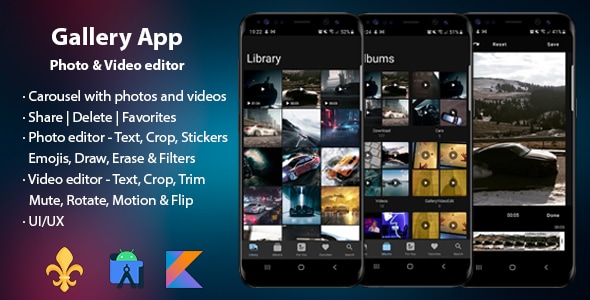
The Gallery App is a feature-rich multimedia management and editing platform for Android devices. It boasts a user-friendly interface that allows users to easily browse, organize, and edit their photos and videos. The app provides a comprehensive set of tools for photo editing, including cropping, resizing, color adjustments, filters, and text overlays. Similarly, the video editor offers features like trimming, rotating, adding text, and applying motion effects.
Modern Design and User Experience
The Gallery App is designed with a modern and intuitive user interface that prioritizes ease of use. The app's layout is clean and organized, with clear navigation menus and intuitive controls. The use of vibrant colors and engaging animations enhances the overall user experience, making it visually appealing and enjoyable to interact with.
Main Features and Capabilities
Multimedia Management:
-
Library: The app provides a centralized library to view and manage all photos and videos on the device. Users can easily browse through their media library, organized by date, folder, or type.
-
Albums: Users can create and manage albums to categorize their photos and videos. Albums allow for easier organization and sharing of specific collections of media.
-
For You: This section curates personalized recommendations based on user's viewing history and preferences. It showcases recent memories, trending content, and suggested albums.
-
Favorites: Users can mark their favorite photos and videos for quick access and easy sharing.
-
Search: A robust search function allows users to quickly find specific photos or videos by name, date, or keywords.
Photo Editing:
- Crop & Rotate: Users can precisely crop and rotate their photos to achieve the desired composition.
- Filters: A wide range of filters are available to apply different artistic effects to photos.
- Text: Users can add text overlays to their photos, customizing font, size, color, and position.
- Stickers: A library of stickers can be added to photos for playful personalization.
- Emojis: Users can insert emojis into their photos to express emotions or add fun elements.
- Paint: The app includes a painting tool for freehand drawing and adding custom designs to photos.
Video Editing:
- Trim: Users can trim unwanted segments from videos to create concise clips.
- Crop & Rotate: Similar to photo editing, users can crop and rotate videos for precise framing.
- Text: Add text overlays to videos, customizing font, size, color, position, and duration.
- Motion Effects: Users can apply motion effects like fast motion, slow motion, and stop motion to their videos.
-
Audio Editing:
-
Remove audio from videos.
Additional Features:
- Share: Easily share edited photos and videos with friends and family through various social media platforms or messaging apps.
- Set as Wallpaper: Users can set their edited photos as wallpaper for their home screen, lock screen, or both.
Customization Options
While the Gallery App offers a pre-designed layout and aesthetic, it provides some level of customization to personalize the user experience. Users can choose from different themes, adjust display settings, and modify the order of features within the app's interface.
Responsive Design
Since this is a mobile application, responsiveness is inherent in its design. The app's interface is optimized to adapt seamlessly to different screen sizes and orientations, ensuring a consistent and enjoyable experience across various Android devices.
Pages, Components, or Modules
The Gallery App is structured into several key pages and modules:
-
Home: The main screen displays recently added photos and videos, curated recommendations, and quick access to popular albums.
-
Library: This page provides a comprehensive view of all photos and videos on the device, organized by date, folder, or type.
-
Albums: Users can create, manage, and browse through their albums here.
-
For You: This personalized section showcases curated content based on user preferences and viewing history.
-
Favorites: Access a collection of marked favorite photos and videos.
-
Search: A dedicated page for searching photos and videos by name, date, or keywords.
-
Settings: Users can adjust app settings, themes, and display preferences.
-
Photo Editor: A comprehensive suite of tools for editing photos, including cropping, resizing, filters, text overlays, stickers, emojis, and painting.
-
Video Editor: A dedicated section for editing videos, offering trimming, cropping, rotating, text overlays, motion effects, and audio editing options.
Integration and Compatibility
The Gallery App is designed to seamlessly integrate with the Android operating system and existing multimedia libraries. It supports various file formats for both photos and videos, ensuring compatibility with a wide range of content.
Target Audience
The Gallery App is targeted towards a broad audience of Android users who seek a comprehensive and user-friendly solution for managing, editing, and sharing their photos and videos. It caters to both casual users who want to enhance their everyday media and photography enthusiasts who require more advanced editing tools.
Category: Mobile App
(Only For Premium Category Products !)
1. All digital products are the most recent version, with no possibility of free updates. After payment, you can request an update to the most recent version for 5 days if a new version is released. We free support within 5 days.
2. If a license is required (Excludes WHMCS license , we provide only method not license), please contact us via email or ticket for assistance with activation. Our license is only valid for activation and does not include support.
3. We provide Mobile, PHP script installation services for $19.90 / ₹1700. Please create a backup after installation as we do not support re-installation. For mobile app source code, we do not offer installation services.
4. If you have any questions, please contact us by email [email protected] or create a ticket on this page
5. Please note that any digital products presented on the website do not contain malicious code, viruses or advertising. You will receive the original files from the developers. We do not sell any products that have been downloaded from other websites.
6. The response time can last up to 6 hours.
(Only For Membership Category Products !)
Benefits of our Membership Plans
- Instant access to all plugins and all themes including all future releases
- Unlimited domain usage
- Regular Updates as of when available. Usually, updates are released daily.
- Before purchasing, please read the Terms and Conditions & Refund Policy.
- If you have any questions, please first read the FAQs.
- If you haven’t found the answer to your question, please contact us, and we will respond ASAP.
- Please note that any digital products on the website do not contain malicious code, viruses, or advertising. We buy the original files from the developers. We do not sell any products downloaded from other sites.
- Buy or download for FREE by subscribing to our VIP Membership Plan. Join the club of more than 1100+ happy members. This is the same theme as sold by the developer.
Updates:
- We offer frequent updates for one year from the date of purchase. After this period, you have to purchase the item again to receive further updates, we also offer lifetime updates as a second option.
- We regularly update products as soon as we are notified about an update, we go and download it from the author and update it on our site, but In case the current version of the product is not the latest, You can request an update for the product by contact form.
- We send regular emails advising when products have been updated so please be sure to provide an active email address when you sign up.
Support:
- Our support team is available 24/7, if you have any questions or need help in installing or configuring digital products purchased on the website, please don’t hesitate to contact form.
- Please note that we are not developers of the provided products, so our technical support capabilities are limited. We do not change product functionality and do not fix developer bugs.
(Only For WHMCS Category Products !)
- We Only provide WHMCS Module, how you can nulled any module step only !
- Instant access to all plugins and all themes
- Unlimited domain usage
- Regular Updates as of when available. Usually, updates are released daily.
- Before purchasing, please read the Terms and Conditions & Refund Policy.
- If you have any questions, please first read the FAQs.
- If you haven’t found the answer to your question, please contact us, and we will respond ASAP.
- Please note that any digital products on the website do not contain malicious code, viruses, or advertising. We buy the original files from the developers. We do not sell any products downloaded from other sites.