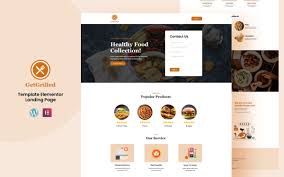

GetGrilled – Restaurant Services Elementor Landing Page Template is a stylish, professional, and easy-to-use template created specifically for restaurants, cafes, food trucks, and other food-related businesses. It is designed to help you build a visually appealing landing page that attracts potential customers, showcases your menu, services, and atmosphere, and drives online reservations or orders. Whether you are running a casual dining spot, a fine dining restaurant, or a café, provides all the essential features you need for a successful online presence.
Key Features of – Restaurant Services Landing Page Template:
- Fully Responsive Design:
- The template is fully responsive, ensuring that your website looks and functions perfectly on all devices. This includes desktops, tablets, and smartphones, allowing you to cater to customers no matter where they access your site from.
- Visually Stunning Hero Section:
- The hero section is the first thing visitors will see when they land on your page. It’s designed to feature high-quality images or even a video that showcases your restaurant’s atmosphere or signature dishes. It’s the perfect space to make a memorable first impression.
- Interactive Menu Showcase:
- The template includes an interactive menu display that lets you showcase your restaurant’s offerings in a clean and organized manner. You can break down the menu into sections such as appetizers, main courses, drinks, and desserts. Each item can be accompanied by attractive images, descriptions, and pricing.
- Online Reservation Form:
- With an integrated online reservation form, you make it easy for your customers to book a table at your restaurant directly from your landing page. The form is customizable to allow users to choose the date, time, and number of guests, making the process seamless and user-friendly.
- Call to Action (CTA) Buttons:
- Throughout the page, strategically placed Call to Action (CTA) buttons encourage users to take the next step. These buttons can guide your visitors to make a reservation, explore the menu, view offers, or even place an order online. CTAs help drive conversions and engagement on your site.
- Customer Testimonials:
- Add a testimonial section to showcase reviews from happy customers. This builds social proof and credibility, which can help new visitors feel more confident in choosing your restaurant. Positive feedback from real customers can influence decision-making and attract new diners.
- Location and Contact Information:
- The template includes a location section where you can display your restaurant’s address, phone number, email, and operating hours. You can also integrate a Google Map feature so visitors can easily find your location.
- Special Offers and Promotions:
- Highlight special offers, discounts, or seasonal promotions directly on the landing page. This is a great way to entice visitors to book a reservation or visit your restaurant. Whether it's a happy hour, a limited-time menu, or a holiday special, this section helps drive sales.
- Social Media Links:
- Social media is a key element in connecting with customers. The template includes social media icons that allow you to link to your restaurant’s social media profiles (Instagram, Facebook, Twitter, etc.). Share updates, promotions, and connect with your customers on these platforms to build a loyal following.
- Newsletter Subscription:
- The newsletter subscription form allows visitors to sign up for updates about your restaurant. It’s an effective way to keep your customers informed about upcoming events, new menu items, or exclusive promotions, and helps build customer loyalty over time.
- SEO Optimized:
- GetGrilled is designed with SEO best practices in mind, ensuring that your website is optimized for search engines. This will help your restaurant rank better in search results, making it easier for potential customers to find you when they search for dining options nearby.
- Fast Loading Speed:
- The template is optimized for fast loading times, providing a better user experience. Faster loading times are crucial for keeping visitors on your site and reducing the bounce rate. This also positively impacts your website’s SEO ranking.
- Easy Customization with Elementor:
- Built with Elementor, this template is highly customizable with a drag-and-drop editor. You can easily modify the text, images, colors, and layout to suit your brand without needing any coding skills. Elementor gives you the flexibility to personalize your landing page and make it uniquely yours.
- One-Click Demo Import:
- With the one-click demo import feature, you can quickly import the demo content and get started with minimal setup. This will help you hit the ground running, saving you time during the initial configuration process.
- Event and Special Occasion Section:
- Add a section to promote any special events, parties, or celebrations your restaurant might be hosting. You can display event details, menu offerings, and booking information to encourage guests to reserve a spot for events like birthdays, anniversaries, or themed nights.
How to Use GetGrilled – Restaurant Services Elementor Landing Page Template:
- Install WordPress:
- Make sure that WordPress is installed on your hosting platform. Most hosting providers offer one-click WordPress installation.
- Install Elementor Plugin:
- Install the Elementor Page Builder plugin to enable easy drag-and-drop page customization. Elementor makes it simple to personalize your template without the need for coding knowledge.
- Install and Activate the Template:
- After installing Elementor, go to Appearance > Themes and click Add New. Upload the GetGrilled template and activate it.
- Import Demo Content:
- Use the one-click demo import feature to quickly import the demo content. This will help you set up your landing page with all of the pre-configured sections and designs.
- Customize the Template:
- Go to Pages > Edit with Elementor to customize the landing page. You can change the text, add your restaurant’s logo, upload photos of your menu items or restaurant ambiance, and adjust colors to match your branding.
- Update the Menu Section:
- Replace the demo menu with your restaurant’s actual menu items, including descriptions, prices, and high-quality images of your dishes. You can easily organize your menu into different categories like appetizers, mains, desserts, and drinks.
- Set Up the Online Reservation Form:
- Customize the online reservation form with fields that are relevant to your restaurant, such as the date, time, number of guests, and any special requests. Ensure the form is easy to use and intuitive.
- Add Testimonials:
- Use the testimonial section to display customer reviews and feedback. You can feature quotes from happy diners, which will help build trust and social proof.
- Highlight Special Offers:
- If you have any ongoing special offers or promotions, make sure to feature them prominently on your landing page. This could include discounts, holiday promotions, or special dishes.
- Connect Social Media:
- Add links to your restaurant’s social media profiles so that customers can follow you for updates. This is a great way to keep customers engaged and informed about new dishes or events.
- Optimize for SEO:
- Use an SEO plugin like Yoast SEO or Rank Math to optimize your landing page content. This will help your restaurant show up in search results when people search for food, restaurants, or dining in your area.
- Publish and Go Live:
- Once you’ve customized your page, test it across different devices to ensure it’s fully responsive. After making any final adjustments, hit Publish and your restaurant landing page will be live.