
Premium Category Products

Google Sheet Connector For Elementor Forms v1.0

Google Sheet Connector For Elementor Forms v1.0

Google Sheet Connector For Elementor Forms v1.0

Live Demo: Google Sheet Connector For Elementor Forms v1.0 Live Demo

Google Sheet Connector for Elementor Forms is a powerful plugin that integrates Elementor's form builder with Google Sheets, allowing users to automatically send form submissions directly to a connected spreadsheet. This tool is ideal for businesses and individuals who want to streamline data collection, organization, and analysis.

Product Overview

The Elementor Google Sheet Connector acts as a bridge between your WordPress Elementor forms and Google Sheets, simplifying the process of capturing and managing form data. This add-on plugin seamlessly synchronizes form submissions with pre-configured Google Sheets in real-time, eliminating the need for manual data entry and reducing the risk of errors.

Seamless Integration

With the Elementor Google Sheet Connector, connecting your Elementor forms to Google Sheets is a straightforward process. The plugin offers minimal setup requirements, allowing you to quickly establish a connection and begin sending form data directly to your spreadsheets.

Customizable Data Mapping

One of the key advantages of this plugin is its customizable data mapping feature. You have the flexibility to map form fields to specific columns in your Google Sheet, ensuring that your data is organized and structured exactly as you need it. This level of customization allows you to tailor the data flow to your specific requirements.

Real-Time Data Sync

The Elementor Google Sheet Connector ensures real-time data synchronization. As soon as a form is submitted, the data is instantly transferred to your connected Google Sheet. This eliminates any delays and keeps your data up-to-date, enabling you to access the latest information immediately.

Multiple Sheet Support

The plugin supports multiple sheet connections, allowing you to connect different Elementor forms to different Google Sheets. This feature is particularly beneficial for managing diverse data sources and organizing information based on specific categories or projects.

Key Features

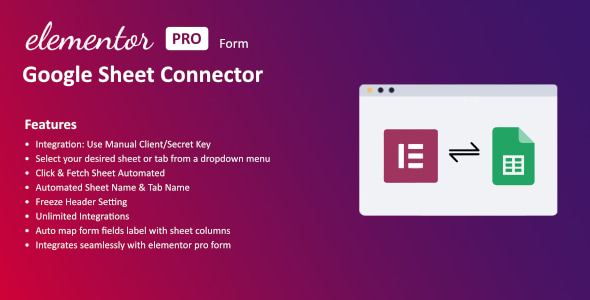
  • Integration: Use Manual Client/Secret Key (Manual Google API Configuration)
  • Google Sheet Settings: Select your desired sheet or tab from a dropdown menu
  • Click & Fetch Sheet Automated: Easily select and connect to your desired Google Sheet.
  • Automated Sheet Name & Tab Name: The plugin automatically identifies and uses the correct sheet name and tab name.
  • Freeze Header Setting: Option to freeze the header row for easy navigation and data reference.
  • Unlimited Integrations: Connect to multiple Google Sheets with multiple Forms without any limitations.
  • Auto Map Form Fields Label with Sheet Columns: Streamlines the data mapping process by automatically matching form field labels with corresponding sheet columns.
  • Integrates Seamlessly with Elementor Pro Form: Works seamlessly with Elementor Pro forms, providing a comprehensive solution for form creation and data management.

Ideal Use Cases

The Elementor Google Sheet Connector is a versatile tool suitable for a wide range of use cases, including:

  • Lead Capture and Management: Collect leads from website forms and automatically store them in a Google Sheet for easy tracking and follow-up.
  • Event Registration: Streamline event registration by capturing participant information directly in a Google Sheet.
  • Customer Feedback Collection: Gather customer feedback through forms and analyze the data in Google Sheets to identify trends and improve products or services.
  • Survey Data Collection: Conduct online surveys and automatically store the responses in a Google Sheet for analysis and reporting.

Who Should Use This Product?

This plugin is ideal for:

  • WordPress Website Owners:
  • Businesses of all sizes:
  • Marketers and Sales Professionals:
  • Anyone who needs to collect and manage data efficiently:

Installation and Setup Guide

Installing and setting up the Google Sheet Connector for Elementor Forms is a straightforward process.

  1. Install the Plugin: Go to your WordPress dashboard and navigate to "Plugins" > "Add New." Search for "Google Sheet Connector for Elementor Forms" and click "Install Now."
  2. Activate the Plugin: Once installed, activate the plugin by clicking "Activate."
  3. Configure Settings: Access the plugin settings by going to "Elementor" > "Forms" > "Google Sheet Connector."
  4. Connect Your Google Sheet: Follow the on-screen instructions to connect your Google Sheet to your Elementor form.
  5. Map Form Fields: Map your form fields to the corresponding columns in your Google Sheet.
  6. Test Your Integration: Submit a test form to ensure that the data is being sent to your Google Sheet correctly.

Important Product Information

  • Compatibility: This plugin is compatible with Elementor Pro.
  • Support: We offer comprehensive support for this plugin.

Final Conclusion

The Google Sheet Connector for Elementor Forms is an essential tool for anyone who wants to streamline their data collection and management processes. Its seamless integration, customizable data mapping, and real-time synchronization capabilities make it a powerful solution for businesses and individuals alike.

Category: Premium

(Only For Premium Category Products !)

1. All digital products are the most recent version, with no possibility of free updates. After payment, you can request an update to the most recent version for 5 days if a new version is released. We free support within 5 days.

2. If a license is required (Excludes WHMCS license , we provide only method not license), please contact us via email or ticket for assistance with activation. Our license is only valid for activation and does not include support.

3. We provide Mobile, PHP script installation services for $19.90 / ₹1700. Please create a backup after installation as we do not support re-installation. For mobile app source code, we do not offer installation services.

4. If you have any questions, please contact us by email  or create a ticket on this page

5. Please note that any digital products presented on the website do not contain malicious code, viruses or advertising. You will receive the original files from the developers. We do not sell any products that have been downloaded from other websites.

6. The response time can last up to 6 hours.

(Only For Membership Category Products !)

Benefits of our Membership Plans

  • Instant access to all plugins and all themes including all future releases
  • Unlimited domain usage
  • Regular Updates as of when available. Usually, updates are released daily.
  • Before purchasing, please read the Terms and Conditions & Refund Policy.
  • If you have any questions, please first read the FAQs.
  • If you haven’t found the answer to your question, please contact us, and we will respond ASAP.
  • Please note that any digital products on the website do not contain malicious code, viruses, or advertising. We buy the original files from the developers. We do not sell any products downloaded from other sites.
  • Buy or download for FREE by subscribing to our VIP Membership Plan. Join the club of more than 1100+ happy members. This is the same theme as sold by the developer.

Updates:

  • We offer frequent updates for one year from the date of purchase. After this period, you have to purchase the item again to receive further updates, we also offer lifetime updates as a second option.
  • We regularly update products as soon as we are notified about an update, we go and download it from the author and update it on our site, but In case the current version of the product is not the latest, You can request an update for the product by contact form.
  • We send regular emails advising when products have been updated so please be sure to provide an active email address when you sign up.

Support:

  • Our support team is available 24/7, if you have any questions or need help in installing or configuring digital products purchased on the website, please don’t hesitate to contact form.
  • Please note that we are not developers of the provided products, so our technical support capabilities are limited. We do not change product functionality and do not fix developer bugs.

For more information please read FAQs & About Us.

(Only For WHMCS Category Products !)

  • We Only provide WHMCS Module, how you can  nulled any module step only !
  • Instant access to all plugins and all themes 
  • Unlimited domain usage
  • Regular Updates as of when available. Usually, updates are released daily.
  • Before purchasing, please read the Terms and Conditions & Refund Policy.
  • If you have any questions, please first read the FAQs.
  • If you haven’t found the answer to your question, please contact us, and we will respond ASAP.
  • Please note that any digital products on the website do not contain malicious code, viruses, or advertising. We buy the original files from the developers. We do not sell any products downloaded from other sites.

More Like This Products