
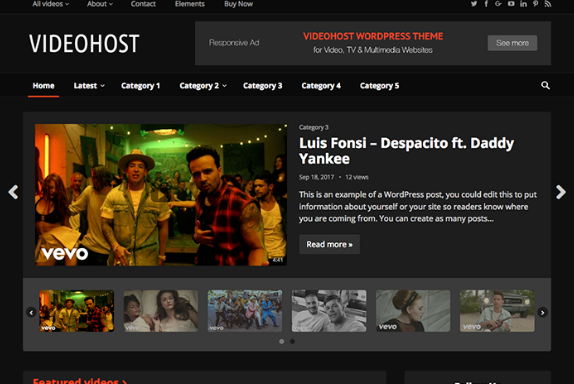


HappyThemes VideoHost Pro is a powerful WordPress theme designed specifically for creating video-centric websites, including video blogs, video tutorials, streaming platforms, or any site that primarily features video content. It offers a clean and professional design that makes it easy to showcase and organize video content while providing a great user experience for viewers.
The theme is tailored for users who need a platform to share video content, whether it's for personal blogs, educational purposes, or professional video hosting. With its integration of multimedia features, customization options, and SEO-friendly design, VideoHost Pro is a great solution for anyone looking to create a video-based website.
Key Features of HappyThemes VideoHost Pro:
- Video-First Design:
- VideoHost Pro is built with a focus on video content, providing an attractive and user-friendly layout that highlights videos. The theme is designed to showcase videos in various formats (e.g., YouTube, Vimeo, self-hosted videos) prominently on the homepage and throughout the site.
- Responsive and Mobile-Optimized:
- The theme is fully responsive, ensuring that your video content looks great on all devices, including desktops, tablets, and smartphones. This mobile-optimized design is crucial for video websites since users frequently access videos from mobile devices.
- Customizable Video Player:
- VideoHost Pro comes with an integrated custom video player that supports different video formats and streaming services (like YouTube and Vimeo). The player is highly customizable, allowing you to change its appearance to match your website’s design.
- Multiple Video Layouts:
- The theme offers various layout options for displaying videos. You can choose from grid layouts, list layouts, or a more traditional blog-style format. This flexibility helps you customize your website’s structure to best suit your content.
- Video Categories and Tags:
- VideoHost Pro allows you to organize your videos into categories and tags, making it easy for users to browse through your content. This organization helps keep your site clean and user-friendly, making it easier for visitors to find videos that interest them.
- Video Embedding and Hosting:
- The theme supports both self-hosted videos and embeds from popular video platforms like YouTube and Vimeo. This means you can upload your own videos or embed videos from other platforms without any hassle.
- Advanced Search Functionality:
- With VideoHost Pro, users can easily search through your video content. The theme includes an advanced search feature that filters results by categories, tags, or keywords, helping users find specific videos quickly.
- User-Submitted Content:
- If you're running a community-based video platform, VideoHost Pro supports user-generated content. Visitors or registered users can submit their own videos, making your website interactive and community-driven.
- SEO-Optimized:
- The theme is SEO-friendly, built with clean, optimized code to ensure that search engines can easily index your videos and content. It also integrates well with popular SEO plugins like Yoast SEO, helping you improve your site's visibility in search results.
- Speed Optimization:
- VideoHost Pro is designed with fast loading times in mind, which is essential for video-heavy sites. Video hosting sites tend to have a lot of heavy content, but this theme is optimized to ensure your videos load quickly, which contributes to a better user experience and better SEO rankings.
- Built-in Social Sharing:
- The theme comes with social media integration, allowing users to share videos on social platforms like Facebook, Twitter, and Instagram. This increases the reach of your videos and helps grow your audience.
- Customizable Homepage:
- The theme allows you to create a customizable homepage where you can feature the most popular or latest videos, set up featured video sections, or add other content like blog posts, user testimonials, and more.
- Ad Integration:
- For monetization, VideoHost Pro supports advertisement integration. You can easily add ads to your videos or within the layout of your site, allowing you to generate revenue through ads or affiliate links.
- Easy to Use:
- VideoHost Pro is designed to be easy to use and setup. Even if you don’t have technical expertise, the theme offers an intuitive interface, making it easy for you to manage your content and customize your site.
- Translation Ready:
- The theme is translation-ready, so you can easily translate your site into multiple languages. This feature is particularly useful if you have an international audience or want to reach viewers from different regions.
- Regular Updates and Support:
- HappyThemes provides regular updates to the theme to ensure compatibility with the latest WordPress versions. Additionally, you can expect premium support for any issues you encounter while using the theme.
Benefits of Using HappyThemes VideoHost Pro:
- Ideal for Video Content Creators:
- VideoHost Pro is perfect for users who create and share video content regularly, as it is tailored specifically for showcasing videos. Whether you're a content creator, educator, or business owner, the theme helps you present your videos professionally.
- Great User Experience:
- With its responsive design, video-centric layout, and fast loading times, VideoHost Pro offers an excellent user experience for viewers. Videos play smoothly on all devices, making it easy for your audience to watch, engage, and share your content.
- Enhanced Search and Navigation:
- Organizing your videos into categories and tags ensures that users can find exactly what they’re looking for quickly. The advanced search and filtering options further enhance the user experience.
- Monetization Options:
- The integration of advertisements and the ability to host your own videos gives you multiple ways to monetize your video content. Whether you prefer running ads, offering paid subscriptions, or selling video courses, VideoHost Pro supports a variety of monetization strategies.
- SEO and Social Media Friendly:
- With its SEO optimization and social media sharing features, the theme helps increase the visibility of your video content, ensuring that it reaches a wider audience and ranks well on search engines.
- Community Features:
- If you're building a platform where users can upload videos, the user-submission feature allows you to run a community-driven site, making your platform more dynamic and engaging.
- Customizable and Flexible:
- VideoHost Pro offers numerous customization options, so you can tailor the theme to suit your branding and content needs. Whether you want to adjust colors, fonts, or layout, the theme provides the flexibility to create a unique video website.
- Fast and Reliable Performance:
- The optimized code and fast loading times ensure that your video website runs smoothly and efficiently, reducing bounce rates and improving the overall performance of your site.
Use Cases for HappyThemes VideoHost Pro:
- Video Blogs:
- If you run a video blog, VideoHost Pro provides a great foundation for sharing regular video posts, tutorials, and other video content, allowing you to present them in an organized, user-friendly manner.
- Video Tutorials or Courses:
- If you're creating a video tutorial site or offering online courses, this theme is perfect for structuring educational content with videos in a way that’s easy for users to navigate.
- Streaming Platforms:
- VideoHost Pro can be used to build a video streaming platform for sharing or live-streaming content. It offers the necessary functionality for creating a video-based platform that’s engaging and functional.
- Entertainment or Movie Sites:
- If you're running an entertainment or movie review site, VideoHost Pro can help you create an attractive site that showcases video content such as movie trailers, reviews, and related media.
- Social Media or Community Video Sites:
- VideoHost Pro also works well for building a community-based social media platform where users can upload, share, and comment on videos, much like YouTube or Vimeo.
How to Set Up and Use HappyThemes VideoHost Pro:
- Install the Theme:
- Install the VideoHost Pro theme from the WordPress dashboard and activate it. You can upload the theme manually or use the one-click install feature.
- Customize Your Site:
- Use the WordPress Customizer to modify site colors, typography, layout options, and video settings. Choose your preferred video player, and adjust the homepage and content sections as needed.
- Add and Organize Video Content:
- Start uploading videos or embedding them from external platforms like YouTube or Vimeo. Organize your videos into categories and tags, making it easy for users to navigate.
- Enable User-Generated Content:
- If you want users to submit their own videos, enable the user-submission feature. This allows users to create accounts and contribute their own content.
- Optimize for SEO and Social Sharing:
- Install SEO plugins like Yoast SEO to optimize your video content. Add social sharing buttons to your posts so users can easily share videos with their networks.
- Monetize Your Content:
- Integrate ads using your preferred advertising networks (e.g., Google AdSense), or set up subscription plans to monetize access to premium video content.






























