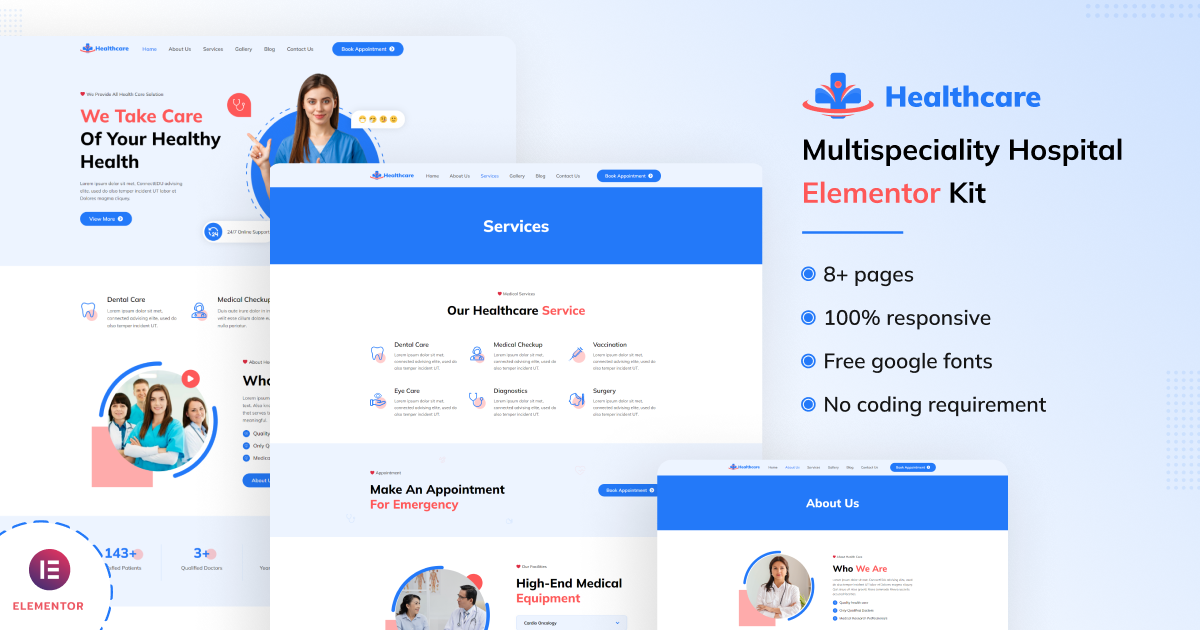
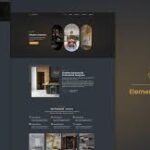
The Healthcare - Multispeciality Hospital Elementor Kit is a pre-designed Elementor template kit that provides an easy and effective way to build a website for a healthcare or multispecialty hospital. This kit is designed to be user-friendly, customizable, and fully responsive, allowing you to create a professional and modern hospital website without any coding knowledge. It includes pre-designed pages, sections, and elements specifically tailored for the healthcare industry, making it a perfect fit for hospitals, clinics, medical centers, or any healthcare-related organization.
Key Features of Healthcare - Multispeciality Hospital Elementor Kit:
- Pre-Designed Healthcare Pages:
- The kit includes a variety of pre-designed pages such as:
- Homepage: An attention-grabbing homepage with sections like service highlights, testimonials, and call-to-action buttons.
- About Us: A page to showcase your hospital's history, values, and mission.
- Services: Dedicated service pages that detail the different medical specialties or healthcare services your hospital offers.
- Doctors' Profile: Pages to display profiles of your medical staff, including their qualifications, specialties, and experience.
- Appointment Booking: A page where patients can book appointments with doctors or request consultations.
- Contact Us: A contact form with location details and a map to make it easy for patients to get in touch.
- The kit includes a variety of pre-designed pages such as:
- User-Friendly Elementor Integration:
- This kit is fully compatible with Elementor, one of the most popular drag-and-drop page builders. You don’t need coding skills to customize your site. You can easily drag, drop, and edit elements in real-time using the Elementor editor.
- Modern and Professional Design:
- The Healthcare Elementor Kit has a clean, modern design with a focus on usability. It includes professional layouts, healthcare-related imagery, and sections designed to create trust and credibility for your hospital.
- The design is responsive, ensuring that your website looks great on any device, whether it's a desktop, tablet, or mobile phone.
- Appointments & Booking Integration:
- Many hospital websites feature an appointment booking system where users can book consultations with doctors. This Elementor kit includes ready-made sections for appointments, and it can be integrated with plugins like Bookly, Amelia, or other appointment booking plugins for more advanced functionality.
- The form can be easily customized to match your hospital’s needs.
- Doctor’s Profile Pages:
- Showcase your medical team with individual doctor profile pages. Each profile can feature:
- A photo of the doctor.
- Their name, designation, and specialty.
- Education, experience, and professional background.
- Contact information and available appointment slots.
- This helps build trust and transparency between your healthcare facility and your patients.
- Showcase your medical team with individual doctor profile pages. Each profile can feature:
- Responsive & Mobile Optimized:
- Healthcare Elementor Kit is fully responsive, meaning your site will adapt to any screen size. Whether visitors are on a phone, tablet, or desktop, the site will display beautifully, ensuring a smooth user experience for all.
- SEO Friendly:
- The design is optimized for SEO (Search Engine Optimization), meaning it follows best practices to improve the visibility of your site in search engines like Google. This includes optimized page structure, fast loading speeds, and clean code that allows search engines to crawl and index your website.
- Customizable Design:
- You can easily customize the kit to match your hospital’s branding and aesthetic. You can change colors, fonts, images, and text to personalize the template kit.
- The template kit uses global widgets, meaning you can update the design of elements like headers, footers, and buttons across your entire site at once.
- High-Quality Images & Icons:
- The Healthcare Elementor Kit comes with high-quality images and icons that are relevant to the healthcare industry. These include images of medical equipment, doctors, and healthcare environments, helping to create a professional and trustworthy atmosphere.
- Fully Compatible with WordPress:
- As an Elementor kit, it is designed to work seamlessly with WordPress, making it easy to set up and manage your website on the world’s most popular content management system.
- Fast and Lightweight:
- The kit is built with performance in mind, ensuring that your website loads quickly. This is important for both user experience and SEO, as faster sites are ranked higher by search engines.
- Support & Documentation:
- The kit comes with detailed documentation that walks you through the installation and customization process. Plus, you get support if you run into any issues while setting up the website.
- Multiple Layout Options:
- The kit provides multiple layout options for different sections, like service listings, testimonials, and team profiles. You can mix and match these sections to create a unique design that fits your hospital’s branding.
How to Use the Healthcare – Multispeciality Hospital Elementor Kit:
- Install WordPress & Elementor:
- Make sure you have WordPress installed on your website. After that, you need to install the Elementor page builder plugin if you haven’t already.
- Elementor has both a free version and a Pro version. Some advanced widgets may require the Pro version, but the kit works well with the free version as well.
- Install the Healthcare Elementor Kit:
- Upload the Healthcare Elementor Kit files to your WordPress website. You can do this by going to Appearance > Themes > Add New, and then installing the kit as you would with a regular WordPress theme or template.
- Follow the documentation that comes with the kit to ensure proper installation.
- Import Demo Content:
- The kit typically offers a one-click demo import feature. This feature helps you import pre-designed content so that your site will look like the demo version right away, making it easier for you to start editing.
- Customize Pages with Elementor:
- Open the Elementor editor to start customizing your website. From the pre-designed templates, you can edit the text, images, and layout to match your hospital’s specific offerings and branding.
- You can drag and drop sections, such as service blocks, team profiles, and call-to-action buttons, and customize them to suit your needs.
- Set Up Appointment Booking:
- Customize the appointment booking form and integrate it with a booking plugin if desired (e.g., Bookly or Amelia). This will allow users to book appointments with your hospital’s specialists online.
- Add Doctor Profiles & Services:
- Create pages for individual doctors and their specialties. Add information such as qualifications, services they offer, availability, and contact details.
- You can also use the service pages to list all of the healthcare services provided by your hospital.
- Optimize for SEO:
- Install an SEO plugin like Yoast SEO or Rank Math and optimize your website for search engines. Ensure that your services, doctor profiles, and contact details are properly structured and optimized for search queries related to healthcare.
- Mobile Optimization:
- Review your site on multiple devices to ensure it is mobile-friendly. Make any necessary adjustments to ensure the best experience for mobile visitors, as a significant portion of users will visit your hospital website from smartphones.
- Publish & Promote:
- Once everything is set up, publish your site and start promoting it. You can link it to your hospital’s social media accounts, share it in newsletters, and encourage patients to schedule appointments or contact you through the site.