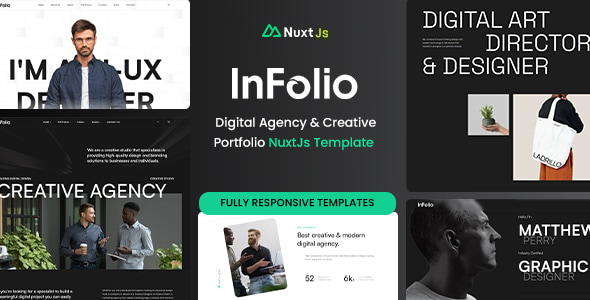


Infolio - Digital Agency & Creative Portfolio Nuxt.js Template is a modern, clean, and fully responsive Nuxt.js-based template designed for digital agencies, creative portfolios, and businesses looking to showcase their work and services. Built using Nuxt.js, a powerful Vue.js framework, this template is optimized for fast performance, SEO, and a seamless user experience. It's particularly suited for developers, designers, and agencies who want to quickly launch a professional online presence.
Key Features of Infolio - Digital Agency & Creative Portfolio Nuxt.js Template:
- Fully Responsive Design:
- Infolio is designed to work perfectly on any screen size, ensuring that your website looks great on desktops, tablets, and smartphones. It uses modern front-end frameworks and responsive design principles to adapt to different devices.
- Built with Nuxt.js:
- The template is powered by Nuxt.js, which is a popular framework for building Vue.js applications. Nuxt.js offers features like server-side rendering (SSR), static site generation (SSG), and automatic code splitting, making it ideal for performance and SEO optimization.
- Modern Design & Clean Aesthetic:
- Infolio features a clean, minimalist design with a focus on imagery, typography, and interactive elements. It’s designed to provide an elegant, professional look for your agency or portfolio.
- SEO Optimized:
- Nuxt.js supports server-side rendering (SSR) and static site generation (SSG), which makes Infolio highly SEO-friendly. This ensures that your website’s pages are properly indexed by search engines, improving visibility in search results.
- Pre-Built Pages:
- The template comes with several pre-designed pages, including:
- Homepages for showcasing your agency or portfolio in a striking and modern way.
- About Us page to describe your agency or team.
- Services page to showcase your offerings.
- Portfolio page to display your projects, works, or case studies.
- Contact page with forms to allow potential clients to reach you.
- Blog page for content marketing and sharing updates.
- The template comes with several pre-designed pages, including:
- Creative Portfolio Showcase:
- The portfolio section is designed to display your creative work beautifully, with grid layouts, hover effects, and filtering options. It’s ideal for photographers, designers, developers, and other creatives to showcase their projects.
- Smooth Animations and Interactivity:
- Infolio includes smooth animations and interactive elements to engage visitors. These effects enhance the overall user experience by adding a dynamic feel to the website as users navigate through different sections.
- Customizable and Easy to Use:
- The template is highly customizable. You can easily modify colors, fonts, layout configurations, and content through a clean and well-documented codebase.
- With Nuxt.js and Vue.js powering the template, it's easy for developers to adjust and extend the features to suit their needs.
- Pre-configured with Vuex:
- Infolio comes with Vuex, which is Vue's state management pattern. This allows you to manage your application's state (data) in a central store, making it easier to maintain complex applications.
- Fast Performance:
- Due to Nuxt.js's automatic code-splitting and static site generation, Infolio is optimized for fast loading speeds, which improves user experience and SEO rankings.
- Easy Deployment:
- The template is ready to be deployed to any platform that supports Nuxt.js, such as Netlify, Vercel, Heroku, or traditional web hosts. It also allows easy deployment for both SSR and SSG modes.
- Built-in Forms:
- Infolio includes ready-to-use contact forms that can be easily customized and integrated with form-handling services.
- Support for Light/Dark Mode:
- The template may come with a toggle for switching between light and dark themes, offering a modern and customizable user experience.
- Clean and Well-Structured Code:
- The code is well-organized, easy to read, and follows best practices, making it accessible for developers who want to build on top of the template or customize it further.
- Extensive Documentation:
- Infolio comes with comprehensive documentation to guide you through the installation, customization, and deployment process, ensuring you can get up and running quickly.
Benefits of Using Infolio:
- Fast Loading Speed & Performance:
- Leveraging Nuxt.js's SSR and SSG capabilities, Infolio ensures your site loads quickly, even with large images or content-heavy pages, making it ideal for user experience and SEO.
- SEO-Friendly:
- Server-side rendering means that search engines can easily index your content, which helps improve the visibility of your site on Google and other search engines.
- User-Centric Design:
- With a modern, clean, and visually engaging design, Infolio provides a great first impression, crucial for attracting potential clients or visitors to your agency or portfolio.
- Highly Customizable:
- The template is built with flexibility in mind, so you can adapt it to your needs. Whether you’re a freelancer, a digital agency, or a design studio, Infolio offers a solid foundation to showcase your work.
- Mobile-Friendly:
- Infolio is fully responsive, ensuring that your website looks great on smartphones, tablets, and desktops, which is important for keeping visitors engaged on all devices.
- Great for Agencies & Creatives:
- Infolio is tailor-made for creative professionals and agencies who need a portfolio or a business website with an aesthetic that reflects their work.
- Easy Setup & Deployment:
- With its detailed documentation and easy deployment options, you can set up your site quickly and start customizing it according to your brand.
How to Use Infolio:
- Install Nuxt.js:
- To get started with Infolio, you will first need to set up Nuxt.js on your local development environment. You can install it by following the official Nuxt.js documentation.
- Clone or Download the Template:
- Once Nuxt.js is installed, you can download or clone the Infolio template from a marketplace or GitHub (depending on where it's available).
- Customize the Template:
- Modify the template's settings to suit your needs. You can change the logo, adjust the content, update the portfolio items, and tweak the design to match your brand.
- Add Content:
- Add your agency's or portfolio's content, such as your services, case studies, portfolio items, and team details. You can easily edit these through the template’s structure.
- Deploy the Website:
- Once your customizations are complete, deploy the website to your preferred hosting platform (Netlify, Vercel, or others). You can choose between SSR or SSG deployment based on your requirements.
- Maintain & Update:
- Keep your website up to date by regularly updating the content, adding new projects to the portfolio, and maintaining your Nuxt.js framework.