
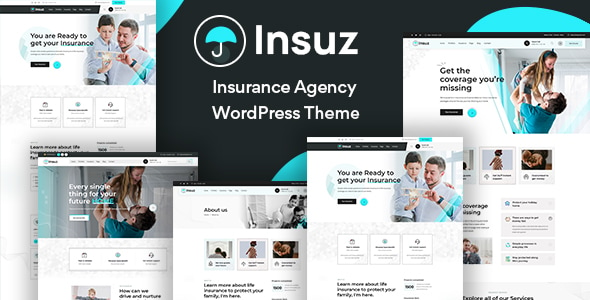

Insuz - Insurance Company WordPress Theme is a premium WordPress theme designed specifically for insurance companies, agencies, and brokers. It provides a professional, visually appealing, and functional design that is perfect for presenting insurance services, plans, and related information on a website.
The theme is fully responsive and optimized for easy customization, making it an ideal choice for any business in the insurance industry, including health, life, auto, or property insurance providers.
Key Features of Insuz - Insurance Company WordPress Theme:
1. Responsive and Mobile-Friendly Design:
- The Insuz theme is designed to work seamlessly on all devices, including desktops, tablets, and smartphones, ensuring your site looks great and functions well on any screen size.
2. Pre-built Demo Pages:
- The theme includes various pre-built pages that make it easy to launch your website. These may include:
- Homepages: Different homepage layouts tailored for various insurance types.
- About Us Page: To provide information about your insurance company, its values, and its team.
- Services Pages: To describe the various insurance services you offer (e.g., life, auto, health).
- Insurance Plans: Display different plans, coverage options, and premium details.
- Blog: To share news, tips, and other relevant content.
- Contact Page: To facilitate inquiries with contact forms and other details like your address and phone number.
3. Insurance Calculator:
- Many insurance websites benefit from having an insurance calculator to help users estimate premiums. Insuz comes with this feature, allowing visitors to calculate the potential costs of various insurance plans.
4. Drag-and-Drop Page Builder:
- The theme is compatible with popular page builders like WPBakery (formerly Visual Composer), making it easy for anyone to build and customize their pages without needing coding knowledge.
5. Multiple Insurance Plan Layouts:
- Showcase your different insurance packages with customizable layouts that allow you to display pricing tables, coverage details, and other relevant information clearly and professionally.
6. SEO Optimized:
- Insuz is built with SEO in mind, helping you rank better in search engines. It includes proper HTML markup, heading tags, and optimized images to improve your website’s visibility.
7. Fully Customizable:
- Customize colors, typography, layouts, and more without needing to touch a single line of code. The theme comes with a theme options panel for easy customization of key settings.
8. One-Click Demo Import:
- The Insuz theme provides a one-click demo import feature, allowing you to quickly set up your site to look like the demo version. This saves a significant amount of time in setting up your website.
9. Multiple Header Styles:
- You can choose from various header styles (sticky header, transparent header, etc.) to customize the header of your website, making it look more modern and professional.
10. Appointment Booking System:
- As an insurance agency, you may need clients to schedule consultations or meetings. The Insuz theme often includes a booking system to help users book appointments directly on your site.
11. Built-in Contact Forms:
- Pre-built contact forms allow potential clients to easily inquire about insurance services or request a quote.
12. Multilingual and RTL Ready:
- The theme is compatible with WPML, allowing you to build a multilingual website to serve customers in different languages. It's also RTL (Right to Left) ready, making it suitable for languages like Arabic and Hebrew.
13. WooCommerce Compatibility:
- If you plan to sell insurance plans directly from your website, Insuz is fully compatible with WooCommerce, enabling you to add products or services to your online store.
14. Custom Widgets:
- The theme comes with several custom widgets such as testimonials, news, latest articles, and social media feeds, making it easier to engage users and display content dynamically.
How to Set Up and Use Insuz - Insurance Company WordPress Theme:
1. Install and Activate the Theme:
- In your WordPress dashboard, go to Appearance > Themes > Add New.
- Upload the Insuz theme file (usually a .zip file) and click Install Now. Once installed, click Activate.
2. Install Recommended Plugins:
- The theme will typically prompt you to install plugins that enhance its functionality, such as:
- WPBakery Page Builder (for building custom pages),
- Contact Form 7 (for adding contact forms),
- WooCommerce (if you plan to sell insurance products),
- Revolution Slider (for creating attractive sliders on your site).
3. Import Demo Content:
- After installing the theme, go to Appearance > Import Demo Data. With a single click, you can import the demo content, which will set up your site to resemble the theme demo.
- This will include demo pages, posts, widgets, and settings, making it easier to get started.
4. Customize the Theme:
- Go to Appearance > Customize to start customizing the theme settings. You can adjust:
- Colors, Typography, and Layout Options,
- Configure your Header and Footer,
- Add your Logo and Favicon,
- Set up your Contact Information and Social Media Links.
5. Create Insurance Plans and Services:
- Create a page for each insurance service you offer (e.g., Life Insurance, Health Insurance, Auto Insurance). You can use the WPBakery Page Builder to design the layout of these pages.
- Use the built-in pricing tables or custom layouts to display your insurance plans clearly.
6. Add Content:
- Replace the demo content with your own information, including your company’s history, team, services, and contact details.
- You can add client testimonials, case studies, or reviews to build credibility and trust.
7. Set Up Appointment Booking:
- If the theme includes an appointment booking system, ensure it’s configured correctly. Customize the form to let users book consultations with your agents.
8. Optimize for SEO:
- Use SEO plugins like Yoast SEO to optimize the pages on your site for search engines.
- Make sure you have meta descriptions, keywords, and alt tags for your images to boost search engine rankings.
9. Test the Website:
- Before launching, test your site on different devices to ensure it’s responsive and works well on mobile devices.
- Test all forms (contact, booking, etc.) and ensure everything is working smoothly.
10. Go Live:
- Once your website is set up, customized, and tested, it’s time to go live. Promote it through social media, email marketing, and other channels.






























