
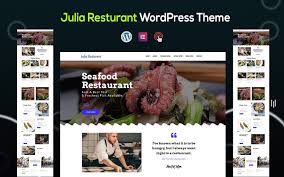

Julia is a beautifully designed Seafood and Restaurant One Page WordPress Theme specifically built for restaurants, seafood businesses, and any establishment in the food and hospitality industry. The theme is sleek, modern, and perfect for showcasing a restaurant’s offerings in an elegant and functional way. With its one-page layout, it is ideal for businesses that want to provide a simple, engaging experience for customers while keeping everything easily accessible on a single page.
Key Features of the Julia Theme:
- One-Page Design:
- Julia is built with a one-page layout, allowing all your essential content to be displayed on a single scrollable page. This is perfect for a clean, minimalist approach, ensuring customers can find everything they need (menus, location, contact, etc.) without navigating through multiple pages.
- Seafood & Restaurant Focused:
- Designed specifically for seafood restaurants, this theme includes visual elements like marine-inspired colors, textures, and design accents that tie in with the theme of seafood and dining. It gives your website a fresh, oceanic vibe that fits the ambiance of a seafood restaurant.
- Menu Display:
- The Julia theme has a beautifully organized menu section, allowing you to showcase your dishes with images, descriptions, and prices. Whether you want to highlight your seafood platters, specials, or drinks, it’s easy for customers to explore your offerings.
- Smooth Parallax Scrolling:
- Parallax scrolling is included in the theme, creating a dynamic and engaging user experience. As users scroll down the page, they get a visually rich experience, which adds depth and sophistication to your website.
- Online Reservation Form:
- The theme includes a reservation form feature that allows customers to easily book a table at your restaurant. The form can be customized to fit your specific needs (such as date, time, number of guests, etc.), making it simple for customers to plan their visit.
- Contact Information & Google Maps Integration:
- Julia includes a section for contact information, where you can add your phone number, email, and address. Additionally, it integrates Google Maps, making it easy for visitors to find your restaurant’s location, especially if you’re in a busy area or want to help customers easily navigate to your place.
- Mobile Optimized:
- The theme is fully responsive, ensuring that your website looks amazing on smartphones, tablets, and desktops. Given the rise of mobile browsing, the mobile optimization ensures that your customers will have a smooth experience no matter how they access your site.
- Social Media Integration:
- Julia comes with social media integration, so you can link your Instagram, Facebook, or other social profiles directly to your website. You can also display your latest social media posts or images, which helps engage visitors and encourage them to follow your brand.
- Customizable Layout & Sections:
- With easy-to-use customization options, you can change the layout and design elements of your website to suit your brand identity. You can customize colors, fonts, backgrounds, and images to reflect the ambiance and style of your restaurant.
- High-Quality Image Display:
- Julia offers high-quality image display options, allowing you to showcase your delicious seafood dishes and restaurant atmosphere in full detail. The theme supports large image galleries and sliders, making it easy to highlight your best dishes or popular menu items.
- SEO Optimized:
- Built with SEO best practices in mind, Julia is optimized to help your website rank higher in search engine results. This will make it easier for new customers to discover your restaurant when searching for seafood dining options or restaurants in your area.
- Blog Section:
- You can integrate a blog section to post about new seafood dishes, special events, promotions, or share recipes and restaurant news. This is a great way to engage with your audience and build a community around your restaurant.
- Call-to-Action (CTA) Buttons:
- The theme includes strategically placed call-to-action buttons like “Reserve Now” or “Order Online” that make it easy for customers to take action. Whether it’s making a reservation, ordering food online, or checking out your menu, the CTAs guide visitors to engage with your site.
- Fast Performance:
- Julia is optimized for speed and performance. This ensures that your site loads quickly and offers a smooth browsing experience. Fast load times help improve the user experience and can positively impact your SEO rankings.
- Retina Ready:
- With retina-ready support, images on your site (like food photos, menu items, and restaurant visuals) will appear crisp and clear, even on high-resolution devices like the latest smartphones or tablets.
- Regular Updates & Support:
- Julia comes with regular updates to ensure compatibility with the latest WordPress versions. Additionally, it includes customer support to help you if you run into any issues with the theme or need help customizing the layout.
How to Set Up the Julia Theme:
- Install WordPress & Theme:
- First, make sure you have WordPress installed on your website. In your WordPress dashboard, go to Appearance > Themes, click Add New, upload the Julia theme ZIP file, and activate it.
- Import Demo Content:
- Julia comes with a one-click demo import feature. This allows you to quickly import pre-designed content, including sections like your menu, reservation form, and contact info. You can then customize it with your restaurant’s details.
- Install Required Plugins:
- Install any required plugins, such as WooCommerce (if you plan to offer online ordering or deliveries), Contact Form 7 (for contact forms), and any other recommended plugins that enhance the theme’s functionality.
- Customize the Theme:
- Use the WordPress Customizer or Elementor (if you prefer a drag-and-drop page builder) to adjust your site’s colors, fonts, images, and layout to reflect your brand. You can customize sections for the menu, reservation form, contact info, and more.
- Add Your Content:
- Add your own menu items, restaurant details, high-quality images, and reservation information. You can easily edit the content directly from the WordPress dashboard.
- Set Up Reservation & Contact Forms:
- Customize and configure your reservation form to allow customers to easily book a table. Additionally, set up a contact form to handle inquiries, feedback, or any other customer communication.
- Optimize for SEO:
- Install an SEO plugin like Yoast SEO or RankMath to optimize your site for better search engine rankings. Add meta descriptions, keywords, and other SEO elements to improve your visibility.
- Test Your Site:
- Before launching, test your site on various devices to make sure it’s responsive and looks great on all screen sizes. Check the reservation system, contact forms, and all functionality to ensure everything is working smoothly.
- Launch & Promote:
- Once you're satisfied with the setup, launch your website and start promoting it on social media, via email marketing, and through other channels. Encourage customers to make reservations, check out your menu, and visit your restaurant.






























