
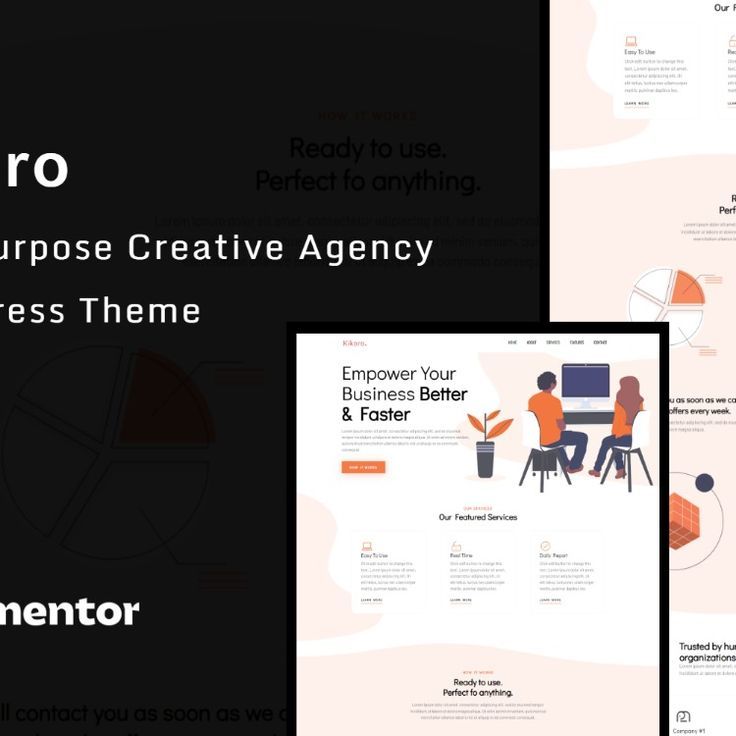

Kikoro is a WordPress theme designed for creative agencies, freelancers, and design studios. It provides an elegant and modern design with powerful features to help you build a professional website for your creative business. Whether you’re offering graphic design, web development, branding, digital marketing, or any other creative service, Kikoro has the flexibility and tools you need to showcase your work and attract new clients.
Key Features of the Kikoro Theme:
- Sleek & Modern Design:
- Kikoro features a contemporary and stylish design that exudes creativity. The theme has clean lines, bold typography, and a minimalist layout, which makes it perfect for any creative agency or portfolio. The design is user-friendly and keeps the focus on your work and services.
- Multiple Pre-Built Demos:
- The theme comes with several demo layouts that you can import with a single click. This helps you get your site up and running quickly with pre-designed templates. Whether you want a one-page or multi-page website, Kikoro offers a variety of options to suit your needs.
- Drag-and-Drop Page Builder (Elementor):
- Kikoro is compatible with Elementor, one of the most popular page builders for WordPress. This means you can easily create custom layouts and pages using the drag-and-drop interface, without needing any coding skills. You can create stunning landing pages, portfolios, service pages, and more with ease.
- Portfolio Showcase:
- The portfolio section of Kikoro is perfect for showcasing your work in a beautiful and organized manner. The theme offers various portfolio layouts, including grid, masonry, and carousel styles. You can display high-quality images, videos, and project details, giving potential clients a thorough look at your past work.
- Service Pages:
- Kikoro provides dedicated service pages where you can showcase your agency's offerings. You can create detailed descriptions of the services you provide, include pricing tables, and even display client testimonials to help build trust with prospective clients.
- Creative Blog Layout:
- The theme comes with a blog layout, so you can share industry news, creative tips, case studies, and other content related to your agency. Blogging is a great way to engage with your audience, boost SEO, and establish yourself as an authority in your field.
- Smooth Scrolling & Parallax Effects:
- Kikoro includes smooth scrolling and parallax effects, which give your site a modern and dynamic feel. These features make navigating your website a more engaging and visually appealing experience.
- Responsive & Mobile-Friendly:
- The theme is fully responsive, meaning it adapts to all screen sizes, from desktops to smartphones and tablets. This ensures that your website will look great and function properly on any device, which is important for delivering a great user experience.
- SEO Optimized:
- Kikoro is built with SEO best practices in mind, including fast-loading pages, clean code, and structured data. This helps improve your site’s ranking on search engines, making it easier for potential clients to find your agency online.
- One-Click Demo Import:
- With the one-click demo import feature, you can quickly set up your website to match the demo version of the theme. This saves you time in the setup process and ensures that your site has the same design and layout as the theme demo.
- Customizable Header & Footer:
- You can easily customize the header and footer sections to match your brand identity. Add your logo, contact info, social media links, and other important elements to create a cohesive look across your site.
- Testimonials & Client Logos:
- Kikoro includes sections for client testimonials and client logos, which are important for building social proof and credibility. You can showcase positive feedback from previous clients and display logos of companies you've worked with, helping potential clients feel confident in your abilities.
- WooCommerce Compatibility:
- If you plan to sell products or services through your website, Kikoro is fully compatible with WooCommerce. This allows you to create an online store for your creative agency, whether you're selling digital products, design templates, or service packages.
- Multiple Header Styles:
- The theme offers several header styles, including options for a sticky header, a full-width header, or a minimal header, giving you the flexibility to choose the one that best fits your website's design.
- Advanced Theme Options:
- Kikoro includes an advanced theme options panel where you can customize various elements of your website, such as typography, color schemes, layouts, and more. You don’t need any coding knowledge to make these changes.
- Built for Speed:
- The theme is optimized for fast loading times to ensure that your website performs well and provides a great user experience. Speed is important for keeping visitors engaged and improving SEO rankings.
- Regular Updates & Dedicated Support:
- Kikoro is regularly updated to stay compatible with the latest version of WordPress and plugins. You also have access to dedicated customer support to help you with any issues or questions that arise during the setup or use of the theme.
How to Set Up the Kikoro Theme:
- Install WordPress & Theme:
- Start by installing WordPress on your hosting account. Once that's done, go to the Appearance > Themes > Add New section in the WordPress dashboard, upload the Kikoro theme ZIP file, and activate it.
- Import Demo Content:
- After activating the theme, you can use the one-click demo import feature to quickly import the demo content and get your website up and running with the default layout. This saves you time and helps you get a feel for how the theme will look with content.
- Install Required Plugins:
- Install the recommended plugins, including Elementor (for page building), WooCommerce (if selling products), Contact Form 7 (for forms), and any other plugins suggested by the theme. These plugins will extend the functionality of your website.
- Customize the Theme:
- Use the WordPress Customizer to adjust the global settings for your website, such as colors, fonts, and logos. You can also modify the theme’s layout, typography, and design elements from the theme settings panel.
- Add Your Content:
- Customize the pre-built pages, such as Portfolio, Services, About, and Contact, to reflect your business. Add your portfolio items, details of your services, team members, and any other relevant information.
- Set Up Your Shop (if applicable):
- If you plan to sell products or services, you can set up WooCommerce to manage products, payments, and shipping. Add products to your store, configure payment gateways, and set up shipping options to complete your eCommerce functionality.
- Test Your Website:
- Test your website to make sure all the features are working properly, including contact forms, navigation menus, and portfolio galleries. Check that your site looks great on both desktop and mobile devices.
- Launch & Promote:
- Once you're happy with the design and functionality of your site, you're ready to launch! Share your website with your audience on social media, start creating content for your blog, and promote your services to attract clients.






























