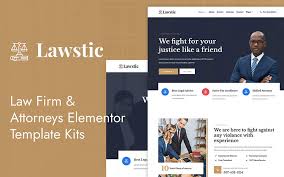


The Lawstic - Lawyer Services Ready to Use Elementor Kit is a comprehensive Elementor Template Kit specifically created for law firms, attorneys, and legal service providers. This kit provides all the essential templates and elements to help lawyers and law firms build a professional and functional website quickly and easily. It is designed to work with Elementor, the popular drag-and-drop page builder for WordPress, so no coding knowledge is needed to customize it.
Key Features of the Lawstic Elementor Kit:
- Pre-Designed Pages:
- The Lawstic kit includes ready-to-use templates for various important pages that law firms typically need. Some of the key templates include:
- Home Page: A sleek and professional landing page to introduce your services and firm.
- About Page: A page to showcase your firm’s history, mission, and team.
- Services Page: A dedicated page to list and describe the different legal services you offer, such as family law, criminal defense, corporate law, etc.
- Attorney Profile Page: Individual pages for each lawyer in your firm, highlighting their qualifications, expertise, and experience.
- Blog Page: A space to share legal insights, news, and helpful content to engage your audience.
- Contact Page: A contact form, office address, phone number, and other contact details to help potential clients reach you.
- Testimonials Page: Showcase reviews and positive feedback from clients to build credibility and trust.
- The Lawstic kit includes ready-to-use templates for various important pages that law firms typically need. Some of the key templates include:
- Fully Customizable with Elementor:
- The Lawstic kit is built for Elementor, meaning you can easily drag and drop elements to customize the templates according to your needs. You don’t need any coding skills—just a basic understanding of how to use Elementor’s intuitive editor.
- Mobile-Friendly & Responsive:
- All templates in the Lawstic kit are fully responsive, meaning your website will look great on desktops, tablets, and mobile devices. This is crucial for law firms, as clients may browse your website from various devices.
- One-Click Demo Import:
- Lawstic includes a one-click demo import feature, allowing you to quickly set up your website with the exact same layout, content, and structure as the demo site. This helps save time when setting up your website, as you can immediately begin editing the demo content to fit your needs.
- Clean, Professional Design:
- The design of Lawstic is modern and professional, providing a trustworthy look that is ideal for law firms. The color scheme, typography, and layout are clean and simple, allowing your services to take center stage.
- Attorney & Legal Service Highlight:
- The kit is tailored to highlight lawyers and legal services, with templates specifically designed for attorney profiles and descriptions of practice areas. This helps potential clients learn more about your expertise and what you offer in a clear, structured format.
- Blog & Content Marketing:
- Lawstic provides a blog template where you can post legal articles, updates, and tips. This is a great way to showcase your firm’s knowledge and establish authority in your practice areas. Posting helpful content can also improve your site’s SEO.
- SEO Optimized:
- The Lawstic kit is built with SEO best practices in mind, ensuring that your website is optimized for search engines. This makes it easier for clients to find your law firm when searching online for legal services.
- Call-to-Action (CTA) Integration:
- The theme includes strategically placed call-to-action buttons to encourage visitors to take the next step, such as scheduling a consultation or contacting your firm. These CTAs are designed to guide users smoothly through your site and lead them toward conversion.
- GDPR Compliant:
- Lawstic follows GDPR compliance, which is important for firms operating in areas with strict privacy and data protection laws (like the EU). You can customize cookie consent banners and data protection measures to ensure your website complies with relevant regulations.
- Customizable Header & Footer:
- Customize your header and footer with your firm’s branding, including logos, contact information, social media icons, and any other important details that should appear across all pages.
- Fast & Lightweight:
- Lawstic is built to be lightweight and fast, which improves both the user experience and your website’s SEO. Fast load times are critical for retaining visitors and improving your Google ranking.
How to Set Up the Lawstic Elementor Kit:
- Install WordPress & Elementor:
- To use Lawstic, you’ll first need to install WordPress (if you haven’t already). Then, install the Elementor plugin from the WordPress plugin repository. The free version of Elementor will work, but Elementor Pro provides additional functionality and widgets that might be useful.
- Import the Demo Content:
- Once you’ve installed the Lawstic Elementor Kit, you can easily import the demo content using the one-click demo import feature. This will set up the structure and layout of your website similar to the demo, giving you a solid starting point.
- Customize the Templates:
- After importing the demo content, go to Elementor > Templates in your WordPress dashboard and begin customizing the pre-built pages. You can change text, images, colors, and other elements to match your branding.
- Set Up Your Legal Services Pages:
- Start by filling out the services pages with details about the legal services you offer. Create a separate page for each practice area (e.g., family law, personal injury, criminal defense, etc.) and provide descriptions, pricing, and any relevant information.
- Create Attorney Profiles:
- Customize the attorney profile pages by adding your team members’ bios, photos, qualifications, and areas of expertise. These pages help clients get to know the lawyers they might work with.
- Add Client Testimonials:
- Include client testimonials on your site to build trust with potential clients. Add positive reviews, case studies, or client success stories to highlight the impact your firm has had.
- Optimize for SEO:
- Install an SEO plugin like Yoast SEO or Rank Math to optimize your pages and blog posts. Add appropriate keywords, meta descriptions, and alt text for images to help improve your search engine rankings.
- Customize Contact Forms:
- Lawstic comes with contact forms that allow potential clients to get in touch with your firm. Customize the form fields to match your firm’s needs, whether it’s for general inquiries, scheduling consultations, or other services.
- Launch Your Website:
- After finalizing your content and design, test your site to ensure that everything works smoothly. Make sure your forms, booking system (if applicable), and contact information are all functioning properly before launching your site.