
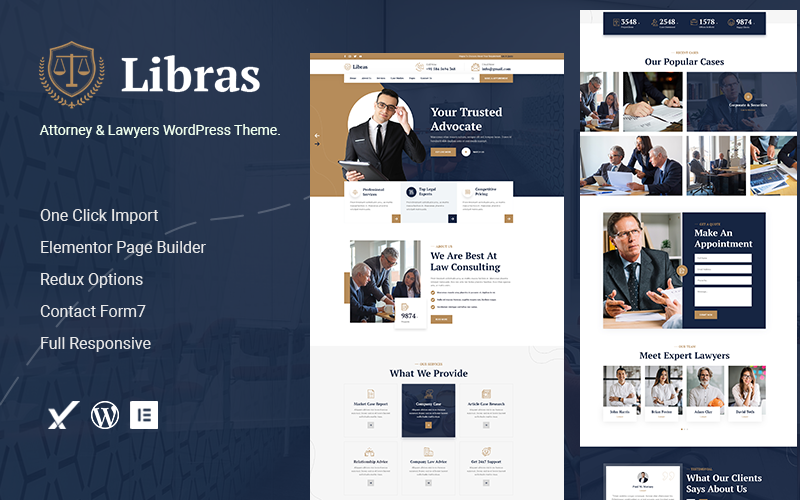


Libras is a WordPress theme designed specifically for attorneys, lawyers, and law firms. It offers a clean, professional, and modern design that helps legal professionals create a credible, trustworthy online presence. With pre-designed pages and features tailored for legal services, Libras is a great option for anyone looking to build a law-related website without the need for coding skills.
Key Features of the Libras Theme:
- Modern, Professional Design:
- Libras offers a sleek, professional design with a clean, polished look, perfect for law firms and legal professionals. It combines a modern aesthetic with easy-to-read typography, ensuring that your site looks professional and credible.
- Pre-Built Demo Content:
- The theme includes demo content that you can import with a single click. This feature helps you quickly set up your website with the same structure and layout as the demo site, so you don’t have to start from scratch. Once imported, you can easily customize the content to fit your firm.
- Customizable Pages:
- Libras comes with pre-designed pages specifically built for law firms and legal services, including:
- Home page: A clean, professional introduction to your firm.
- About page: Details about your law firm’s history, mission, and values.
- Service pages: A space to highlight the different areas of law you specialize in (e.g., family law, criminal law, corporate law).
- Attorney profile pages: Dedicated profiles for each lawyer at your firm, showcasing their qualifications, experience, and practice areas.
- Blog page: An area for sharing legal updates, tips, or thought leadership articles.
- Contact page: A contact form, office address, and other important details for potential clients to get in touch.
- Libras comes with pre-designed pages specifically built for law firms and legal services, including:
- Attorney Profiles:
- Libras makes it easy to create individual attorney profile pages. Each profile can include a lawyer’s bio, credentials, areas of expertise, contact information, and more, helping clients learn about the attorneys who will be handling their cases.
- Case Studies & Testimonials:
- Libras includes testimonial sections to showcase positive client feedback. In addition, you can highlight case studies or successful outcomes to help establish trust and credibility with prospective clients.
- Service Showcase:
- Highlight your legal services in a clear and organized manner. You can create separate pages for each of your practice areas, providing detailed descriptions and the specific services you offer. This helps potential clients understand how you can help them.
- WooCommerce Compatibility:
- Libras is fully compatible with WooCommerce, allowing you to set up a payment system on your website if you wish to sell legal resources, consultations, or other services directly through your site.
- SEO Optimized:
- The theme is built with SEO best practices in mind, making it easier for your site to rank well in search engines. It also works well with SEO plugins like Yoast SEO or Rank Math, helping improve your search engine visibility and driving more traffic to your site.
- Responsive & Mobile-Friendly:
- Libras is fully responsive, ensuring that your site looks great and works smoothly on all devices, from desktops to mobile phones. This is crucial for ensuring a seamless user experience for potential clients who may access your site on their smartphones or tablets.
- Contact Forms & Appointment Booking:
- The theme includes custom contact forms that allow potential clients to reach out to your law firm directly. Additionally, you can integrate appointment booking systems to help clients schedule consultations with your attorneys.
- Customizable Header & Footer:
- Libras offers a variety of options for customizing the header and footer of your site. You can add your firm’s logo, contact details, social media links, and any other important information that you want to display on every page.
- GDPR Compliant:
- Libras is designed to be GDPR-compliant, which is important for law firms operating in regions with strict data protection laws (e.g., the EU). It ensures that your website meets the necessary privacy and cookie consent regulations.
- Custom Widgets:
- The theme includes several custom widgets, such as recent blog posts, client testimonials, lawyer profiles, social media feeds, and more, which you can use to enhance your site’s functionality and appearance.
- Fast Loading Speed:
- The theme is optimized for fast loading speeds, which is crucial for both user experience and SEO. A fast website ensures that visitors stay engaged and that your site ranks better on search engines.
- Regular Updates & Support:
- Libras comes with regular theme updates to ensure compatibility with the latest WordPress version and features. Additionally, it includes access to customer support, which can assist you with any issues you may encounter during setup or customization.
How to Set Up the Libras Theme:
- Install the Theme:
- After purchasing and downloading the theme, go to your WordPress dashboard and navigate to Appearance > Themes > Add New. Upload the ZIP file and activate the theme.
- Import Demo Content:
- To make the setup easier, you can import the demo content by using the one-click demo import feature. This will add all the pre-built pages, layouts, and content from the demo site.
- Install Recommended Plugins:
- The theme may recommend certain plugins for full functionality. Install plugins like WPBakery Page Builder (if required), WooCommerce (for selling services), Contact Form 7 (for creating contact forms), and any others needed for specific features.
- Customize Your Site:
- Go to Appearance > Customize to adjust your site’s colors, fonts, logos, header, footer, and other design elements. You can also edit individual pages using the WordPress Block Editor or a page builder like WPBakery.
- Add Your Content:
- Start by adding content to the pre-built pages. Add information about your legal services, attorneys, testimonials, and any other relevant content. You can easily edit the demo content to fit your firm’s branding.
- Optimize for SEO:
- Use an SEO plugin like Yoast SEO to optimize your site’s pages, posts, and metadata. Focus on relevant keywords related to your practice areas and legal services to help improve your search engine rankings.
- Add Forms & Appointment Bookings:
- Set up contact forms and appointment booking systems to allow potential clients to reach out and book consultations. You can use plugins like Contact Form 7 or Bookly for these features.
- Launch Your Site:
- After customizing your website and ensuring everything is working (forms, contact info, responsiveness), you can officially launch your site!






























