
Premium Category Products

Lollipop – Image Editor

Lollipop – Image Editor

Lollipop - Image Editor

Live Demo: Lollipop - Image Editor Live Demo

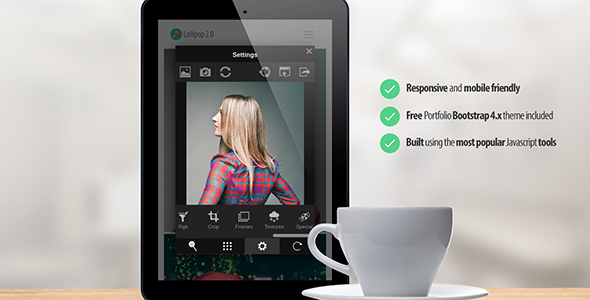
Lollipop is a powerful and versatile image editing tool built with cutting-edge HTML5, CSS3, and JavaScript technologies. This standalone editor provides a user-friendly interface for cropping, applying filters, adjusting images, and sharing them on social media. Whether you're a developer looking to integrate image editing into your website or a user seeking a simple yet effective way to enhance your photos, Lollipop offers a comprehensive solution.

Product Overview

Lollipop leverages the latest web technologies, including ES6 and jQuery, to deliver a smooth and responsive editing experience. The package includes pre-built components and features, allowing you to quickly customize and deploy the editor within your projects. With Lollipop, you can seamlessly edit images directly in your browser, eliminating the need for complex software installations or plugins.

Modern Design and User Experience

Lollipop boasts a modern and intuitive user interface that is both visually appealing and easy to navigate. The editor is designed with user experience in mind, featuring a clean layout, clear instructions, and intuitive controls. Whether you're a seasoned image editor or a beginner, Lollipop's user-friendly design will make it simple to achieve your desired results.

Main Features and Capabilities

Lollipop offers a wide range of features to empower you to edit and enhance your images:

  • Crop: Precisely crop your photos to the desired dimensions and aspect ratio.
  • Social Share: Easily share your edited photos directly to popular social media platforms.
  • Export: Save your edited images in various formats and resolutions.
  • Portfolio: A responsive portfolio theme built with Bootstrap 4.x is included, allowing you to showcase your images in a professional online gallery.
  • Responsive Design: Lollipop is fully responsive and adapts seamlessly to different screen sizes, ensuring a consistent editing experience across devices.
  • Gallery: Import images directly from your device's gallery.
  • Drag and Drop: Upload images and URLs effortlessly using the drag-and-drop functionality.
  • URL: Load images from URLs, whether they are hosted on your server or external websites.
  • Webcam: Capture photos directly from your webcam for real-time editing.
  • Standalone: Launch Lollipop with any image by modifying the "src" parameter in the URL.
  • Easy Integration: Integrate Lollipop into your projects with minimal JavaScript code.
  • 90+ Filters: Explore a vast library of over 90 filters, including Instagram-inspired effects, to enhance the aesthetic appeal of your images.
  • Real-Time Filters: Experience the magic of real-time filter preview as you adjust your photos.
  • Swiping: Navigate through filters effortlessly with simple swipe gestures.
  • Adjustment Tools: Fine-tune your images with comprehensive adjustment tools for brightness, contrast, saturation, noise, sharpness, blur, vignette, and RGB customization.
  • Transform Tools: Rotate, flip, and transform your photos with precision.
  • Overlay Effects: Add frames, textures, and other overlays to create unique and artistic effects.

PHP Helper Class

A handy PHP helper class is included, simplifying image uploading to your server and retrieval.

Files Included

  • Portfolio theme
  • JavaScript integration file (lollipop-integrate.js)
  • PHP Upload Script (saveImage.php) and example for AJAX uploading (used by the portfolio website)
  • PHP Fetch Script (getImage.php) for images on external servers (enabledCORS: true)

Ideal Use Cases

  • Website Developers: Integrate image editing capabilities into your websites, allowing users to customize and enhance their content.
  • Bloggers and Content Creators: Easily edit and improve photos for your blog posts, social media updates, and online portfolio.
  • E-commerce Businesses: Offer customers the ability to edit product images before purchasing, enhancing their shopping experience.
  • Photographers and Designers: Utilize Lollipop for quick edits, retouching, and creating visual content for your projects.

Who Should Use This Product?

Lollipop is a versatile tool suitable for a wide range of individuals and businesses, including:

  • Web developers seeking to add image editing functionality to their websites.
  • Bloggers and content creators who need to enhance their visual content.
  • E-commerce businesses looking to improve the customer experience.
  • Photographers and designers requiring a quick and efficient image editing solution.
  • Anyone who wants to edit and share photos easily and effectively.

Installation and Setup Guide

Installing and setting up Lollipop is straightforward:

  1. Download the Lollipop package.
  2. Unzip the package and access the HTML files.
  3. Include the JavaScript integration file (lollipop-integrate.js) in your project.
  4. Follow the provided documentation for specific integration instructions based on your platform.

Important Product Information

  • Lollipop is a standalone image editor that can be used without any client-side or server-side frameworks.
  • It is compatible with modern web browsers.
  • The package includes a responsive portfolio theme for showcasing your edited images.
  • PHP helper scripts are provided for server-side image handling.

Final Conclusion

Lollipop is a powerful and user-friendly image editor that empowers you to enhance your photos with ease. Its modern design, comprehensive features, and seamless integration capabilities make it an ideal choice for developers, bloggers, photographers, and anyone who needs a reliable and efficient image editing solution.

Category: Premium

(Only For Premium Category Products !)

1. All digital products are the most recent version, with no possibility of free updates. After payment, you can request an update to the most recent version for 5 days if a new version is released. We free support within 5 days.

2. If a license is required (Excludes WHMCS license , we provide only method not license), please contact us via email or ticket for assistance with activation. Our license is only valid for activation and does not include support.

3. We provide Mobile, PHP script installation services for $19.90 / ₹1700. Please create a backup after installation as we do not support re-installation. For mobile app source code, we do not offer installation services.

4. If you have any questions, please contact us by email  or create a ticket on this page

5. Please note that any digital products presented on the website do not contain malicious code, viruses or advertising. You will receive the original files from the developers. We do not sell any products that have been downloaded from other websites.

6. The response time can last up to 6 hours.

(Only For Membership Category Products !)

Benefits of our Membership Plans

  • Instant access to all plugins and all themes including all future releases
  • Unlimited domain usage
  • Regular Updates as of when available. Usually, updates are released daily.
  • Before purchasing, please read the Terms and Conditions & Refund Policy.
  • If you have any questions, please first read the FAQs.
  • If you haven’t found the answer to your question, please contact us, and we will respond ASAP.
  • Please note that any digital products on the website do not contain malicious code, viruses, or advertising. We buy the original files from the developers. We do not sell any products downloaded from other sites.
  • Buy or download for FREE by subscribing to our VIP Membership Plan. Join the club of more than 1100+ happy members. This is the same theme as sold by the developer.

Updates:

  • We offer frequent updates for one year from the date of purchase. After this period, you have to purchase the item again to receive further updates, we also offer lifetime updates as a second option.
  • We regularly update products as soon as we are notified about an update, we go and download it from the author and update it on our site, but In case the current version of the product is not the latest, You can request an update for the product by contact form.
  • We send regular emails advising when products have been updated so please be sure to provide an active email address when you sign up.

Support:

  • Our support team is available 24/7, if you have any questions or need help in installing or configuring digital products purchased on the website, please don’t hesitate to contact form.
  • Please note that we are not developers of the provided products, so our technical support capabilities are limited. We do not change product functionality and do not fix developer bugs.

For more information please read FAQs & About Us.

(Only For WHMCS Category Products !)

  • We Only provide WHMCS Module, how you can  nulled any module step only !
  • Instant access to all plugins and all themes 
  • Unlimited domain usage
  • Regular Updates as of when available. Usually, updates are released daily.
  • Before purchasing, please read the Terms and Conditions & Refund Policy.
  • If you have any questions, please first read the FAQs.
  • If you haven’t found the answer to your question, please contact us, and we will respond ASAP.
  • Please note that any digital products on the website do not contain malicious code, viruses, or advertising. We buy the original files from the developers. We do not sell any products downloaded from other sites.

More Like This Products