
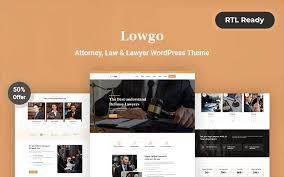

Lowgo is a WordPress theme designed specifically for law firms, attorneys, and legal services. Whether you're a solo practitioner or part of a large law firm, Lowgo offers a professional, clean, and modern design to showcase your legal expertise, services, and team. This theme is perfect for businesses in the legal sector who want to create a strong online presence, attract new clients, and build trust.
Key Features of the Lowgo Theme:
- Professional & Elegant Design:
- Lowgo offers a sleek, minimalist design that conveys professionalism and trust—two crucial aspects for legal businesses. The design uses modern typography, intuitive layouts, and a structured color scheme to make your site look polished and sophisticated.
- Pre-Built Demo Content:
- Lowgo provides one-click demo import functionality, allowing you to quickly set up your website with the theme’s demo content. This feature saves you time, especially if you want to get your site up and running quickly without starting from scratch.
- Responsive & Mobile-Friendly:
- The theme is fully responsive, meaning your website will look great on all devices (desktops, tablets, smartphones). Given that many clients may browse your site on their mobile devices, this is crucial for providing a seamless experience across platforms.
- Customizable Service Pages:
- Lowgo includes customizable service pages to showcase the various legal services your firm offers. Whether it’s personal injury law, criminal defense, corporate law, or any other legal service, you can create dedicated pages with detailed descriptions, case studies, and calls to action.
- Attorney Profile Pages:
- One of the most important aspects of a law firm website is the ability to showcase your attorneys or legal team. Lowgo comes with professionally designed attorney profile pages that allow you to display individual profiles, including qualifications, experience, specialties, and contact information.
- Case Studies & Testimonials:
- Potential clients often look for evidence of successful outcomes before hiring a lawyer. Lowgo offers a case study section where you can highlight past successful cases. Additionally, you can add testimonials from satisfied clients to build credibility and trust with new visitors.
- Contact Forms & Appointment Scheduling:
- Lowgo integrates with contact forms and appointment scheduling systems, making it easy for potential clients to get in touch or book a consultation. This functionality is essential for turning visitors into clients by making the process of getting in touch with your firm simple and efficient.
- SEO Optimized:
- The theme is built with SEO best practices in mind, helping you rank higher on search engines and reach more potential clients. The clean, well-coded structure makes it easy for search engines to crawl and index your content, which can improve your site’s visibility.
- Advanced Blog Functionality:
- Lowgo includes a blog feature, which allows you to post updates, legal advice, industry news, or other relevant content. Blogging is a great way to establish your law firm as a thought leader in your field, while also improving your site’s SEO.
- Fast Loading Speed:
- With a focus on performance, Lowgo is optimized for fast loading times, which is crucial for user experience and SEO. A slow website can discourage visitors and harm your search rankings.
- Custom Widgets:
- Lowgo includes several custom widgets to add extra functionality to your site. These can include widgets for displaying recent blog posts, popular services, contact information, or team members.
- Google Maps Integration:
- Lowgo supports Google Maps integration, which is useful for displaying your office location on a map. This feature is great for local SEO and providing clients with easy-to-follow directions to your firm.
- Translation & RTL Support:
- The theme is translation-ready and supports Right-to-Left (RTL) languages, which means it can be easily adapted to different languages and regions, making it suitable for global law firms or those working in multilingual markets.
- Customizable Header and Footer:
- The theme offers a wide range of header and footer layout options. You can customize these sections to suit your firm’s brand, and include elements like navigation menus, contact info, social media icons, and quick links.
- Regular Updates & Support:
- Lowgo comes with regular updates to ensure compatibility with the latest WordPress versions and plugins. Additionally, you get access to customer support in case you encounter any issues or need assistance with customization.
How to Set Up the Lowgo Theme:
- Install the Theme:
- After purchasing the theme, download the theme ZIP file. Go to Appearance > Themes > Add New in your WordPress dashboard. Upload the ZIP file, and click Activate.
- Import Demo Content:
- To speed up the setup process, you can use the one-click demo import feature. This will load pre-designed content and layouts, giving you a good starting point to customize your site. Go to Appearance > Import Demo Data and follow the instructions.
- Install Recommended Plugins:
- Lowgo may require or recommend certain plugins (like Elementor, Contact Form 7, WooCommerce, or WPBakery Page Builder) for full functionality. Install these plugins as per the theme’s guidelines to ensure everything works correctly.
- Customize Your Site:
- Use the WordPress Customizer (found under Appearance > Customize) to modify your site’s colors, typography, logo, header, footer, and other design elements. This allows you to adjust the look and feel to align with your firm’s branding.
- Create Service Pages:
- Go to Pages > Add New and start adding your services. Each service page should include detailed information about the service you provide, any case studies or examples of your work, and a clear call to action (e.g., "Get in touch for a consultation").
- Build Attorney Profiles:
- Go to the Attorney Profile section and create pages for each member of your team. Include professional images, bios, qualifications, and contact details so potential clients can learn more about your attorneys’ expertise.
- Set Up Contact Forms:
- Customize the contact forms to allow visitors to reach out to your firm. You can include fields like name, email, phone number, and the nature of the legal issue. If you provide consultations, set up an appointment booking system as well.
- Add Testimonials and Case Studies:
- Build testimonials and case study pages to share feedback from satisfied clients and highlight successful cases. This can help build trust and provide social proof of your firm's capabilities.
- Start Blogging:
- Set up a blog section and begin publishing articles that offer legal advice, tips, or industry news. This is a great way to engage with potential clients and boost your site's SEO.
- Launch Your Site:
- Once you’ve completed your site setup and are satisfied with the customization, perform a final check to make sure everything is working (forms, contact info, responsiveness, etc.). Afterward, you can officially launch your site!






























