Premium Category Products

MaterialX Flutter – Flutter Material Design UI 2.5

MaterialX Flutter – Flutter Material Design UI 2.5

MaterialX Flutter - Flutter Material Design UI 2.5

Live Demo: MaterialX Flutter - Flutter Material Design UI 2.5 Live Demo

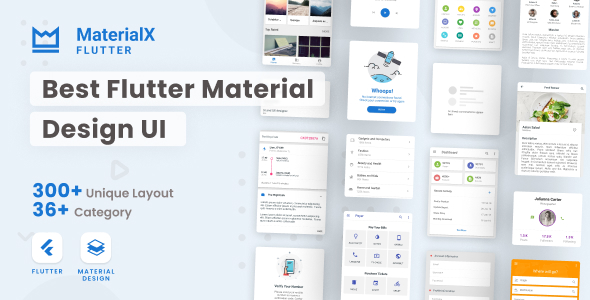
MaterialX Flutter - Flutter Material Design UI 2.5 is a comprehensive Flutter UI template designed to help developers quickly and efficiently implement stunning Material Design interfaces in their applications. Based on Google's Material Design Guidelines, this template provides a wide range of pre-built UI components, layouts, and animations, allowing you to create visually appealing and user-friendly apps with minimal effort.

Product Overview

MaterialX Flutter - Flutter Material Design UI 2.5 is meticulously crafted to deliver a seamless and intuitive user experience. It features a clean and modern design language that adheres to the latest Material Design principles, ensuring your app looks and feels consistent with Google's design standards. Whether you're building a social media app, an e-commerce platform, a productivity tool, or any other type of application, this template provides the foundation for creating a visually stunning and functional user interface.

Modern Design and User Experience

This template is designed to provide a modern and engaging user experience. It incorporates the latest Material Design trends, such as subtle animations, smooth transitions, and dynamic color palettes. The UI elements are carefully crafted to be intuitive and easy to use, making navigation and interaction a breeze for your users.

Main Features and Capabilities

MaterialX Flutter - Flutter Material Design UI 2.5 comes packed with a comprehensive set of pre-built UI components, covering a wide range of common elements found in modern applications.

Here are some of the key features:

  • Bottom Navigation: Easily navigate between different sections of your app with a sleek and customizable bottom navigation bar.
  • Bottom Sheets: Utilize bottom sheets for displaying additional content or actions, providing a non-intrusive way to expand functionality.
  • Buttons Variant: Choose from various button styles and variations to enhance the visual appeal and clarity of your UI.
  • Card View: Display information in an attractive and organized manner using cards, which can be customized with different colors, shapes, and content.
  • Chips: Add interactive chips to your UI for filtering, tagging, or displaying labels, enhancing user interaction and information organization.
  • Dialog View: Create informative and interactive dialogs to present alerts, confirmations, or collect user input.
  • Expansion Panels: Expand and collapse sections of content dynamically, allowing users to explore information in a controlled manner.
  • Grid View: Display items in a visually appealing grid layout, perfect for showcasing products, images, or other content.
  • List View: Present information in a clear and concise list format, ideal for displaying data, news feeds, or tasks.
  • Menu Variant: Implement various menu types, such as dropdown menus, side menus, or bottom sheets, for accessing different features and settings.
  • Pickers (Date, Time, Color): Allow users to easily select dates, times, or colors using intuitive pickers.
  • Progress & Activity: Show progress bars, loading indicators, or activity indicators to keep users informed about ongoing tasks.
  • Sliders: Enable users to adjust values smoothly using sliders, useful for controlling volume, brightness, or other parameters.
  • Toasts: Display short, non-intrusive messages to provide feedback or notifications to users.
  • Steppers: Guide users through multi-step processes with clear progress indicators and interactive steps.
  • Tab View: Organize content into distinct tabs, allowing users to switch between different sections easily.
  • Form: Create comprehensive forms for collecting user data, with built-in validation and styling.
  • Toolbars: Add toolbars to your UI for providing quick access to actions, settings, or navigation.
  • Profile: Design a user profile screen to display personal information, settings, and activity.
  • No Item Page (Empty State): Handle empty data scenarios gracefully with informative empty state screens.
  • Player (Media): Embed a media player to display audio or video content within your app.
  • Timeline (Social Media): Create a timeline view to display posts, updates, or events in a chronological order.
  • Shopping (Ecommerce): Implement shopping cart functionality, product listings, and checkout processes.
  • Search Page: Build a search page to allow users to quickly find specific content or products.
  • Dashboard: Create a personalized dashboard to display key information, widgets, and quick access to features.
  • Article: Design an article layout to display blog posts, news articles, or other written content.
  • Slider Image: Showcase images in a visually appealing slideshow.
  • Ripple Effect: Add subtle ripple animations to buttons and interactive elements for a more immersive experience.
  • Well Documented: The template comes with comprehensive documentation to guide you through its features and customization options.
  • Clean & Neat Code (Relative): The codebase is well-structured and organized, making it easy to understand and maintain.

Customization Options

MaterialX Flutter - Flutter Material Design UI 2.5 provides ample customization options to tailor the template to your specific needs. You can easily modify colors, fonts, sizes, and layouts to match your brand identity and design preferences. The well-documented code structure allows you to make changes and add new features with ease.

Responsive Design

This template is built with responsiveness in mind, ensuring that your app looks great and functions flawlessly on various screen sizes and devices. The UI elements automatically adapt to different screen widths, providing an optimal user experience across desktops, tablets, and mobile phones.

Pages, Components, or Modules

MaterialX Flutter - Flutter Material Design UI 2.5 offers a wide range of pre-built pages, components, and modules to get you started quickly. These include:

  • Home Screen: A customizable template for your app's main landing page.
  • Profile Screen: A template for displaying user information and settings.
  • Product Listing Page: A template for showcasing products or items in a grid or list format.
  • Product Detail Page: A template for displaying detailed information about a specific product.
  • Cart Page: A template for managing user shopping cart items.
  • Checkout Page: A template for processing user purchases.
  • Blog Page: A template for displaying blog posts or articles.
  • Contact Us Page: A template for providing contact information and a form for user inquiries.
  • And many more: Explore the full range of pre-built pages and components to find what suits your app's requirements.

Integration and Compatibility

MaterialX Flutter - Flutter Material Design UI 2.5 is designed to integrate seamlessly with other Flutter packages and libraries. You can easily incorporate third-party APIs, plugins, and services to enhance your app's functionality.

SEO and Performance Considerations

While this UI template focuses on design and user experience, it's essential to consider SEO and performance best practices when developing your app.

  • SEO: Utilize descriptive page titles, meta descriptions, and alt tags for images to improve your app's visibility in search results.
  • Performance: Optimize images, code, and network requests to ensure your app loads quickly and runs smoothly on various devices.

Ideal Use Cases

MaterialX Flutter - Flutter Material Design UI 2.5 is an ideal choice for a wide range of app development projects:

  • E-commerce Apps: Create visually appealing and user-friendly online stores with product listings, shopping carts, and checkout processes.
  • Social Media Apps: Develop engaging social media platforms with user profiles, news feeds, and interactive elements.
  • Productivity Tools: Build task management apps, note-taking apps, or project management tools with intuitive interfaces.
  • Educational Apps: Create interactive learning apps with engaging content, quizzes, and progress tracking.
  • Entertainment Apps: Develop streaming apps, gaming apps, or multimedia platforms with a modern and visually appealing design.

Who Should Use This Product?

This template is perfect for:

  • Flutter Developers: Streamline your app development process with pre-built UI components and a comprehensive design foundation.
  • UI/UX Designers: Bring your design concepts to life quickly and efficiently with a ready-to-use Material Design template.
  • Startups and Agencies: Save time and resources by leveraging a pre-designed UI template for your app projects.

Installation and Setup Guide

The installation and setup process for MaterialX Flutter - Flutter Material Design UI 2.5 is straightforward.

  1. Import the Package: Add the necessary dependency to your Flutter project's pubspec.yaml file.
  2. Install Dependencies: Run flutter pub get to install the required packages.
  3. Import the UI Library: In your Dart files, import the appropriate library from the MaterialX Flutter package.
  4. Use the Components: Start using the pre-built UI components within your Flutter widgets.

Important Product Information

  • License: The license information for MaterialX Flutter - Flutter Material Design UI 2.5 is provided with the product files. Please review the license terms carefully before using the template.
  • Support: If you have any questions or need assistance, please contact the product support team through the provided channels.

Category: Mobile App

(Only For Premium Category Products !)

1. All digital products are the most recent version, with no possibility of free updates. After payment, you can request an update to the most recent version for 5 days if a new version is released. We free support within 5 days.

2. If a license is required (Excludes WHMCS license , we provide only method not license), please contact us via email or ticket for assistance with activation. Our license is only valid for activation and does not include support.

3. We provide Mobile, PHP script installation services for $19.90 / ₹1700. Please create a backup after installation as we do not support re-installation. For mobile app source code, we do not offer installation services.

4. If you have any questions, please contact us by email  or create a ticket on this page

5. Please note that any digital products presented on the website do not contain malicious code, viruses or advertising. You will receive the original files from the developers. We do not sell any products that have been downloaded from other websites.

6. The response time can last up to 6 hours.

(Only For Membership Category Products !)

Benefits of our Membership Plans

  • Instant access to all plugins and all themes including all future releases
  • Unlimited domain usage
  • Regular Updates as of when available. Usually, updates are released daily.
  • Before purchasing, please read the Terms and Conditions & Refund Policy.
  • If you have any questions, please first read the FAQs.
  • If you haven’t found the answer to your question, please contact us, and we will respond ASAP.
  • Please note that any digital products on the website do not contain malicious code, viruses, or advertising. We buy the original files from the developers. We do not sell any products downloaded from other sites.
  • Buy or download for FREE by subscribing to our VIP Membership Plan. Join the club of more than 1100+ happy members. This is the same theme as sold by the developer.

Updates:

  • We offer frequent updates for one year from the date of purchase. After this period, you have to purchase the item again to receive further updates, we also offer lifetime updates as a second option.
  • We regularly update products as soon as we are notified about an update, we go and download it from the author and update it on our site, but In case the current version of the product is not the latest, You can request an update for the product by contact form.
  • We send regular emails advising when products have been updated so please be sure to provide an active email address when you sign up.

Support:

  • Our support team is available 24/7, if you have any questions or need help in installing or configuring digital products purchased on the website, please don’t hesitate to contact form.
  • Please note that we are not developers of the provided products, so our technical support capabilities are limited. We do not change product functionality and do not fix developer bugs.

For more information please read FAQs & About Us.

(Only For WHMCS Category Products !)

  • We Only provide WHMCS Module, how you can  nulled any module step only !
  • Instant access to all plugins and all themes 
  • Unlimited domain usage
  • Regular Updates as of when available. Usually, updates are released daily.
  • Before purchasing, please read the Terms and Conditions & Refund Policy.
  • If you have any questions, please first read the FAQs.
  • If you haven’t found the answer to your question, please contact us, and we will respond ASAP.
  • Please note that any digital products on the website do not contain malicious code, viruses, or advertising. We buy the original files from the developers. We do not sell any products downloaded from other sites.

More Like This Products