
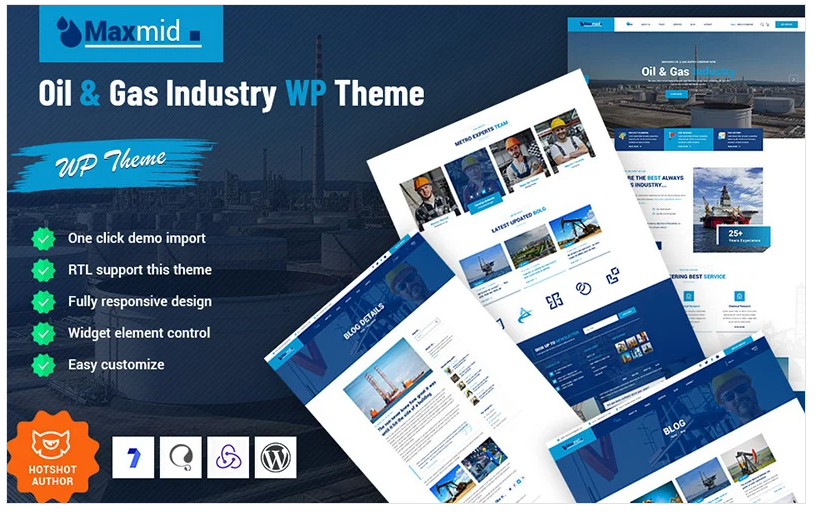
The Maxmid WordPress theme is a specialized theme designed for businesses in the oil, gas, and energy industries. It provides a professional and modern design that caters to companies involved in oil exploration, energy production, gas distribution, and related industries. This theme is ideal for creating corporate websites, energy services companies, or oil and gas consultants looking to enhance their online presence. Here's a breakdown of the key features and how to structure a website using the Maxmid theme for the oil and gas industry.
Key Features of Maxmid WordPress Theme
- Industry-Specific Demo Layouts:
- Oil and Gas Company Demo: Ideal for companies in the oil and gas sector to showcase their services, projects, and expertise.
- Energy and Power Demo: Perfect for energy generation or renewable energy businesses, featuring specialized services.
- Industrial Services Demo: Tailored for businesses offering industrial services, such as maintenance, consulting, or equipment rental for the oil and gas sector.
- Drag-and-Drop Page Builder:
- Elementor Support: Maxmid is fully compatible with Elementor, a user-friendly page builder that allows you to customize pages with a simple drag-and-drop interface, making it easy to create unique layouts.
- One-Click Demo Import:
- Import demo content with a single click, making it easy to set up a fully functional website without starting from scratch.
- Service Showcase:
- Services Pages: Display detailed information about your oil, gas, or energy services, including exploration, drilling, production, distribution, and consulting.
- Icons and Descriptions: Each service can be represented with icons and brief descriptions, helping visitors understand the range of offerings.
- Project & Case Study Pages:
- Showcase Completed Projects: Display case studies or portfolio pages of completed oil, gas, or energy projects, highlighting your company’s expertise and successful projects.
- Project Details: Include project timelines, technologies used, outcomes, and client testimonials.
- Team Pages:
- Team Member Profiles: Create profiles for key members of your team, such as engineers, project managers, and executives. Include their bios, expertise, and photos to build credibility.
- Consultation & Inquiry Forms:
- Contact Forms: Easily create inquiry forms for potential clients to request consultations, project quotes, or more information about services.
- CTA: Include prominent CTAs like "Get a Quote" or "Request a Consultation" to drive conversions.
- Blog & News Section:
- Industry Insights: Create blog posts or news articles related to the oil, gas, or energy industry. Share company news, industry trends, and technical insights to engage visitors.
- Content Management: Use WordPress’s native content management system to keep your blog updated.
- SEO Optimized:
- SEO Features: Maxmid is optimized for SEO, helping your site rank better in search engine results. You can add keywords, meta descriptions, and optimize your images for better visibility.
- Mobile-Responsive Design:
- Fully responsive and optimized for mobile, ensuring that your website looks great on any device, from smartphones to desktops.
- WooCommerce Compatibility:
- If your business involves selling products or equipment, the theme integrates with WooCommerce for easy setup of an online store.
- Customizable Design:
- Color and Font Options: Change the color scheme and fonts to match your brand’s identity. Maxmid offers plenty of design flexibility without needing coding knowledge.
- Multiple Header Styles: Choose from a variety of header styles that best suit your corporate image.
- Fast Loading and Performance Optimized:
- The theme is optimized for fast loading times, which is crucial for user experience and SEO.
Suggested Layout and Sections for Maxmid Oil & Gas Website
1. Hero Section:
- Background: Use a striking background image of an oil rig, gas plant, or energy facility.
- Headline: "Leading the Way in Oil & Gas Innovation"
- Subheadline: "Providing Sustainable Solutions for the Energy Industry"
- Call to Action (CTA): Buttons such as "Explore Our Services" or "Request a Quote"
- Key Features: Icons representing core services like oil extraction, drilling, consulting, and energy solutions.
2. About Us Section:
- Headline: "About Our Company"
- Content: A short paragraph describing your company’s history, mission, and values, including any important milestones or achievements in the industry.
- Images: Show the team, office, or facilities in the background to build trust and professionalism.
- CTA: "Learn More About Us"
3. Our Services Section:
- Headline: "Our Expertise"
- Content: Create individual service sections, each describing a different aspect of your business, such as:
- Oil exploration and extraction
- Gas production and distribution
- Environmental consulting
- Maintenance and equipment rental
- Icons or Images: Use icons or images to visually represent each service.
- CTA: "Learn More About Our Services" or "Request a Quote"
4. Project/Case Studies Section:
- Headline: "Our Projects"
- Content: Display completed projects or case studies showcasing the company’s work. Include project details such as objectives, outcomes, and any key partners.
- Project Gallery: Use a gallery or slider to showcase images from the project.
- CTA: "View Our Case Studies" or "See Our Work"
5. Meet Our Team Section:
- Headline: "Meet Our Experts"
- Content: Introduce your team with individual profiles, highlighting their roles, expertise, and experience in the oil and gas industry.
- Photos: Include professional headshots of each team member.
- CTA: "Meet the Team" or "Learn More About Us"
6. News/Blog Section:
- Headline: "Industry News & Insights"
- Content: Share news related to the oil, gas, and energy sectors, including the latest trends, technological advances, and company updates.
- CTA: "Visit Our Blog" or "Read the Latest Articles"
7. Contact Us Section:
- Headline: "Get in Touch"
- Content: Provide your company’s contact information, including phone numbers, emails, and physical addresses. You can also embed a Google Map to show the location.
- Contact Form: A form for inquiries, project requests, or consultation bookings.
- CTA: "Request a Quote" or "Contact Us Now"
8. Footer Section:
- Quick Links: Include links to important pages such as Privacy Policy, Terms & Conditions, Services, and Contact.
- Social Media: Links to your social media profiles, such as LinkedIn, Facebook, or Twitter.
- Newsletter Signup: Allow visitors to subscribe to updates or newsletters related to the oil and gas industry.
Design Tips for Maxmid Theme:
- Color Palette: Use industrial colors like dark blues, grays, and metallic tones to represent professionalism and strength, with accent colors like orange or yellow to highlight key sections.
- Typography: Choose bold and modern fonts for headings to communicate strength, paired with clean, readable fonts for body text.
- Visual Hierarchy: Use large headings and clear, concise text to guide users through the site. Incorporate enough white space to ensure the content is easy to digest.
- Interactive Elements: Add hover effects and animations to buttons, images, and icons to create a more dynamic experience for users.






























