
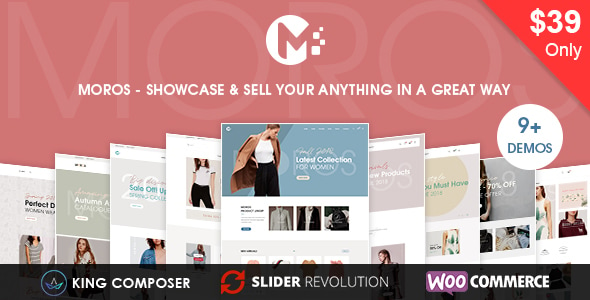


Moros - eCommerce WordPress Theme is a highly customizable, feature-rich, and visually appealing theme designed specifically for building professional online stores. Whether you're selling fashion, electronics, furniture, or any other product, Moros provides the tools and design elements you need to create an engaging, modern e-commerce site with ease. This theme is fully integrated with WooCommerce, ensuring seamless functionality for your online store. Additionally, it offers a variety of pre-built demos, advanced theme customization options, and excellent mobile responsiveness.
Key Features of Moros - eCommerce WordPress Theme:
- Modern and Stylish Design:
- Moros boasts a clean, contemporary, and user-friendly design, making it perfect for a variety of e-commerce businesses. The theme emphasizes large product images and clean typography to give your site a professional and modern look.
- Fully Compatible with WooCommerce:
- Moros is fully integrated with WooCommerce, allowing you to easily set up an online store, add products, manage payments, track orders, and more. WooCommerce’s flexibility ensures you have complete control over your e-commerce website.
- Multiple Pre-Built Demos:
- The theme comes with several pre-built demo templates, ideal for a variety of niches like fashion, electronics, accessories, and more. You can easily import these demos with one-click import and get started with your store quickly.
- Responsive and Mobile-Friendly:
- Moros is fully responsive, ensuring that your store looks great and functions smoothly on desktops, tablets, and smartphones. This is crucial as an increasing number of users shop online through their mobile devices.
- Drag-and-Drop Page Builder:
- Moros is compatible with WPBakery Page Builder (formerly Visual Composer), a powerful drag-and-drop page builder that allows you to create custom page layouts and designs without any coding knowledge.
- Advanced Product Pages:
- The theme offers advanced product page layouts, which give you the flexibility to display product images, descriptions, reviews, pricing, and product variations in an appealing and functional way.
- Mega Menu Support:
- Moros supports mega menus, allowing you to create large, multi-column dropdown menus for easier product navigation. This is ideal for stores with extensive product catalogs, as it helps customers find what they’re looking for faster.
- Ajax Product Search and Filters:
- Moros features Ajax search and product filters, enabling customers to filter products by categories, attributes, prices, and more without needing to refresh the page. This improves the user experience and can help increase conversion rates.
- One-Click Demo Import:
- With the one-click demo import, you can easily set up your site to look like the demo in just a few clicks. This saves time and allows you to focus on customizing your content and products.
- Customizable Headers and Footers:
- The theme comes with customizable header and footer layouts, so you can choose the style that fits your brand. You can also add custom elements like logos, contact info, social media links, and more.
- SEO Optimized:
- Moros is designed with SEO best practices in mind, which helps your online store rank higher in search engines. The theme is optimized for fast loading speeds, clean code, and mobile-friendly design, all of which contribute to better SEO performance.
- Product Quick View:
- The product quick view feature allows customers to view product details without leaving the page they’re on, streamlining the shopping experience and encouraging more sales.
- Integrated Blog:
- Moros includes a blog feature that allows you to publish content like product reviews, industry news, or style tips. This helps improve your SEO and lets you engage with your audience, building trust and encouraging repeat customers.
- Multiple Payment Gateway Support:
- As Moros is built to work seamlessly with WooCommerce, you have access to multiple payment gateways, such as PayPal, Stripe, bank transfers, and more. You can easily set up and manage your payment methods.
- Translation and Multi-Language Ready:
- The theme is WPML compatible and translation-ready, making it easy to create a multilingual store. You can reach a global audience by offering your site in multiple languages and currencies.
- Social Media Integration:
- Moros integrates well with social media platforms, allowing you to easily display your social media feeds or add social sharing buttons to product pages and blog posts. This can help increase your online presence and drive traffic to your store.
- Custom Widgets:
- The theme includes several custom widgets, such as recent products, popular products, testimonial widgets, and Instagram feeds, which you can add to your site’s sidebar or footer for additional content and engagement.
- Fast Loading Speed:
- Moros is optimized for speed, which helps your site load quickly even with many products. Fast loading speeds contribute to a better user experience, reduce bounce rates, and improve SEO rankings.
- Premium Support and Regular Updates:
- Moros includes premium support, so if you encounter any issues or need help, you can rely on the theme’s support team. The theme is also regularly updated to ensure compatibility with the latest WordPress and WooCommerce versions.
Benefits of Using Moros - eCommerce WordPress Theme:
- Complete WooCommerce Integration:
- Moros offers full integration with WooCommerce, providing all the essential e-commerce features you need, from product management to order tracking and payment processing. This makes it easy to set up a fully functional online store.
- Easy Setup with Demo Import:
- The one-click demo import allows you to set up your website quickly, saving you time on design and configuration. You can then customize the content, images, and branding to suit your business.
- Mobile-Optimized Design:
- Moros is fully responsive, ensuring that your store will look great on any device. Given the increasing number of mobile shoppers, this is a crucial feature for reaching a broader audience and improving conversions.
- Customization Options:
- The theme is highly customizable, with options for headers, footers, layouts, colors, and fonts. You can adjust your site’s design without touching any code, ensuring it aligns with your brand’s style.
- Enhanced Shopping Experience:
- With features like Ajax product filters, quick view, and mega menus, Moros provides an enhanced shopping experience for your customers, making it easier and faster for them to browse and purchase products.
- SEO-Friendly:
- Moros is built with SEO optimization in mind, which helps improve your store’s visibility on search engines and attract organic traffic. The theme’s clean code and fast loading times are factors that contribute to higher SEO rankings.
- Translation and Global Reach:
- With WPML compatibility, Moros allows you to easily create a multilingual store. This is a great feature for businesses looking to reach international customers and offer products in different languages and currencies.
- Social Media and Marketing Features:
- The theme’s social media integration helps you connect with your audience and promote your products across platforms. You can also use the blog feature to create content that engages your customers and drives traffic to your store.
- Regular Updates and Premium Support:
- Moros comes with premium support and regular updates, ensuring your website stays up-to-date with the latest features and security improvements.
How to Set Up Moros - eCommerce WordPress Theme:
- Install the Theme:
- From the WordPress dashboard, go to Appearance > Themes, click Add New, and upload the Moros theme file. Activate the theme once it’s installed.
- Import Demo Content:
- After activation, use the one-click demo import feature to import a demo layout that suits your store’s niche. This will set up your site with pre-built pages, product layouts, and design elements.
- Customize Your Site:
- Use the theme options panel to change colors, fonts, layouts, and other visual elements. You can also use the WPBakery Page Builder to customize individual pages and create your own layouts.
- Add Products:
- Go to WooCommerce > Products to start adding your products. Customize product details, including images, descriptions, pricing, and variations (such as size or color).
- Set Up Payment Gateways:
- Set up payment gateways such as PayPal or Stripe through the WooCommerce settings to accept payments from customers.
- Launch Your Store:
- After customizing the design and adding your products, test your site on different devices and browsers to ensure everything looks and works as expected. Once satisfied, launch your store and start promoting it!






























