
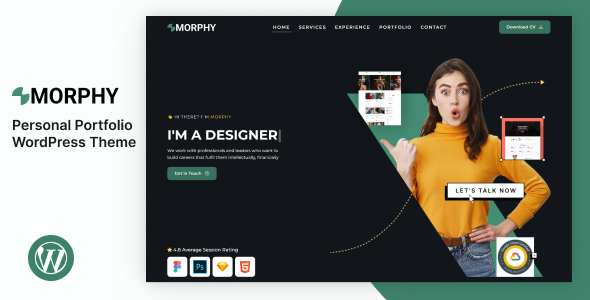

Morphy – Personal Portfolio WordPress Theme is a stylish, modern, and highly customizable WordPress theme designed specifically for personal portfolios. This theme is ideal for creative professionals such as graphic designers, photographers, web developers, freelancers, and other individuals looking to showcase their skills, work, and achievements in a visually appealing and professional manner.
Key Features of Morphy – Personal Portfolio WordPress Theme:
1. Minimalist and Modern Design:
- Morphy features a clean, minimalist design that puts the focus on your portfolio, making it perfect for personal portfolios where the work needs to stand out.
- The modern design is flexible and can be adapted to different types of creative portfolios, ensuring that your work looks sleek and professional.
2. Fully Responsive and Mobile-Friendly:
- The theme is fully responsive, meaning your website will automatically adjust to any screen size, ensuring it looks great on desktops, tablets, and smartphones.
- This is especially important for portfolio websites, as many clients may access your site from mobile devices or tablets.
3. Pre-designed Portfolio Layouts:
- Morphy offers multiple portfolio layouts designed to showcase your work beautifully. You can choose from grid, masonry, and other layout styles.
- The theme supports a wide variety of content types, such as images, videos, or even presentations, making it easy to present your work in a compelling way.
4. One-Click Demo Import:
- With Morphy, you can easily import demo content with just one click. This gives you a starting point to build your portfolio quickly, as you can replace demo content with your own.
- This feature saves time and helps you create a polished, professional website without starting from scratch.
5. Elementor Page Builder Compatibility:
- The theme is fully compatible with Elementor, one of the most popular drag-and-drop page builders for WordPress.
- With Elementor, you can easily customize your website without needing to touch any code. You can create custom pages, layouts, and content by simply dragging and dropping widgets and elements.
6. Creative and Clean Blog Layouts:
- Morphy includes creative blog layouts where you can share your thoughts, project updates, industry news, or personal stories.
- You can choose from different blog formats (grid, list, etc.) to match the overall style of your website and keep your content engaging for visitors.
7. Customizable About Me Section:
- The theme provides a customizable About Me section, allowing you to showcase your biography, skills, and background in a professional manner.
- You can display your personal story, career highlights, and contact information, giving potential clients or employers a clear picture of who you are.
8. Contact Forms and Social Media Integration:
- Morphy includes a contact form so visitors can easily get in touch with you. You can customize the contact form fields to collect specific information.
- The theme also integrates social media buttons, allowing you to link to your social profiles like LinkedIn, Instagram, Twitter, and others.
9. SEO Optimized:
- Morphy is built with SEO in mind, ensuring that your website can be easily indexed by search engines.
- The clean code and optimized structure make it easier to rank higher on search engine results, helping you attract more visitors and clients.
10. Fast Loading and Performance Optimized:
- The theme is optimized for fast loading times, which is essential for user experience and SEO. A fast-loading portfolio can help you retain visitors and improve your site’s performance on search engines.
11. Highly Customizable Typography and Colors:
- You can easily adjust the typography (fonts, font sizes, etc.) and color schemes to align with your personal brand and style.
- The theme provides full control over font choices and color settings, giving you the flexibility to create a cohesive look.
12. WooCommerce Support (Optional):
- If you want to sell products, services, or digital downloads (e.g., design templates, photography prints, or custom work), Morphy integrates seamlessly with WooCommerce.
- This makes it easy to turn your portfolio website into an online store and start monetizing your creative work.
13. Custom Widgets:
- The theme comes with several custom widgets, such as a recent posts widget, social media feeds, and a custom “About Me” widget, all of which help make your portfolio site more interactive and informative.
14. Regular Updates & Premium Support:
- Morphy comes with regular theme updates, ensuring compatibility with the latest version of WordPress and other plugins.
- You also get access to premium support to assist you with any setup, customization, or technical issues you may encounter.
How to Set Up and Use Morphy – Personal Portfolio WordPress Theme:
1. Install the Theme:
- In your WordPress dashboard, go to Appearance > Themes > Add New and upload the Morphy theme ZIP file.
- Click Install Now and then Activate to make the theme live on your website.
2. Install Required Plugins:
- Morphy will prompt you to install the required plugins such as Elementor, Contact Form 7, and any other recommended plugins.
- Install and activate these plugins to ensure the theme’s features work properly.
3. Import Demo Content:
- Use the one-click demo import feature to import demo content. This will set up your site with pages, layout settings, and sample content, allowing you to start editing right away.
4. Customize Your Website:
- Use the WordPress Customizer or Elementor to change your website’s settings, such as fonts, colors, layout styles, and branding elements.
- Add your personal content, such as portfolio projects, images, an “About Me” section, and blog posts.
5. Create Portfolio Items:
- Add new portfolio entries by uploading your projects, including images, descriptions, and any additional details.
- Organize your portfolio into categories (e.g., Graphic Design, Web Development, Photography) to make it easier for visitors to browse your work.
6. Set Up the Blog:
- If you plan to share articles, case studies, or industry updates, create blog posts and configure your preferred blog layout (grid, list, etc.).
7. Configure Contact Form:
- Set up the contact form by customizing the fields and email settings. This allows visitors to easily contact you for inquiries or project proposals.
8. WooCommerce Setup (Optional):
- If you plan to sell products or services, set up WooCommerce and create your store pages. Add products, set up payment gateways, and manage orders.
9. Test Your Website:
- Make sure to test your website across various devices and browsers to ensure it’s fully responsive and working correctly.
- Test the contact form, portfolio page, blog, and any other interactive features to ensure everything functions smoothly.
10. Launch Your Website:
- Once you’re happy with the customization, it’s time to launch your personal portfolio website. Share your portfolio with potential clients, employers, or collaborators and start promoting your work.






























