
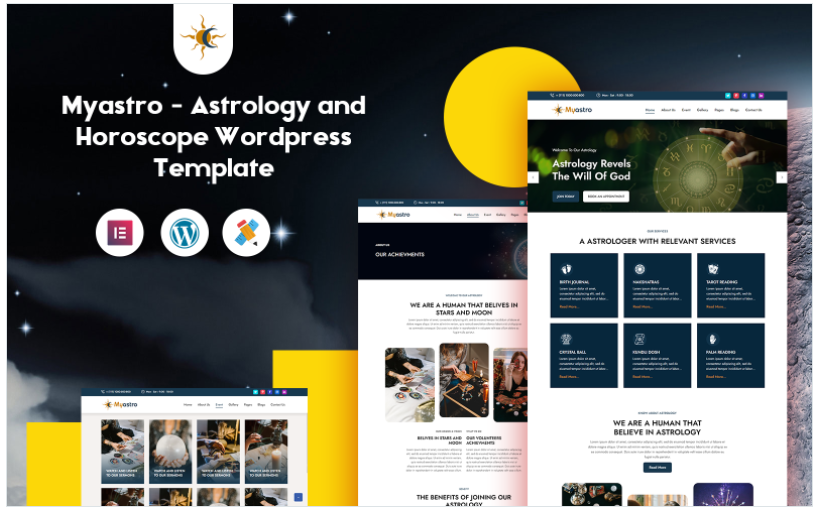

Myastro - Astrology and Horoscope WordPress Template is a specialized theme designed for astrology, horoscope, tarot, and spiritual websites. This template provides an elegant and professional design for astrology-related services, including astrology readings, horoscope predictions, tarot card readings, and related spiritual guidance. Whether you are an astrologer, psychic, tarot reader, or run an astrology-focused blog or shop, Myastro offers the ideal features to build a unique and engaging website.
Key Features of Myastro - Astrology and Horoscope WordPress Template
- Modern and Elegant Design:
- Myastro features a sleek, modern design with a spiritual and mystical vibe, perfect for astrology and horoscope businesses.
- It includes stunning visuals such as starry backgrounds, zodiac symbols, and celestial elements, which create an immersive atmosphere for your website visitors.
- Pre-designed Pages:
- Myastro comes with several ready-to-use, pre-designed pages, including:
- Home Page: A captivating homepage that introduces your astrology services and features recent horoscopes or blog posts.
- Horoscope Page: Dedicated pages to offer daily, weekly, or monthly horoscope predictions, or to present customized astrology readings.
- About Page: Share information about your background, expertise, and the services you offer as an astrologer or spiritual guide.
- Service Page: Showcase the different astrology, tarot, or psychic services you provide, such as consultations, astrology charts, tarot readings, etc.
- Blog Page: Share articles, astrological tips, horoscope insights, or spiritual guidance through a well-organized blog layout.
- Contact Page: Include a contact form and your business details so potential clients can reach out to you easily.
- Myastro comes with several ready-to-use, pre-designed pages, including:
- Customizable via WordPress Customizer:
- Myastro is highly customizable, allowing you to adjust colors, fonts, logos, and layout options through the WordPress Customizer. This ensures that you can match the design to your personal style or brand.
- You can modify sections such as header, footer, page layouts, and much more, all without needing to write a single line of code.
- User-Friendly Interface:
- The theme is built with user experience in mind, offering a clean and simple interface that is easy to navigate for your visitors.
- Whether you're offering astrology readings, horoscope services, or spiritual guidance, the design ensures that users can quickly find what they're looking for and book a service or read a prediction.
- Booking and Appointment Integration:
- Myastro can easily integrate with appointment booking plugins like Bookly or Amelia to allow users to schedule personal astrology consultations, readings, or psychic sessions directly on your website.
- Visitors can view your available slots, select services, and book an appointment with just a few clicks.
- SEO Optimized:
- The theme is SEO-friendly, helping you rank higher in search engine results. Clean code and optimized structure contribute to improved website speed, searchability, and user experience.
- Myastro works well with popular SEO plugins like Yoast SEO, allowing you to optimize your content, blog posts, and pages to improve visibility.
- Responsive and Mobile-Friendly:
- The theme is fully responsive, meaning your website will look great on any device, including desktops, tablets, and smartphones.
- With an increasing number of users browsing on mobile devices, ensuring that your site works well on phones and tablets is crucial.
- Custom Widgets for Astrology Features:
- Myastro includes custom widgets to showcase your astrology services in an engaging way. For example, you can display:
- Horoscope of the Day: Show daily or weekly horoscope predictions on the homepage or in the sidebar.
- Zodiac Sign Information: Add widgets to explain the different zodiac signs, their traits, and astrological significance.
- Tarot Card of the Day: Display a daily tarot card reading to engage users and keep them coming back.
- Astrology Birth Chart: Offer widgets to generate and display astrology birth charts or compatibility reports.
- Myastro includes custom widgets to showcase your astrology services in an engaging way. For example, you can display:
- Online Store for Astrological Products:
- Myastro is compatible with WooCommerce, so you can easily sell astrology-related products, such as books, tarot decks, crystals, incense, or astrology-themed merchandise.
- The integration of WooCommerce makes it simple to manage your online store, including adding products, setting up payment gateways, and handling inventory.
- Multilingual and RTL Support:
- Myastro is translation-ready and supports RTL (Right to Left) languages, making it suitable for international audiences.
- If you're targeting non-English-speaking clients, you can easily translate the theme into different languages using plugins like WPML or Polylang.
- Event Management:
- The theme offers built-in event management features for hosting astrology webinars, workshops, or live tarot readings.
- You can easily add events to your site and allow visitors to register or buy tickets for astrology-related events.
- Fast Loading Speed:
- Myastro is optimized for performance and speed. Faster loading times improve user experience, reduce bounce rates, and are beneficial for SEO.
- Optimized images, minimal use of heavy scripts, and best coding practices ensure that your website loads quickly.
- Social Media Integration:
- Myastro includes social media integration, allowing you to connect with your audience on platforms like Instagram, Facebook, and Twitter.
- You can display your social media feeds directly on your website, encouraging visitors to follow you on their preferred platforms.
- Live Chat Integration:
- You can integrate live chat functionality to connect with your visitors in real-time. This feature is especially helpful for astrology services where users may have immediate questions about your offerings or wish to book a consultation.
- Regular Updates and Support:
- The theme is regularly updated to ensure compatibility with the latest WordPress versions and plugins.
- Myastro also comes with dedicated support to assist you with any theme-related issues or questions you may have.
How to Set Up Myastro - Astrology and Horoscope WordPress Template
- Install WordPress:
- Install WordPress on your hosting platform. Most hosts provide one-click installation for WordPress.
- Install the Myastro Theme:
- In your WordPress dashboard, go to Appearance > Themes > Add New, upload the Myastro theme files, and activate the theme.
- Install Required Plugins:
- Install essential plugins, including WooCommerce for setting up an online store, Elementor for easy page-building, and Bookly or Amelia for appointment bookings.
- You can install these plugins directly from the Plugins > Add New section in the WordPress dashboard.
- Import Demo Content:
- Use the one-click demo import feature to import demo content, including pre-built pages, blog posts, and settings. This allows you to quickly set up your website with the layout you prefer.
- Customize Your Website:
- Use the WordPress Customizer or Elementor to change the theme's appearance. You can adjust colors, fonts, layout styles, and header designs.
- Replace the demo content with your own, such as your astrology services, blog posts, and product offerings.
- Add Astrology Services:
- Add detailed pages for your astrology services, such as personalized readings, zodiac sign compatibility, tarot readings, or birth chart analysis.
- Include a booking system where users can schedule consultations directly from your site.
- Set Up Online Store (Optional):
- If you plan to sell astrology products, install WooCommerce and add your products (e.g., astrology books, crystals, tarot cards) to your store.
- Configure payment gateways, shipping options, and inventory management.
- Optimize for SEO:
- Use an SEO plugin like Yoast SEO to optimize your content for search engines.
- Add meta descriptions, keywords, and alt tags for images to boost your site's SEO performance.
- Launch Your Website:
- Once your website is fully set up and customized, you can publish it and start promoting your astrology services online.






























