

MyThemeShop is a popular WordPress theme and plugin provider known for offering a wide range of themes that are user-friendly, optimized for performance, and designed to suit various business needs. They provide a variety of premium WordPress themes catering to different types of websites, including blogs, eCommerce stores, business sites, and portfolios.
Features of MyThemeShop Best WordPress Theme:
When considering the "best" WordPress theme from MyThemeShop, it largely depends on the type of website you are creating. Some of the best themes offered by MyThemeShop include Ad-Sense, Schema, WP Review Pro, and SociallyViral. These themes are highly regarded for their speed, SEO-friendliness, and customization options. Below is a general overview of their features:1. SEO Optimized:
- All themes from MyThemeShop are designed with SEO optimization in mind. They come with clean code, proper HTML structure, and built-in SEO options to help your website rank better in search engines.
2. Fast Loading Speed:
- Speed is a crucial factor for both user experience and SEO. MyThemeShop themes are lightweight and designed to load quickly, ensuring that your site provides an optimal experience for visitors, which helps reduce bounce rates.
3. Responsive and Mobile-Friendly:
- The themes are fully responsive, meaning they adapt seamlessly to any screen size, from desktop monitors to mobile devices. This ensures that your website looks great on any device, enhancing the user experience.
4. Easy Customization:
- The themes come with a theme options panel that makes it easy to customize various aspects of your site. From changing colors and fonts to uploading logos and adjusting layouts, you can tailor the theme to fit your brand without needing any coding knowledge.
5. One-Click Demo Import:
- Many MyThemeShop themes offer one-click demo import, allowing you to quickly import a demo version of the theme and populate your website with placeholder content. This speeds up the setup process and helps you get started faster.
6. Built-In Ad Management:
- Several of MyThemeShop’s themes, like Ad-Sense, include built-in ad management features. This makes it easier to monetize your website by placing ads in strategic locations without needing to install additional plugins.
7. Comprehensive Support and Documentation:
- MyThemeShop provides premium customer support and extensive documentation. Whether you're new to WordPress or an experienced user, you'll find all the help you need to set up and customize your website.
8. WooCommerce Compatibility:
- For eCommerce websites, many MyThemeShop themes are fully compatible with WooCommerce, making it easy to set up an online store. You can sell products, manage inventory, and accept payments directly from your website.
9. Regular Updates:
- All themes come with lifetime updates and are regularly updated to stay compatible with the latest WordPress versions. This ensures that your site remains secure and functional as WordPress evolves.
10. Pre-Built Widgets:
- MyThemeShop themes come with custom widgets like recent posts, popular posts, social media links, and Instagram feeds, allowing you to easily display dynamic content on your website.
11. Premium Features (for certain themes):
- Some of the top themes like WP Review Pro or WP Quiz Pro come with premium features such as advanced review systems, rating systems, and quiz functionalities that allow you to add rich interactive content to your site.
12. Translation Ready:
- All MyThemeShop themes are translation-ready, making it easy to translate the website into any language. This feature is great for businesses targeting international audiences or those in non-English speaking regions.
Notable MyThemeShop Themes:
1. Schema:
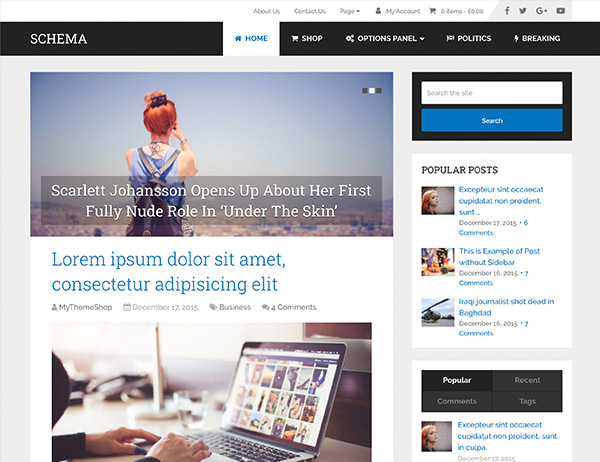
- Schema is one of the most popular themes from MyThemeShop. It’s designed with SEO as a top priority and features a clean, fast-loading design. It’s perfect for content-heavy websites like blogs, magazines, and review sites. Key features include rich snippets for better search engine visibility, fast loading speed, and an easy-to-use theme options panel.
2. Ad-Sense:
- Ad-Sense is tailored for websites looking to monetize through ads. It comes with multiple ad placement options to maximize your ad revenue, and it’s designed for speed and SEO optimization. It's perfect for blog sites or news sites where ad monetization is the primary goal.
3. WP Review Pro:
- This theme is designed specifically for creating review websites. It includes advanced review and rating systems that allow you to write and display detailed reviews. WP Review Pro is also compatible with Schema markup for rich snippets, making it great for SEO.
4. SociallyViral:
- The SociallyViral theme is built to help content go viral. It’s optimized for social media sharing, and it comes with built-in social media buttons and recommendation engines. This theme is ideal for blogs, news websites, and viral content sites.
5. WP Quiz Pro:
- If you want to engage your audience with fun and interactive content, WP Quiz Pro is a great choice. It allows you to create custom quizzes that can be shared on social media. It also includes options for scoring, quizzes for lead generation, and more.
How to Set Up MyThemeShop WordPress Theme:
- Purchase and Download:
- First, visit the MyThemeShop website, purchase the theme of your choice, and download the theme file.
- Install the Theme:
- Go to the WordPress dashboard, navigate to Appearance > Themes > Add New. Click Upload Theme, then upload the theme file you downloaded and click Install Now.
- Activate the Theme:
- Once the theme is installed, click Activate to make it live on your website.
- Import Demo Content (optional):
- If you want to use the demo content for a quicker setup, use the one-click demo import feature available in the theme options. This will import all the necessary content, widgets, and settings.
- Customize the Theme:
- Go to Appearance > Customize to start adjusting the design and layout of your website. You can change colors, fonts, header styles, and more to match your branding.
- Add Plugins:
- Install any necessary plugins recommended by the theme or required for additional functionality, such as WooCommerce for eCommerce sites, WP Review Pro for review sites, or WP Quiz Pro for quiz functionality.
- Create and Publish Content:
- Start adding content to your website by creating pages, posts, and other necessary sections. You can use Visual Composer or the WordPress editor to build and design your content.
- Configure SEO and Analytics:
- Set up your SEO settings using plugins like Yoast SEO or Rank Math, and make sure you integrate Google Analytics for tracking your website’s performance.






























