
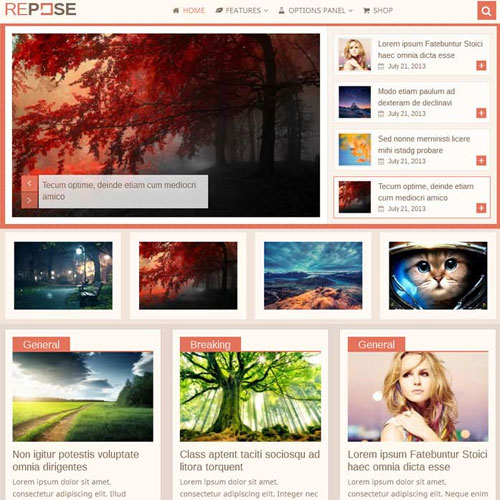

MyThemeShop Repose WordPress Theme is a premium, minimalist WordPress theme designed by MyThemeShop. It focuses on providing a clean and elegant user experience, making it a great choice for bloggers, writers, and content creators who want to showcase their work with a simple and distraction-free design. Repose is designed to prioritize readability, ease of use, and speed, with responsive and SEO-friendly features built-in.
Key Features of MyThemeShop Repose WordPress Theme
- Minimalist and Clean Design:
- Repose has a minimalist layout, ideal for bloggers and content creators who want to focus on their writing without distractions. The design is clean, with a lot of white space that ensures your content takes center stage.
- Responsive and Mobile-Friendly:
- The theme is fully responsive, meaning it automatically adjusts to different screen sizes. Whether viewed on a desktop, tablet, or smartphone, Repose provides an optimal experience across all devices.
- Fast Loading Speed:
- Speed is a critical factor for both user experience and SEO, and Repose is optimized for performance. The theme is lightweight and uses efficient coding practices to ensure fast loading times, reducing bounce rates and improving SEO rankings.
- SEO Optimized:
- Built with SEO best practices in mind, Repose ensures your content is optimized for search engines. It includes clean HTML5 code, proper heading structure, and fast page load speeds to boost your chances of ranking well in search engine results.
- Customizable Homepage:
- Repose allows you to easily customize the homepage layout to suit your needs. You can display recent posts, popular posts, or other types of content. The theme also supports various layout options, such as grid or list layouts.
- Typography Control:
- Repose offers full control over typography with integration of Google Fonts. You can choose from hundreds of fonts to personalize your site's look, making it easier to match your brand's style.
- Built-In Widgets:
- The theme includes several custom widgets that can be added to the sidebar or footer. These widgets display recent posts, popular posts, social media links, and other useful content, enhancing the user experience and site functionality.
- WooCommerce Support:
- Repose is WooCommerce-compatible, which means you can set up an online store within your site if you wish. Whether you're selling digital products, physical items, or services, Repose will work seamlessly with WooCommerce.
- Ad Management:
- If you plan to monetize your site, Repose includes built-in ad management features. You can easily display banner ads in strategic positions, such as the sidebar or between posts.
- Multiple Header Styles:
- The theme offers different header styles and customization options, such as the position of your logo, navigation menu, and other elements. You can create a unique look for your site that matches your branding.
- Customizable Widgets for Social Media:
- Repose supports social media integration, allowing you to add social sharing buttons to posts or display your social media profiles in the sidebar. This helps drive traffic to your social profiles and encourages sharing.
- Translation Ready:
- The theme is translation-ready, meaning it can be easily localized into different languages. If you want to create a multilingual site, Repose works well with translation plugins like WPML.
- Regular Updates and Support:
- MyThemeShop offers regular updates to ensure compatibility with the latest version of WordPress and provide new features and improvements. You'll also have access to premium support, where you can get assistance with any issues or questions.
- RTL Support:
- For websites targeting audiences who read from right to left (e.g., Arabic or Hebrew), Repose is fully RTL (right-to-left) ready, providing a seamless experience for those users.
- Content Layouts:
- Repose allows you to choose from various content layouts to suit your content's type. You can choose between single-column or multi-column layouts, depending on how you want your posts to be presented.
- Custom Logo and Branding:
- The theme lets you easily add a custom logo to personalize your website’s branding. You can upload your logo directly through the WordPress Customizer.
Benefits of Using MyThemeShop Repose WordPress Theme
- Elegant, Distraction-Free Design:
- Repose is designed with a minimalist layout that ensures your content is the focal point. This is perfect for bloggers and writers who want to provide a calm, distraction-free environment for their readers.
- Speed and SEO Optimization:
- The theme’s fast loading speed and SEO-friendly structure ensure that your site performs well in search engine rankings and offers a smooth user experience, encouraging visitors to stay on your site longer.
- Easy Customization:
- The built-in Customizer and the variety of customization options give you the flexibility to change the layout, typography, and colors of your site without needing any coding knowledge.
- Mobile Optimization:
- Repose’s responsive design ensures that your site will look great and work smoothly on mobile devices, which is essential given the growing importance of mobile traffic in the modern digital landscape.
- SEO-Friendly Features:
- With its clean code, structured headings, fast load times, and compatibility with popular SEO plugins, Repose is designed to give your website a strong foundation for SEO success.
- Monetization Options:
- The ad management system and WooCommerce compatibility make it easy to monetize your site through ads, affiliate marketing, or by running an e-commerce store.
- Supports Blogging and E-Commerce:
- Whether you're running a blog or an online store, Repose is versatile enough to handle both types of websites. It integrates well with WooCommerce, so you can create a beautiful e-commerce site with minimal setup.
- Multilingual Ready:
- If you need to create a website in different languages, Repose is translation-ready, and it works seamlessly with translation plugins like WPML, helping you reach a global audience.
- Built-In Social Media Features:
- The theme includes social sharing options and the ability to link to your social media profiles, making it easier for visitors to engage with you across different platforms.
How to Set Up and Use MyThemeShop Repose Theme
- Install the Theme:
- After purchasing the Repose theme, download the theme files. From your WordPress dashboard, go to Appearance > Themes > Add New, upload the theme ZIP file, and click "Activate" to make Repose your active theme.
- Import Demo Content (Optional):
- If you'd like to start with a pre-configured setup similar to the theme demo, you can use the demo importer tool to import sample content. This will help you set up the layout and design quickly.
- Customize the Theme:
- Go to Appearance > Customize to access the theme’s customization settings. You can adjust settings such as logo, fonts, colors, and layout options to make your site look unique.
- Add Widgets:
- Repose comes with several custom widgets. Go to Appearance > Widgets to drag and drop widgets into sidebar or footer areas. You can display recent posts, popular posts, social media buttons, and more.
- Configure Social Media:
- Add your social media links to the theme, so visitors can easily find and follow you. You can display social icons in the header, footer, or sidebar.
- Monetize Your Site:
- If you're planning to monetize, set up the ad management system to display banner ads in strategic locations on your site. You can also integrate WooCommerce to sell products online.
- Optimize for SEO:
- Install a plugin like Yoast SEO or Rank Math to optimize your site’s content for search engines. Repose is already SEO-friendly, but using a plugin can help you fine-tune your content and meta tags.
- Set Up E-Commerce (If Applicable):
- If you're setting up an online store, install and configure WooCommerce to create product pages, set up payment gateways, and manage orders.
- Test Your Site on Different Devices:
- Make sure your site is looking great on mobile devices by testing it on smartphones and tablets. Repose is responsive, but testing ensures everything displays correctly.






























