
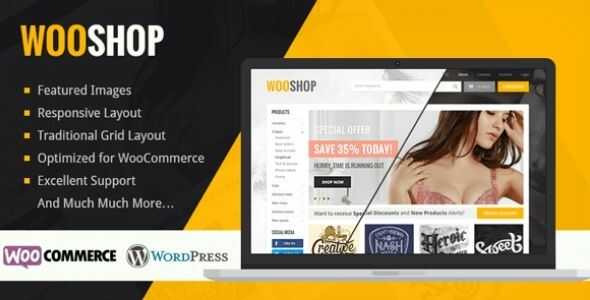

MyThemeShop WooShop WordPress Theme is a premium, WooCommerce-compatible theme designed specifically for building online stores. It provides a clean, modern design with a focus on user experience, performance, and conversion optimization. Ideal for anyone looking to create a professional eCommerce website, WooShop offers a variety of customization options, making it a flexible and user-friendly solution for both beginners and experienced users alike.
Key Features of MyThemeShop WooShop WordPress Theme
- WooCommerce Integration:
- WooShop is fully integrated with WooCommerce, which means it is optimized for creating online stores. Whether you're selling physical products, digital downloads, or a mix of both, WooShop is built to support the entire eCommerce ecosystem.
- Responsive and Mobile-Friendly:
- The theme is fully responsive, ensuring that your store looks great on all devices, from desktops to smartphones. Since a large portion of online shopping is done via mobile devices, this feature is crucial for offering a seamless shopping experience to users.
- Fast Loading Speed:
- WooShop is optimized for speed, ensuring that your website loads quickly. A fast website is not only good for user experience but also crucial for SEO, as search engines like Google prioritize fast-loading pages in search results.
- SEO Optimized:
- The theme is SEO-friendly, which helps your site rank better in search engine results. It uses clean code and follows best practices for SEO, making it easier for your products and pages to be discovered by potential customers.
- Modern and Clean Design:
- WooShop features a modern and minimalist design that allows your products to stand out. Its clean layout helps ensure that the focus remains on the products, and the design itself does not overwhelm the visitor, making it ideal for creating a professional online store.
- One-Click Demo Import:
- The theme includes a one-click demo import feature, which allows you to import demo content and layouts in just a few clicks. This makes it much easier to get your online store up and running quickly, even if you're new to WordPress.
- Customizable Product Pages:
- WooShop provides several options for customizing product pages, including multiple layout styles, custom fields, and product image gallery options. You can showcase your products in a way that aligns with your brand's vision and provides a better shopping experience for your customers.
- Built-In Product Filters:
- To improve the shopping experience, WooShop includes product filters, allowing customers to filter products based on attributes like size, color, price, and category. This makes it easier for customers to find exactly what they are looking for.
- Product Quick View:
- The Quick View feature allows visitors to see product details without having to navigate away from the page they’re on. This is particularly useful for providing an intuitive shopping experience, encouraging more conversions.
- Cart and Checkout Pages:
- WooShop comes with optimized cart and checkout pages that streamline the purchasing process. You can customize the cart page and checkout fields to reduce friction and improve the conversion rate.
- Custom Widgets:
- The theme includes several custom widgets, such as recent products, best-selling items, social media links, and more. These widgets can be added to your site’s sidebar, footer, or other widgetized areas to increase user engagement and encourage purchases.
- Multiple Layout Options:
- WooShop offers various layout options for different pages, including the homepage, product pages, category pages, and blog pages. You can choose from grid layouts, list layouts, or masonry-style layouts, depending on your preference.
- Typography and Color Customization:
- You can easily adjust the fonts and colors of the theme to match your brand’s look and feel. WooShop integrates with Google Fonts to give you access to a wide range of typography choices.
- Translation Ready and RTL Support:
- WooShop is translation-ready, meaning you can easily translate your website into different languages. Additionally, the theme supports right-to-left (RTL) languages, which makes it a good choice for a global audience.
- Security and Regular Updates:
- MyThemeShop themes are known for their security and regular updates. WooShop is no exception, ensuring that your site stays secure and up-to-date with the latest WordPress and WooCommerce versions.
- Retina Ready:
- WooShop is retina-ready, meaning that images and product photos will look crisp and clear on high-resolution screens, ensuring a premium look for your online store.
- Premium Support:
- As part of the MyThemeShop package, WooShop offers premium support. If you encounter any issues, you can reach out to the support team, who can assist with resolving problems and helping you set up your store.
Benefits of Using MyThemeShop WooShop WordPress Theme
- Ideal for eCommerce Stores:
- WooShop is specifically designed for eCommerce, with full WooCommerce compatibility. This makes it perfect for anyone looking to build an online store, whether you're selling a few products or running a large-scale business.
- Highly Customizable:
- The theme offers various customization options, allowing you to personalize your site’s design, layout, and product presentation. Whether you want to showcase products in a grid or list format, or adjust the colors and fonts, WooShop gives you the flexibility to create a store that suits your needs.
- Optimized for Conversions:
- WooShop is built with conversion optimization in mind. With features like the Quick View, product filters, and streamlined checkout, the theme is designed to reduce friction and help guide customers to make a purchase.
- SEO-Friendly:
- The SEO optimization built into WooShop helps improve the visibility of your store in search engine results, driving more organic traffic to your site. This is especially important for eCommerce websites looking to rank well and attract potential buyers.
- Fast Performance:
- WooShop is optimized for speed, ensuring that your website loads quickly. A fast-loading website is important not only for user experience but also for SEO and customer retention.
- Mobile-First Approach:
- With a mobile-friendly design, WooShop ensures that your store provides an excellent shopping experience for mobile users, who are an increasing percentage of online shoppers.
- Easy to Set Up:
- With the one-click demo import feature and user-friendly customization options, WooShop makes it easy to set up and launch your eCommerce website, even if you have no prior experience with WordPress or WooCommerce.
- Built for Scalability:
- Whether you're just starting out or looking to expand, WooShop is designed to scale with your business. It supports both small online stores and large catalogs, making it a great option for growing businesses.
How to Set Up and Use MyThemeShop WooShop Theme
- Install the Theme:
- After purchasing the theme, go to Appearance > Themes > Add New in your WordPress dashboard. Upload the ZIP file and activate the theme.
- Import Demo Content (Optional):
- Use the one-click demo import feature to replicate the theme's demo content and layout, making it easier to get started.
- Customize the Theme:
- Go to Appearance > Customize to adjust settings such as colors, fonts, and layout options. Use the theme customizer to make adjustments to the overall design of your store.
- Set Up WooCommerce:
- Install and configure WooCommerce to enable product pages, shopping carts, and checkout functionalities. You can add products, set up payment gateways, and configure shipping options through the WooCommerce settings.
- Add Products and Categories:
- Add your products, assign them to categories, and set pricing, shipping, and other product details. You can also add product variations like sizes or colors if applicable.
- Set Up Product Pages:
- Customize the design and layout of individual product pages to showcase your products effectively. Use custom fields and image galleries to highlight the features and benefits of each product.
- Configure Cart and Checkout:
- Set up the cart and checkout pages to ensure a smooth and seamless purchasing process for your customers.
- Add Custom Widgets:
- Add custom widgets like recent products, social media links, or a newsletter sign-up form to enhance user engagement.
- Optimize for SEO:
- Install an SEO plugin such as Yoast SEO or Rank Math to optimize your site’s content and ensure it ranks well in search engines.
- Test Your Site:
- Test your site across different devices to ensure that it is fully responsive and user-friendly.






























