
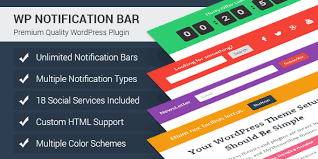
MyThemeShop WP Notification Bar Plugin is a versatile and easy-to-use WordPress plugin that allows you to display customizable notification bars on your website. These notification bars can be used for a variety of purposes, such as promoting special offers, announcing new content, collecting email subscriptions, or simply sharing important site-wide information. The plugin is designed to be simple, yet powerful, offering a wide range of customization options to enhance user engagement and drive conversions.
Key Features of MyThemeShop WP Notification Bar Plugin
- Multiple Notification Bar Styles:
- The plugin offers a variety of notification bar styles, including fixed top bars, floating bars, and sticky bars. These styles can be customized to fit your website’s design and your specific needs.
- Customizable Content:
- You can fully customize the content displayed on the notification bar, including text, buttons, and links. This makes it easy to tailor the message to your audience, whether you’re promoting a sale, sharing a new post, or encouraging email sign-ups.
- Color & Style Customization:
- WP Notification Bar provides options to adjust the background color, text color, font size, and other design elements. This allows you to ensure the notification bar matches your website’s branding and overall design.
- Button Options:
- You can add call-to-action buttons to the notification bar, directing visitors to specific pages or actions, such as subscribing to a newsletter, making a purchase, or reading a blog post. You can customize the button text, color, and link.
- Easy Display Control:
- The plugin gives you control over when and where the notification bar is displayed. You can choose to show it on certain pages, for specific user roles, or even based on the time spent on a page. This ensures the right message reaches the right audience at the right time.
- Mobile Optimization:
- The notification bar is fully responsive and works well on all screen sizes, including desktops, tablets, and smartphones. You can also choose to hide the bar on mobile devices if you prefer.
- Display Frequency:
- You can set up frequency controls to determine how often the notification bar will be displayed to users. For example, you can make sure the notification bar only appears once to a visitor, or after a certain amount of time.
- Close Button:
- The plugin includes a close button option that allows users to dismiss the notification bar if they’re no longer interested in the message. This feature improves user experience and prevents the bar from becoming intrusive.
- Predefined Templates:
- WP Notification Bar offers predefined templates that make it easier to set up a notification bar quickly. These templates are professionally designed and can be customized further to match your branding and messaging.
- Easy Integration:
- The plugin integrates smoothly with WordPress, and there are no complex settings required. The user-friendly interface allows you to create and manage notification bars without any coding knowledge.
- Analytics Tracking:
- WP Notification Bar supports integration with Google Analytics, allowing you to track how effective your notification bars are in terms of engagement, clicks, and conversions.
- Multiple Bars:
- You can create and display multiple notification bars on your website simultaneously. This is useful for websites with different types of announcements or promotions that need to be showcased at the same time.
- Exit-Intent Option:
- The plugin also supports exit-intent triggers. This means you can set the notification bar to show up when a user is about to leave the site, offering a last chance to grab their attention with a special offer or reminder.
- Custom CSS:
- For more advanced users, the plugin offers the option to add custom CSS, allowing you to make more granular design adjustments and fine-tune the appearance of your notification bars.
Benefits of Using WP Notification Bar Plugin
- Increase Engagement:
- A well-designed notification bar can significantly boost engagement by drawing attention to key announcements or promotions. With its customization options, you can tailor your message to appeal directly to your target audience.
- Drive Conversions:
- By using a call-to-action (CTA) button on your notification bar, you can drive more conversions, whether that means getting users to sign up for a newsletter, take advantage of a special offer, or visit a specific landing page.
- Non-Intrusive:
- The plugin allows you to design non-intrusive bars that can be easily dismissed by users. This means you can deliver important information without negatively affecting the user experience.
- Boost Sales & Marketing Efforts:
- WP Notification Bar can be a powerful tool for marketing and sales. Whether you’re running a flash sale, promoting a limited-time offer, or launching a new product, this plugin helps you get the word out without cluttering the page.
- Customization to Fit Your Brand:
- The flexibility in color, style, and button options ensures that your notification bars seamlessly blend with your website’s design. You can make it stand out or keep it subtle, depending on your brand's aesthetic.
- Improved User Experience:
- By allowing users to close the notification bar if they don’t want to see it, or controlling how often the bar is shown, you ensure that the plugin enhances the user experience rather than detracting from it.
- Increased Traffic:
- Whether you're promoting a new post, feature, or page, WP Notification Bar can help drive more traffic to specific parts of your website. It’s especially useful for bloggers, marketers, and business owners who want to highlight specific content.
- Mobile-Friendly:
- The responsive design ensures that your notification bar looks great on mobile devices, helping you capture attention from all users, regardless of the device they're using.
- Track Performance:
- With the analytics integration, you can track how well your notification bars are performing and make adjustments to improve results, such as adjusting the message or testing different CTA buttons.
How to Use WP Notification Bar Plugin
- Install and Activate the Plugin:
- To get started, download the WP Notification Bar plugin from the MyThemeShop website and install it on your WordPress site. Go to Plugins → Add New → Upload Plugin, and upload the plugin file. After installation, activate it.
- Configure the Notification Bar:
- Once activated, go to the plugin settings. From here, you can create a new notification bar, enter your content (text, links, buttons), and customize the appearance (colors, font sizes, etc.).
- Set Display Rules:
- Choose where and when you want the notification bar to appear. You can set it to display on specific pages, for specific user roles, or after a certain amount of time spent on the site.
- Customize Button and Content:
- Add a call-to-action button and customize its text, color, and link destination. You can also modify the notification bar’s message to be more specific, such as promoting a limited-time offer or encouraging users to subscribe.
- Enable Mobile Optimization:
- Ensure that the notification bar is optimized for mobile devices by selecting the mobile responsive option in the settings. You can also hide the bar on mobile devices if needed.
- Track Performance:
- Use the Google Analytics integration to track the performance of your notification bar. Monitor metrics like clicks, impressions, and conversions to see how well your call-to-action is performing.
- Display Frequency & Exit Intent:
- Set how frequently the notification bar should appear to returning visitors, and enable exit-intent to display the bar when a user is about to leave your website.






![Booknetic - Appointment Booking & Appointment Scheduling & Calendar reservation [SaaS]](https://gplpixel.com/wp-content/uploads/2024/06/Booknetic-Appointment-Booking-Appointment-Scheduling-Calendar-reservation-SaaS-400x203.jpg)























