
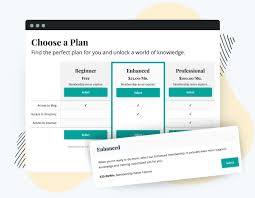


Paid Memberships The Paid Memberships Pro - Advanced Levels Page Shortcode Add On is a useful extension for the Paid Memberships Pro (PMP) plugin for WordPress. This add-on allows you to create a more customized and detailed membership levels page by providing advanced shortcodes that offer enhanced functionality for displaying membership levels and other related information.
Paid Memberships Key Features of the Paid Memberships Pro - Advanced Levels Page Shortcode Add On:
1.Paid Memberships Customizable Membership Levels Display:
- The main feature of this add-on is to allow you to use shortcodes to customize the display of your membership levels on a specific page. This enables you to create a tailored page that showcases your membership options more effectively and aligns with your website’s design and user experience.
- The add-on enhances the default membership levels page, which typically shows a basic list of membership options, by giving you the flexibility to design a more engaging layout using shortcodes.
2. Advanced Shortcodes:
- This add-on provides you with advanced shortcodes that can be placed on any WordPress page or post to display membership levels, pricing, benefits, and other relevant membership data in a structured and visually appealing way.
- Some examples of shortcodes include:
- Displaying a list of all available membership levels
- Showcasing specific details for each membership level
- Adding the option to select a membership level for sign-ups directly on the page
- Offering a “call to action” button for users to subscribe to a particular membership level
3. Show/Hide Features Based on Membership Levels:
- The shortcodes provided by this add-on allow you to show or hide certain content based on the user's current membership level. For example, you can create a section that is only visible to premium members while hiding it from basic or free members.
- This can be useful for creating tiered content, where users are presented with more exclusive information or benefits depending on their membership status.
4. Enhanced Flexibility:
- You can use the shortcodes to create custom templates for your membership levels page, integrating them with your website's theme or layout.
- Whether you want a simple grid layout, a pricing table, or a more complex design, the flexibility of the shortcodes ensures that you can meet your site's design needs without requiring custom coding.
5. Pricing and Benefits Information:
- The shortcodes allow you to display specific pricing and benefits for each membership level, giving potential members a clear overview of what they will get when they join each level.
- You can show benefits such as:
- Access to exclusive content
- Discounts
- Special offers
- Member-only features
6. Membership Level Call-to-Action:
- This add-on provides a call-to-action button within the shortcode output. You can configure the button to link directly to a membership checkout page, encouraging users to upgrade or sign up for a specific membership level.
- This helps drive conversions by giving users an easy path to join your membership program.
7. Seamless Integration with Paid Memberships Pro:
- The add-on integrates seamlessly with the Paid Memberships Pro plugin, meaning it works with your existing membership levels, subscription plans, and settings. There's no need for additional setup beyond inserting the shortcodes on your desired pages.
- Since the add-on relies on the Paid Memberships Pro core plugin, it ensures that all membership level data, pricing, and restrictions are synchronized automatically.
8. Mobile and User-Friendly Layouts:
- The advanced shortcodes allow for responsive and mobile-friendly layouts, making it easier for users on different devices (phones, tablets, desktops) to view your membership offerings.
- The membership levels page can be displayed cleanly and effectively regardless of screen size, ensuring a good experience for all users.
9. Easily Customizable:
- While the shortcodes are advanced, they are designed to be easy to use and implement. You can copy and paste them into any page or post, and adjust parameters (e.g., color, fonts, layout) using custom CSS or theme options for further customization.
- For users familiar with HTML and CSS, you can apply even more detailed styling to match your site's brand.
Benefits of the Paid Memberships Pro - Advanced Levels Page Shortcode Add On:
- More Professional Membership Pages:
- This add-on helps you create a more professional and user-friendly membership levels page. It provides a way to highlight your membership options in an engaging way, which can improve user conversion rates.
- Improved Conversion Rates:
- By providing a more structured and visually appealing page with clear membership benefits, pricing, and easy calls to action, this add-on helps increase the likelihood of users upgrading or signing up for a membership level.
- Tailored User Experience:
- The ability to show or hide content based on membership level means you can provide a personalized experience for users, showing them only the content relevant to their current or desired membership level.
- Time-Saving:
- This add-on streamlines the process of displaying membership information on your website. You don’t have to create complex custom pages or manually input membership details for each user type. The shortcodes automate much of the work.
- Responsive Design:
- With the built-in responsive design features, the add-on ensures that your membership levels page looks good on all devices, improving the mobile user experience.
- Flexibility in Layout:
- The advanced shortcodes give you the flexibility to present membership levels in different layouts, allowing you to fit them into your website’s unique design and style.
- Encourages Member Upgrades:
- By clearly displaying membership benefits and offering call-to-action buttons for signups or upgrades, this add-on makes it easier for users to decide which membership level is right for them, driving more conversions.
How to Use the Paid Memberships Pro - Advanced Levels Page Shortcode Add On:
Step 1: Install and Activate the Add-On
- Ensure that Paid Memberships Pro is installed and activated on your WordPress site.
- Install the Advanced Levels Page Shortcode Add On either from the Paid Memberships Pro Add Ons section or by uploading the plugin file via the WordPress dashboard.
- Activate the add-on after installation.
Step 2: Add the Shortcodes to a Page or Post
- After activating the add-on, go to the page or post where you want to display your membership levels.
- Insert the appropriate shortcode(s) into the content area of the page.
- You can add these shortcodes directly into the WordPress block editor, classic editor, or any page builder that you are using.
Step 3: Customize the Shortcodes
- The shortcodes come with several configurable options, such as:
- Membership level IDs (to display specific levels)
- Custom CSS classes (for styling)
- Call to action links (for sign-up or upgrade buttons)
- Customize the shortcodes based on the desired layout, design, and functionality for your membership page.
Step 4: Style the Membership Page (Optional)
- You can further customize the look of the membership page using CSS. For example, you may want to change the colors of buttons, adjust the spacing between membership options, or tweak the overall design to match your theme.
Step 5: Test the Page
- After adding the shortcodes and customizing your page, test the page to ensure that the membership levels display as expected.
- You can test as different membership levels by logging in as users with different memberships to ensure that the correct content is shown to each group.
Step 6: Publish Your Page
- Once you are satisfied with the design and functionality, publish your page.
- Users can now view the membership options and choose the level that best suits their needs.




![Booknetic - Appointment Booking & Appointment Scheduling & Calendar reservation [SaaS]](https://gplpixel.com/wp-content/uploads/2024/06/Booknetic-Appointment-Booking-Appointment-Scheduling-Calendar-reservation-SaaS-400x203.jpg)

























