
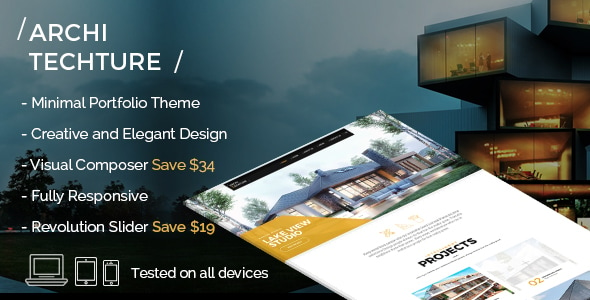


Portfolio Creative Theme for Architecture is a WordPress theme specifically designed for architects, interior designers, construction firms, and creative professionals in the architecture and design industries. This theme focuses on providing a visually stunning and user-friendly platform to showcase portfolios, projects, and services. Its design and features cater to those who want to create a strong online presence that reflects their creativity and professionalism.
Key Features of the Portfolio Creative Theme for Architecture:
1. Modern and Elegant Design:
- The theme is designed with a modern, clean, and minimalist style, ideal for showcasing architecture projects. It focuses on large visuals, making it perfect for displaying high-quality images of buildings, interiors, and designs.
- The layout ensures that your projects are the main focal point, allowing you to highlight your portfolio in a visually engaging way.
2. Responsive and Mobile-Friendly:
- The theme is fully responsive, meaning it will look great on all devices, including desktops, tablets, and smartphones. This is crucial for architecture portfolios since many potential clients may view your work on different types of devices.
3. Customizable Portfolio Layouts:
- The Portfolio Creative Theme offers various customizable portfolio layouts that allow you to display your work in the best possible way. You can choose from grid, masonry, and slider layouts, depending on your preferred style.
- It also includes different filter options, allowing visitors to sort your projects by category or type.
4. Drag-and-Drop Page Builder:
- The theme is compatible with Elementor or other drag-and-drop page builders, enabling you to easily create custom pages and layouts. No coding knowledge is required, making it accessible for users of all experience levels.
- You can design your website’s pages (home page, portfolio, contact page, etc.) with simple drag-and-drop features.
5. Project Showcase Features:
- The theme includes dedicated sections to showcase each project in detail, including project descriptions, images, and even video content. You can add information about the project type, design process, challenges, and results.
- High-resolution image support ensures that your visual content is presented in the best quality.
6. Multiple Page Templates:
- Portfolio Creative Theme comes with a selection of pre-designed page templates, including homepage layouts, about pages, service pages, and contact pages. These templates can be easily customized to fit your brand’s personality and style.
7. SEO Optimized:
- The theme is built with SEO best practices in mind, ensuring that your website has the best chance of ranking higher in search engine results. Clean code, fast loading speeds, and mobile optimization contribute to better SEO performance.
8. One-Click Demo Import:
- Portfolio Creative Theme includes a one-click demo import feature, which helps you quickly set up your website by importing demo content. This allows you to preview the design and structure of the theme before you begin customizing it with your own content.
9. Customizable Colors and Fonts:
- The theme offers full color and typography customization options. You can adjust the theme’s color scheme to align with your branding and choose from a wide variety of fonts to match your style.
10. WooCommerce Integration:
- If you plan to sell services, products, or architectural designs directly from your website, Portfolio Creative Theme integrates seamlessly with WooCommerce, allowing you to set up an online shop with ease.
11. Contact Forms and Appointment Booking:
- The theme includes customizable contact forms that allow potential clients to get in touch with you easily. You can also set up an appointment booking system for consultations or meetings.
- Integration with Google Maps enables clients to find your office location effortlessly.
12. Social Media Integration:
- The theme integrates with social media platforms like Facebook, Twitter, Instagram, and LinkedIn, making it easy for visitors to follow your profiles and share your work.
- Displaying social media icons in various locations (header, footer, or sidebar) helps you build an online community and drive engagement.
13. High-Speed Performance:
- Portfolio Creative Theme is optimized for speed, ensuring that your website loads quickly. A fast website not only provides a better user experience but also helps improve your SEO rankings.
14. Advanced Typography:
- The theme offers access to Google Fonts and custom font upload features, allowing you to choose the perfect typography for your site, whether you prefer a professional, modern, or creative look.
15. Multilingual and RTL Support:
- The theme is translation-ready and supports right-to-left (RTL) languages, making it easy to create a website for a global audience.
- You can use plugins like WPML to offer your website in multiple languages.
16. Regular Updates and Support:
- The theme comes with ongoing updates to ensure compatibility with the latest WordPress version and to introduce new features or improvements. The support team is available to assist you with setup and troubleshooting.
How to Use the Portfolio Creative Theme for Architecture:
- Install the Theme:
- Install the Portfolio Creative Theme through the WordPress dashboard. Go to Appearance > Themes > Add New, upload the theme, and activate it.
- Import Demo Content:
- Use the one-click demo import feature to quickly set up the website with the sample content. This gives you a great starting point for designing your portfolio website.
- Customize the Theme:
- Use the WordPress Customizer or Elementor (if supported) to customize the layout, color scheme, fonts, and other design elements. You can adjust the header, footer, and content sections to match your branding.
- Add Projects:
- Begin adding your architecture projects to the portfolio section. Include high-quality images, detailed descriptions, and any other relevant information about each project.
- Optimize for SEO:
- Make sure to use SEO plugins like Yoast SEO to optimize your content for search engines. Focus on optimizing each project page with relevant keywords, metadata, and alt text for images.
- Monetize Your Site:
- If you want to sell products or services, set up WooCommerce to start selling. You can also use the contact form and appointment booking system to streamline client communication and scheduling.
- Promote Your Work:
- Promote your architecture portfolio through social media integration, email newsletters, and blog posts. Sharing your work regularly on social media can help you reach a broader audience and attract more clients.
Benefits of Using the Portfolio Creative Theme for Architecture:
- Showcase Your Projects: The theme offers dedicated sections for displaying architecture projects, complete with high-quality images, descriptions, and detailed project information.
- Creative Flexibility: You can easily customize the theme to fit your personal or business branding, allowing you to stand out in the competitive architecture and design market.
- User-Friendly: With drag-and-drop page builders, easy customization, and pre-designed templates, the theme is designed to be intuitive and accessible for users of all experience levels.
- SEO and Speed Optimized: The theme is built to ensure fast load times and high search engine visibility, helping your website rank better and load faster.
- Multilingual Support: With multilingual and RTL support, you can reach clients globally and create a site that caters to diverse audiences.






























