Premium Category Products

Prestashop Customer File Upload Module

Last Updated :

Current Version :

Prestashop Customer File Upload Module

Prestashop Customer File Upload Module

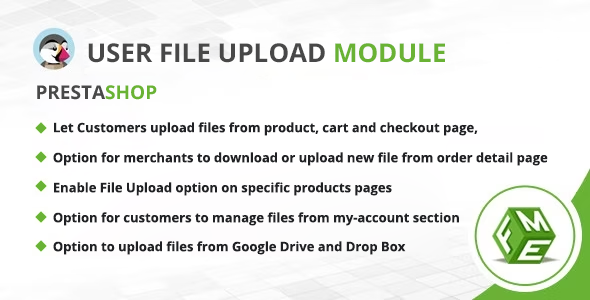
The PrestaShop File Upload Module is a valuable e-commerce tool designed to enhance the customer experience by allowing users to upload files or documents during the shopping process. This module is particularly useful for businesses that sell customizable or personalized products, as it enables customers to submit design files, images, or any other relevant documents that are integral to their order. Most of the Renowned Prestashop Store Owners Use Prestashop Upload File Module for:
  • Allowing Customers to Upload Files from Product, Order & Cart Pages
  • Uploading Multiple Files With Easy Drag-n-Drop Option
  • Letting store admins attach multiple files on product pages
With this module, customers can easily attach files when selecting or customizing products, such as personalized T-shirts, custom prints, or even bespoke jewelry. This feature enables buyers to convey their specific requirements or preferences to the seller. For instance, a customer ordering custom-made invitations can upload their artwork or design files, ensuring that the final product aligns with their vision. The PrestaShop File Upload Module simplifies the order management process. Sellers receive the uploaded files along with the order details, allowing them to fulfill orders accurately and efficiently. It’s particularly beneficial for businesses offering made-to-order or personalized items, as it streamlines communication and ensures that customer expectations are met. The PrestaShop File Upload Module goes a step further in enhancing the customer experience by allowing users to not only upload files during the shopping process but also view and edit these uploaded files in their “My Account” section. This feature provides customers with greater control and convenience. Features offered by Prestashop Customer File Upload Module
  • Let Customers upload files from product, cart and (or) checkout, Order section in “My Account”
  • Option for merchants to download or upload new file from order detail page. (Same file will be displayed in customer account section)
  • Option to show file upload option on cart or checkout page only
  • Enable File Upload option on specific products pages
  • Show file upload option when specific product(s) is added to the cart. (No need to show for all products)
  • Merchants can display downloadable files on product pages
  • Option for customers Upload/manage files from my-account section
  • Email notification sent to admin when new file is upload with new order
  • Email notification sent to customer when merchant upload files on order detail page
  • Customer group base restriction added where specific selected groups can be allowed to upload
  • Option to add new file formats, upload icon to attach with new file type
  • Upload multiple files at a time
  • Drag and drop feature
  • Lock/unlock file
  • Enable/Disable file upload
  • Limit upload file size
  • Limit to upload selected file extensions only
  • One click update/delete a file
  • Admin can attach a file to an order from back end
  • Admin can update/delete a file with single click
  • Admin can lock/unlock a file
  • Design changed, New file uploader with bunch of settings
  • Enable/disable Drag and drop
  • Bulk upload option added
  • Start and cancel buttons for each file
  • Global start/cancel button for bulk uploads
  • Auto upload on file selection (quick upload)
  • Preview for image files option added
  • Set Title field mandatory for uploading files
  • Set Description field mandatory for uploading files
  • Lock files after successful order has been placed
  • Set number of mandatory files on checkout/ Restrict order till required number of files uploaded
  • Option to upload files from Google Drive
  • Option to upload files from DropBox
  • Multi-Store
  • Multi-lingual
Prestashop Customer File Upload Module in Action Upload File Option on Product Page With the PrestaShop File Upload Module, users can easily upload files directly from the product page. This intuitive feature streamlines the customization process, enabling customers to submit design files, images, or any relevant documents effortlessly. Whether they’re personalizing a product or providing specific instructions, this functionality enhances the shopping experience by allowing customers to seamlessly attach files during their product selection, ensuring their unique preferences are accurately captured File Upload from gDrive and Dropbox The PrestaShop File Upload Module offers users the flexibility to upload files not just from their computer but also directly from their Google Drive and Dropbox accounts. This versatile feature simplifies the file submission process, accommodating various user preferences and ensuring a seamless and convenient experience. File Upload Option on Cart Page The PrestaShop File Upload Module extends its convenience by providing a file upload option directly on the cart page. This means that even after customers have added products to their cart and are reviewing their order, they can still upload necessary files or documents. File Upload Option on Checkout Page Our module also offers option for users to upload files on the checkout page. This ensures that customers have the opportunity to provide any necessary files or documents at the final stage of their purchase journey. Uploaded Files in My Account With the PrestaShop File Upload Module, all uploaded files are conveniently accessible in the user’s “My Account” section. Customers can easily review, manage, and re-download their uploaded files for reference or future orders. This central repository of uploaded files ensures that users have a seamless and organized experience, making it straightforward to track and access their important documents and design files whenever they need them.  

(Only For Premium Category Products !)

1. All digital products are the most recent version, with no possibility of free updates. After payment, you can request an update to the most recent version for 5 days if a new version is released. We free support within 5 days.

2. If a license is required (Excludes WHMCS license , we provide only method not license), please contact us via email or ticket for assistance with activation. Our license is only valid for activation and does not include support.

3. We provide Mobile, PHP script installation services for $19.90 / ₹1700. Please create a backup after installation as we do not support re-installation. For mobile app source code, we do not offer installation services.

4. If you have any questions, please contact us by email  or create a ticket on this page

5. Please note that any digital products presented on the website do not contain malicious code, viruses or advertising. You will receive the original files from the developers. We do not sell any products that have been downloaded from other websites.

6. The response time can last up to 6 hours.

(Only For Membership Category Products !)

Benefits of our Membership Plans

  • Instant access to all plugins and all themes including all future releases
  • Unlimited domain usage
  • Regular Updates as of when available. Usually, updates are released daily.
  • Before purchasing, please read the Terms and Conditions & Refund Policy.
  • If you have any questions, please first read the FAQs.
  • If you haven’t found the answer to your question, please contact us, and we will respond ASAP.
  • Please note that any digital products on the website do not contain malicious code, viruses, or advertising. We buy the original files from the developers. We do not sell any products downloaded from other sites.
  • Buy or download for FREE by subscribing to our VIP Membership Plan. Join the club of more than 1100+ happy members. This is the same theme as sold by the developer.

Updates:

  • We offer frequent updates for one year from the date of purchase. After this period, you have to purchase the item again to receive further updates, we also offer lifetime updates as a second option.
  • We regularly update products as soon as we are notified about an update, we go and download it from the author and update it on our site, but In case the current version of the product is not the latest, You can request an update for the product by contact form.
  • We send regular emails advising when products have been updated so please be sure to provide an active email address when you sign up.

Support:

  • Our support team is available 24/7, if you have any questions or need help in installing or configuring digital products purchased on the website, please don’t hesitate to contact form.
  • Please note that we are not developers of the provided products, so our technical support capabilities are limited. We do not change product functionality and do not fix developer bugs.

For more information please read FAQs & About Us.

(Only For WHMCS Category Products !)

  • We Only provide WHMCS Module, how you can  nulled any module step only !
  • Instant access to all plugins and all themes 
  • Unlimited domain usage
  • Regular Updates as of when available. Usually, updates are released daily.
  • Before purchasing, please read the Terms and Conditions & Refund Policy.
  • If you have any questions, please first read the FAQs.
  • If you haven’t found the answer to your question, please contact us, and we will respond ASAP.
  • Please note that any digital products on the website do not contain malicious code, viruses, or advertising. We buy the original files from the developers. We do not sell any products downloaded from other sites.

More Like This Products