
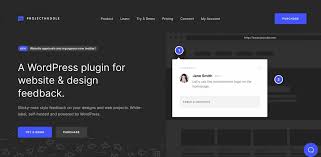

ProjectHuddle is a WordPress plugin designed to streamline the process of gathering feedback and collaborating on projects within WordPress websites. It's especially useful for web developers, designers, and agencies who need a way to communicate with clients or team members about website design, development, and content updates.
Key Features of ProjectHuddle WordPress Plugin:
- Client Feedback & Collaboration:
- Client-Driven Feedback: ProjectHuddle allows clients (or stakeholders) to leave feedback directly on live websites by clicking on elements and providing comments on specific sections. This makes it easy to address issues as they are seen, reducing confusion.
- Markups and Annotations: Users can draw arrows, highlight areas, and leave text annotations directly on the website mockups or live site. This feature is especially useful for giving precise instructions on where changes need to be made.
- Live Website Feedback:
- Clients or team members can leave comments on live pages, making feedback more direct and context-specific. It's ideal for reviewing designs, wireframes, or even staging sites before going live.
- Feedback can be tied to specific elements on the page (e.g., images, buttons, text), ensuring that all comments are contextually relevant.
- Project Management Dashboard:
- ProjectHuddle provides a centralized dashboard where all feedback, comments, and revisions are gathered. This dashboard allows for easy tracking of client feedback, assigned tasks, and progress.
- Feedback can be organized by projects or clients, making it simple to manage multiple projects or clients at once.
- Customizable Workflow:
- Allows the setup of custom workflows to fit the needs of a team or agency. You can manage who receives feedback, the priority of feedback, and even set up approval steps for design or development work.
- Notifications are sent to the relevant users (e.g., developers or designers) when new feedback is received, ensuring quick action and response.
- User Access & Permissions:
- You can assign different user roles and permissions, ensuring that clients can only leave feedback while the internal team can manage the project’s technical aspects.
- This keeps the workflow streamlined and reduces any potential confusion about who is responsible for what.
- Version Control:
- ProjectHuddle supports version control for design revisions. You can track different versions of a project and manage revisions or changes as the design or content evolves.
- This ensures that no feedback is lost and gives everyone clarity on which version of the project is being discussed.
- Team Collaboration:
- Enables team members to leave internal comments, ask questions, and provide suggestions within the feedback system, keeping all communication related to the project in one place.
- Private notes can be left that are visible only to team members (not clients).
- Email Notifications:
- Both the client and team members receive email notifications whenever new feedback is left, ensuring that no comments go unnoticed.
- Notifications include a link to the feedback page, making it easy to jump right to the point of feedback and start working on it.
- Integrations:
- ProjectHuddle integrates seamlessly with WordPress. It works out of the box without requiring complicated setups.
- It can also integrate with other project management tools and communication tools, allowing for smooth workflows across multiple platforms.
- Multilingual Support:
- Supports multiple languages, making it a good option for international teams or clients.
How ProjectHuddle Works:
- Install the Plugin:
- Simply install the ProjectHuddle plugin on your WordPress website, activate it, and start creating projects for clients to review.
- Share the Project URL:
- Share the live website, mockup, or staging URL with clients and invite them to leave feedback directly on the page.
- Clients can highlight issues and leave comments on specific elements without needing to log into WordPress.
- Review Feedback:
- After clients leave feedback, you can review it in the ProjectHuddle dashboard.
- Organize feedback by priority and work through it to make the necessary changes.
- Client Approval:
- Once the revisions are done, you can send the updated version back to the client for approval or further review.
- Ongoing Collaboration:
- As the project continues, you can keep track of the feedback loop and revisions until the project is complete.
Benefits of Using ProjectHuddle:
- Streamlined Communication: It reduces miscommunication by enabling clients and team members to comment directly on the website or design elements, leading to clearer instructions and less back-and-forth.
- Improved Collaboration: It makes collaboration easier by providing a centralized location for all feedback, discussions, and revisions, ensuring everyone stays on the same page.
- Time Efficiency: It saves time by providing instant, actionable feedback and allows you to quickly address client needs and changes.
- Professional Client Experience: By using a tool like ProjectHuddle, you can provide a more professional feedback process to clients, improving their experience and satisfaction with your services.






























