Premium Category Products

QR Scanner Pro – Flutter QR Code Scanner & Generator

QR Scanner Pro – Flutter QR Code Scanner & Generator

QR Scanner Pro - Flutter QR Code Scanner & Generator

Live Demo: QR Scanner Pro - Flutter QR Code Scanner & Generator Live Demo

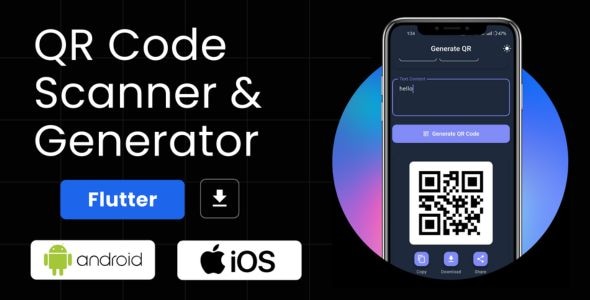
QR Scanner Pro is a modern, feature-rich Flutter application designed for scanning and generating QR codes. Built with clean architecture, smooth animations, and robust functionality, this solution is ready for commercial deployment on both iOS and Android. It is the perfect choice for developers who want to integrate QR solutions into their projects or launch a standalone app on the App Store or Google Play.

Product Overview

QR Scanner Pro empowers users to seamlessly scan and generate various types of QR codes, offering a comprehensive solution for both personal and professional use cases. Its intuitive interface, coupled with advanced features, makes it a versatile tool for a wide range of applications.

Modern Design and User Experience

The application boasts a sleek and modern user interface built with Material Design 3 principles. It offers both dark and light modes, allowing users to customize the appearance based on their preference.

Smooth animations powered by flutter_staggered_animations enhance the user experience, creating a visually appealing and engaging interaction. The responsive layout ensures optimal performance across various screen sizes, from smartphones to tablets and foldable devices. Haptic feedback provides tactile confirmation for interactive elements, further elevating the user experience.

QR Code Generation

QR Scanner Pro provides a powerful QR code generation engine capable of creating numerous QR code types, including:

  • Text: Generate QR codes for plain text, URLs, email addresses, phone numbers, and more.
  • URL: Create QR codes that link directly to websites or specific web pages.
  • WiFi: Generate QR codes containing WiFi network information for easy connection.
  • Email: Create QR codes that trigger email composition with pre-filled recipients and subject lines.
  • Phone: Generate QR codes that initiate phone calls to specific numbers.
  • SMS: Create QR codes that send SMS messages to predefined recipients.
  • Contact: Generate QR codes containing contact information, including name, phone number, email address, and more.
  • Location: Create QR codes that pinpoint specific geographical locations.

Furthermore, the dynamic smart forms feature allows users to generate QR codes with context-aware fields, ensuring accurate data capture and validation. The instant preview functionality provides real-time visualization of the generated QR code, allowing for instant feedback and adjustments.

Users can export generated QR codes in various formats:

  • Copy to Clipboard: Quickly share the QR code data as text.
  • Share via Dialog: Share the QR code using the device's native sharing options.
  • Save High-Resolution Image: Save the QR code as a high-resolution image (600x600px) to the device's gallery.

QR Code Scanning

QR Scanner Pro offers a real-time camera scanning feature for accurate and fast detection of QR codes. The animated overlay enhances the scanning experience, providing visual feedback as the camera focuses on the code.

The application also allows users to scan QR codes from images stored in the device's gallery. The auto-detection feature automatically recognizes the type of QR code scanned (URL, WiFi, etc.) and extracts the relevant data.

Users can perform various actions based on the scanned QR code, including:

  • Open URLs: Navigate directly to the website or web page linked in the QR code.
  • Dial Phone Numbers: Initiate a phone call to the number encoded in the QR code.
  • Send Emails/SMS: Compose and send emails or SMS messages with pre-filled content from the QR code.
  • Connect to WiFi Networks: Automatically connect to the WiFi network specified in the QR code.
  • Batch Scanning: Scan multiple QR codes sequentially, extracting and processing the data efficiently.

History Management

QR Scanner Pro maintains a comprehensive history of all scanned and generated QR codes, including timestamps and metadata. The history is organized by type, allowing for easy browsing and searching. Users can perform various actions on history items, such as:

  • Copy: Copy the QR code data to the clipboard.
  • Share: Share the QR code using the device's native sharing options.
  • Open: Open the linked URL or perform the action associated with the QR code.
  • Delete: Remove individual history items.
  • Regenerate: Regenerate the QR code from the history.
  • Bulk Operations: Clear the entire history, perform selective deletions, or export data as CSV or JSON.

Professional Features

QR Scanner Pro incorporates several professional features to enhance its functionality and reliability:

  • Security: The application utilizes code obfuscation and secure local storage to protect sensitive data.
  • Offline Support: Users can access all core features offline, ensuring continuous functionality even without internet connectivity.
  • High Performance: The application maintains a smooth 60fps animation rate with minimal resource usage, delivering a responsive and efficient experience.
  • Multi-Language Ready: Internationalization (i18n) support enables localization for global audiences.
  • Analytics Integration: Hooks are provided for integrating with popular analytics platforms like Firebase Analytics.
  • Google Fonts: Professional typography is implemented using Google Fonts, ensuring a consistent and polished design.

Ideal Use Cases

QR Scanner Pro is a versatile tool with applications across various industries and scenarios:

  • Marketing and Promotions: Generate QR codes for campaigns, product promotions, and event registrations.
  • Business and Commerce: Integrate QR codes for contactless payments, loyalty programs, product information, and inventory management.
  • Education and Training: Use QR codes to link to educational resources, interactive content, and online learning platforms.
  • Healthcare: Generate QR codes for patient records, medical instructions, and appointment reminders.
  • Travel and Hospitality: Provide QR codes for check-in, room service, and local attraction information.
  • Event Planning: Use QR codes for registration, ticketing, wayfinding, and feedback collection.

Who Should Use This Product?

QR Scanner Pro is an ideal solution for:

  • Developers: Integrate QR code scanning and generation capabilities into their Flutter applications.
  • Businesses: Enhance customer engagement, streamline operations, and promote their products or services.
  • Individuals: Simplify daily tasks, access information quickly, and share content effortlessly.

Installation and Setup Guide

QR Scanner Pro is a Flutter application, so it requires a Flutter development environment to be installed.

Once the environment is set up, follow these steps:

  1. Clone the repository containing the QR Scanner Pro source code.
  2. Navigate to the project directory in your terminal.
  3. Run the following command to install the necessary dependencies:

bash flutter pub get

  1. Build and run the application on your desired platform (iOS or Android).

Important Product Information

  • License: The product comes with a commercial license, allowing for both personal and commercial use.
  • Support: Dedicated support channels are available for users who require assistance with the application.
  • Updates: Regular updates are released to improve performance, add new features, and address any issues.

Final Conclusion

QR Scanner Pro is a comprehensive and feature-rich Flutter application that empowers users to seamlessly scan and generate QR codes. Its modern design, intuitive interface, and robust functionality make it a versatile tool for a wide range of applications. Whether you're a developer looking to integrate QR code capabilities into your projects or an individual seeking a convenient way to access information and share content, QR Scanner Pro is the perfect solution.

Category: Mobile App

(Only For Premium Category Products !)

1. All digital products are the most recent version, with no possibility of free updates. After payment, you can request an update to the most recent version for 5 days if a new version is released. We free support within 5 days.

2. If a license is required (Excludes WHMCS license , we provide only method not license), please contact us via email or ticket for assistance with activation. Our license is only valid for activation and does not include support.

3. We provide Mobile, PHP script installation services for $19.90 / ₹1700. Please create a backup after installation as we do not support re-installation. For mobile app source code, we do not offer installation services.

4. If you have any questions, please contact us by email  or create a ticket on this page

5. Please note that any digital products presented on the website do not contain malicious code, viruses or advertising. You will receive the original files from the developers. We do not sell any products that have been downloaded from other websites.

6. The response time can last up to 6 hours.

(Only For Membership Category Products !)

Benefits of our Membership Plans

  • Instant access to all plugins and all themes including all future releases
  • Unlimited domain usage
  • Regular Updates as of when available. Usually, updates are released daily.
  • Before purchasing, please read the Terms and Conditions & Refund Policy.
  • If you have any questions, please first read the FAQs.
  • If you haven’t found the answer to your question, please contact us, and we will respond ASAP.
  • Please note that any digital products on the website do not contain malicious code, viruses, or advertising. We buy the original files from the developers. We do not sell any products downloaded from other sites.
  • Buy or download for FREE by subscribing to our VIP Membership Plan. Join the club of more than 1100+ happy members. This is the same theme as sold by the developer.

Updates:

  • We offer frequent updates for one year from the date of purchase. After this period, you have to purchase the item again to receive further updates, we also offer lifetime updates as a second option.
  • We regularly update products as soon as we are notified about an update, we go and download it from the author and update it on our site, but In case the current version of the product is not the latest, You can request an update for the product by contact form.
  • We send regular emails advising when products have been updated so please be sure to provide an active email address when you sign up.

Support:

  • Our support team is available 24/7, if you have any questions or need help in installing or configuring digital products purchased on the website, please don’t hesitate to contact form.
  • Please note that we are not developers of the provided products, so our technical support capabilities are limited. We do not change product functionality and do not fix developer bugs.

For more information please read FAQs & About Us.

(Only For WHMCS Category Products !)

  • We Only provide WHMCS Module, how you can  nulled any module step only !
  • Instant access to all plugins and all themes 
  • Unlimited domain usage
  • Regular Updates as of when available. Usually, updates are released daily.
  • Before purchasing, please read the Terms and Conditions & Refund Policy.
  • If you have any questions, please first read the FAQs.
  • If you haven’t found the answer to your question, please contact us, and we will respond ASAP.
  • Please note that any digital products on the website do not contain malicious code, viruses, or advertising. We buy the original files from the developers. We do not sell any products downloaded from other sites.

More Like This Products