
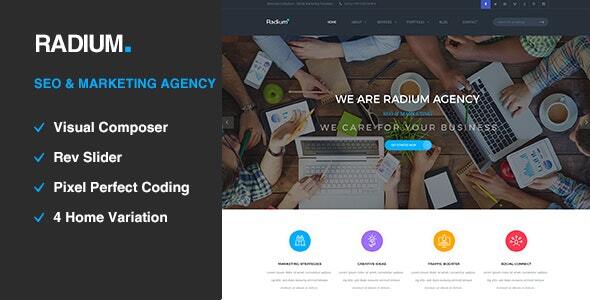
Radium - SEO / Digital Agency WordPress Theme is a professional and highly versatile WordPress theme designed specifically for digital marketing agencies, SEO professionals, and businesses offering online services. This theme combines a sleek, modern design with powerful features to help agencies create a dynamic online presence. It’s perfect for showcasing services, case studies, portfolios, and client testimonials to attract new clients.
Key Features of Radium - SEO / Digital Agency WordPress Theme:
- Clean and Modern Design:
- Radium features a sleek, modern design tailored for SEO and digital marketing agencies. The theme focuses on clean layouts with plenty of white space, ensuring a professional and easy-to-navigate website that highlights your services, portfolio, and expertise.
- Pre-Built Demos:
- Radium comes with a range of pre-built demo content that can be imported with just one click. These demos cover various digital agency needs such as SEO services, online marketing, social media management, and more. Importing the demo content saves you time and helps you get started quickly.
- Fully Responsive:
- The theme is fully responsive, meaning it adapts beautifully to all screen sizes, including desktops, tablets, and mobile devices. It ensures that your site looks great on any device, providing a seamless experience for your users.
- SEO-Optimized:
- As an SEO-focused theme, Radium is built with SEO best practices in mind. The theme's clean code, fast loading times, and compatibility with popular SEO plugins (such as Yoast SEO or Rank Math) help improve your site's visibility on search engines.
- Service and Case Study Showcase:
- The theme includes specialized sections for service showcases and case studies, making it easy for digital agencies to present their core offerings and highlight successful projects. You can create detailed case studies with images, results, and testimonials to build credibility.
- Drag-and-Drop Page Builder (WPBakery):
- Radium is compatible with WPBakery Page Builder (formerly Visual Composer), allowing you to create custom page layouts using a drag-and-drop editor. You don’t need to be a developer to design stunning pages with ease.
- Portfolio Layouts:
- The theme includes a variety of portfolio layouts to help you display your work. You can create a beautiful portfolio with images, videos, and other media to highlight your past projects and attract new clients.
- Lead Generation and CTA:
- Radium is designed to drive conversions. It includes call-to-action (CTA) buttons and lead generation forms that help capture visitor information, making it easier to generate leads directly from your website.
- Social Media Integration:
- The theme offers seamless social media integration, enabling you to link to your social media profiles and display your social media feeds (such as Instagram, Twitter, or LinkedIn) on your site. This helps you build a stronger connection with your audience.
- One-Click Demo Import:
- With the one-click demo import, you can quickly set up your site to look like the demo version, which includes all pages, images, and layout settings. This feature helps you get started faster and saves time in the setup process.
- Customization Options:
- Radium provides a variety of customization options, allowing you to adjust the theme’s colors, typography, layout, and more to match your branding. You can tweak the design through the WordPress Customizer or use the theme options panel for more advanced settings.
- Team and Testimonials Section:
- The theme includes sections to showcase your team members and client testimonials. Displaying your team’s expertise and sharing positive feedback from past clients adds credibility and trustworthiness to your digital agency.
- WooCommerce Compatibility:
- If you plan to sell digital products, services, or courses, Radium is fully compatible with WooCommerce. This enables you to set up an online store and manage your products, payments, and orders efficiently.
- Custom Widgets:
- Radium comes with a variety of custom widgets such as recent posts, testimonials, social media feeds, and contact information. These widgets make it easy to add dynamic content to your site without the need for additional plugins.
- Multilingual & RTL Support:
- The theme is multilingual ready, compatible with WPML, so you can create a multilingual website to cater to a global audience. Additionally, RTL (Right-to-Left) support is included, making it suitable for languages like Arabic or Hebrew.
- Cross-Browser Compatibility:
- Radium is tested to work across all major browsers like Google Chrome, Firefox, Safari, and Edge, ensuring a consistent experience for all visitors.
- Regular Updates & Support:
- The theme is regularly updated to ensure compatibility with the latest version of WordPress. Plus, you get access to premium support to help resolve any issues you encounter during setup or customization.
- High-Quality Code & Fast Performance:
- Radium is built with optimized, high-quality code that ensures fast loading times, improving your site's performance and user experience. A faster website can contribute to better SEO rankings and increased user engagement.
Ideal Use Cases for Radium - SEO / Digital Agency WordPress Theme:
- SEO Agencies: Perfect for SEO experts to showcase their services, case studies, and results-driven strategies to attract new clients.
- Digital Marketing Agencies: Great for digital marketing firms to present their offerings like social media marketing, paid ads, content marketing, and more.
- Web Development Agencies: Web development agencies can showcase their web design and development projects in a professional, clean manner.
- Freelancers: Freelancers offering SEO, digital marketing, or web development services can use Radium to display their skills and attract clients.
- Online Marketing Businesses: Any online marketing or consulting business that offers services like content creation, email marketing, or brand strategy will benefit from the features provided in Radium.
How to Set Up Radium - SEO / Digital Agency WordPress Theme:
- Install the Theme:
- Go to your WordPress dashboard, navigate to Appearance > Themes, and click Add New.
- Upload the Radium theme zip file and click Install Now. Once installed, click Activate.
- Import Demo Content:
- After activating the theme, go to Appearance > Import Demo Data and import the demo content. This will populate your site with pre-designed pages and layouts.
- Customize Your Website:
- Go to Appearance > Customize to adjust your site’s logo, colors, fonts, and layout. You can also configure other settings such as header styles, footer settings, and page layouts.
- Create Your Pages:
- Use the WPBakery Page Builder to customize or create new pages. Add sections for services, case studies, team, testimonials, and more. The drag-and-drop builder makes it easy to design without coding.
- Add Your Content:
- Replace the demo content with your own, including case studies, services, and team profiles. Update the portfolio section to showcase your best work.
- Set Up Contact Forms and Lead Generation:
- Add contact forms using plugins like Contact Form 7 and set up your call-to-action sections to encourage leads.
- Launch Your Site:
- After customizing your site, test it thoroughly on multiple devices and browsers. Once everything is ready, launch your site and start attracting clients.






























